
External Email - Use Caution
Dear freesurfer devleopers,
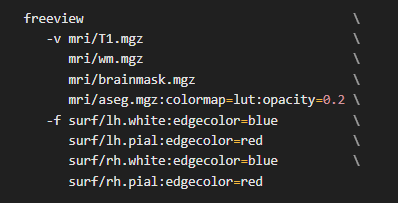
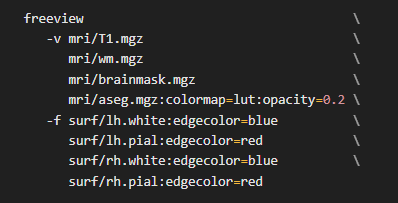
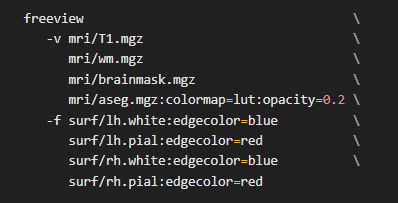
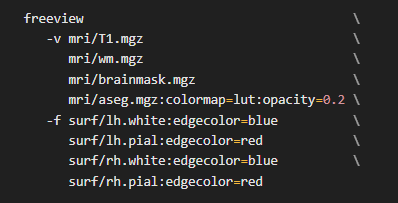
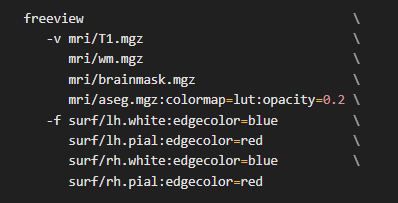
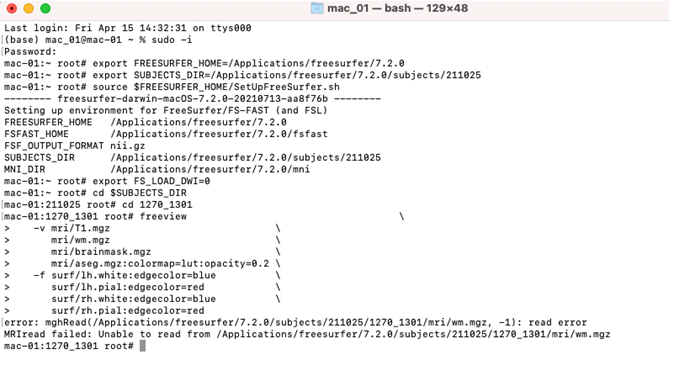
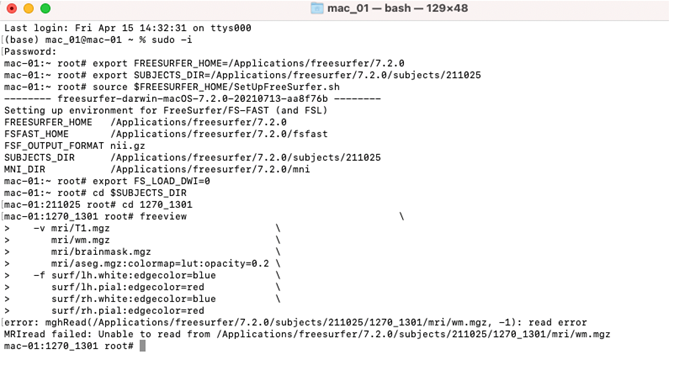
I am experiencing an error while loading freeview using the following code:
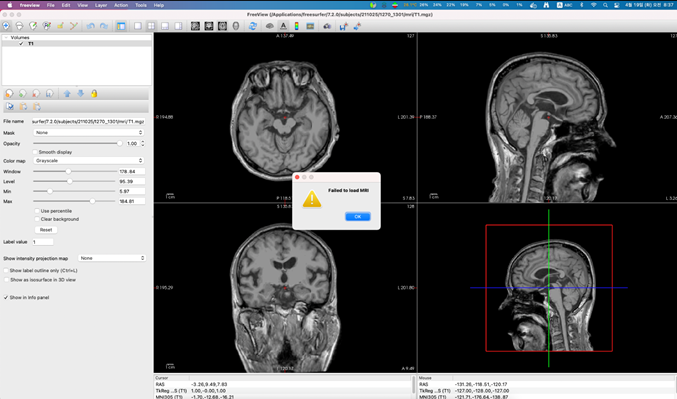
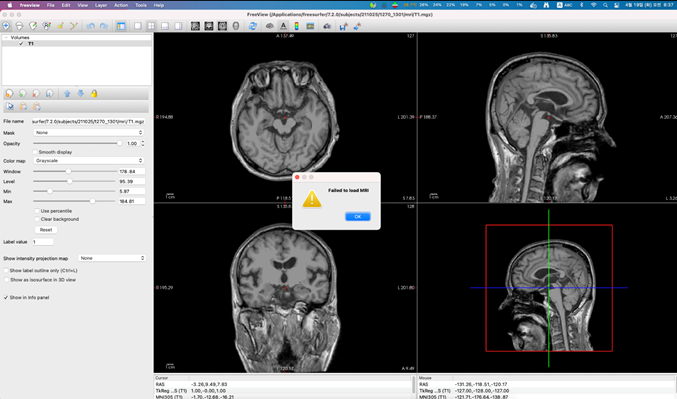
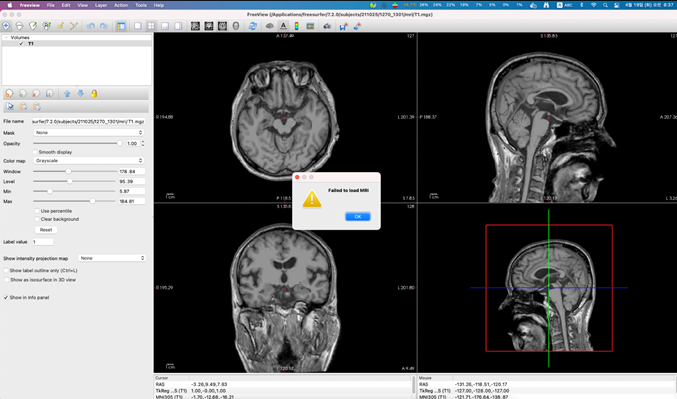
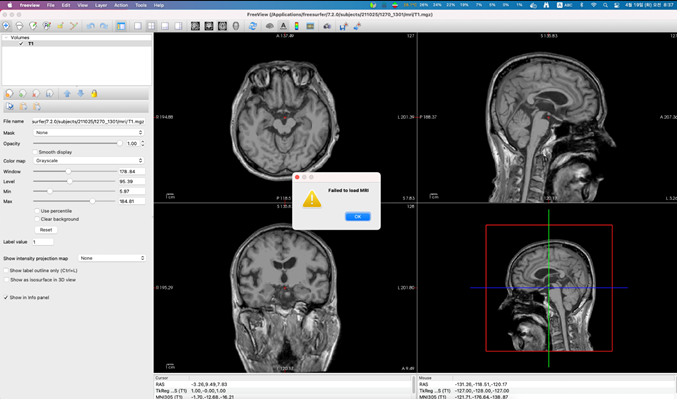
This always worked for me but now when I try to load and view it, a message "failed to load MRI" pops up on freeview after loading T1.mgz.
From the terminal it says:
error: mghRead(/Applications/freesurfer/7.2.0/subjects/211025/1079_4/mri/wm.mgz, -1): read error
MRIread failed: Unable to read from /Applications/freesurfer/7.2.0/subjects/211025/1079_4/mri/wm.mgz
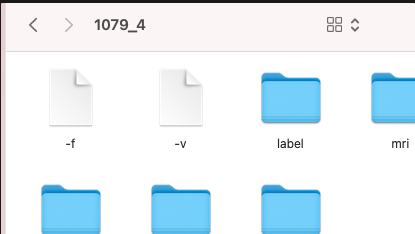
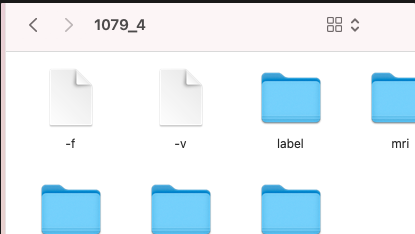
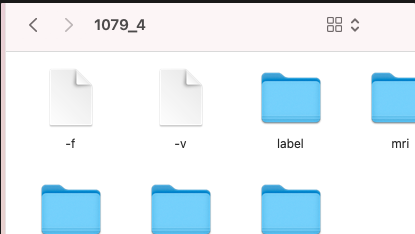
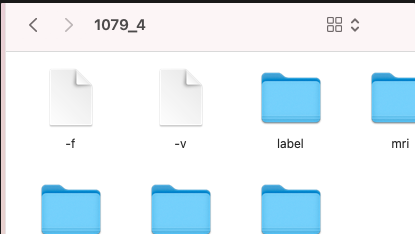
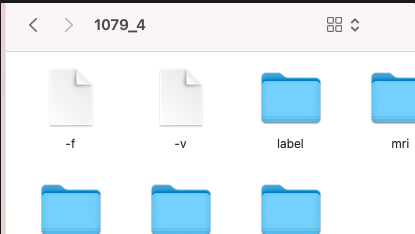
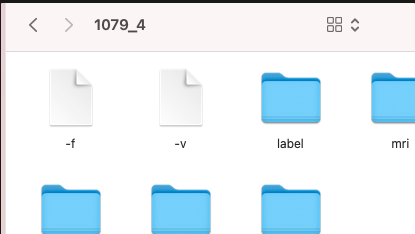
Also, when I check the mri containing file, eg: 1079_4 folder, after loading freeview, the folder contains automatically generated -v and -f file.
I have seen a few similar errors on google and mail archive but they did not solve my issue.
I would very much appreciate any solution to this.
Thank you in advance.
Best,
HJ
External Email - Use Caution
Hi,
Just re-sending this message in case it didn't go through to the developers, I am still searching for a solution to this problem.
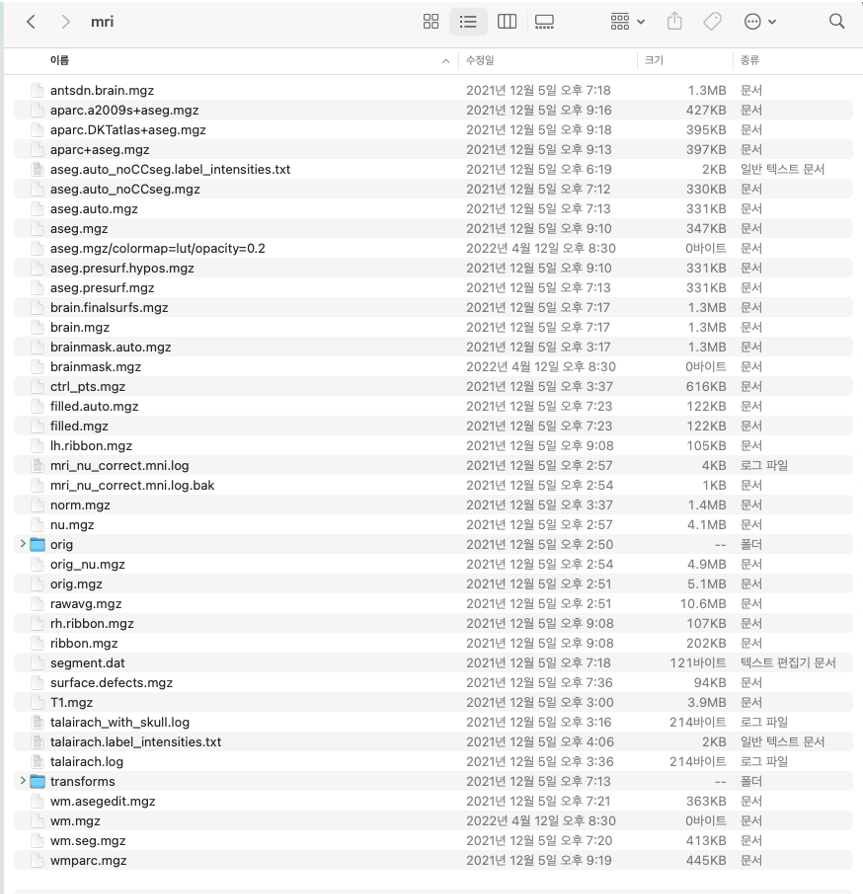
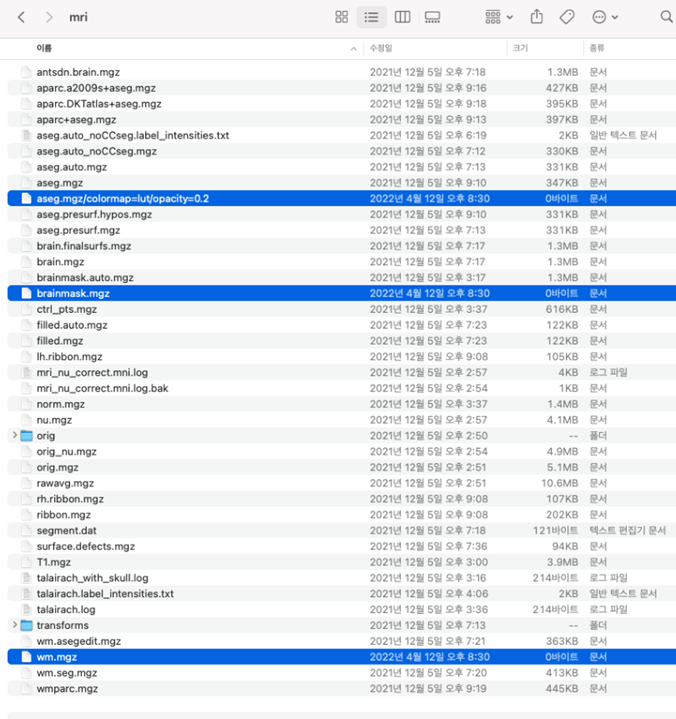
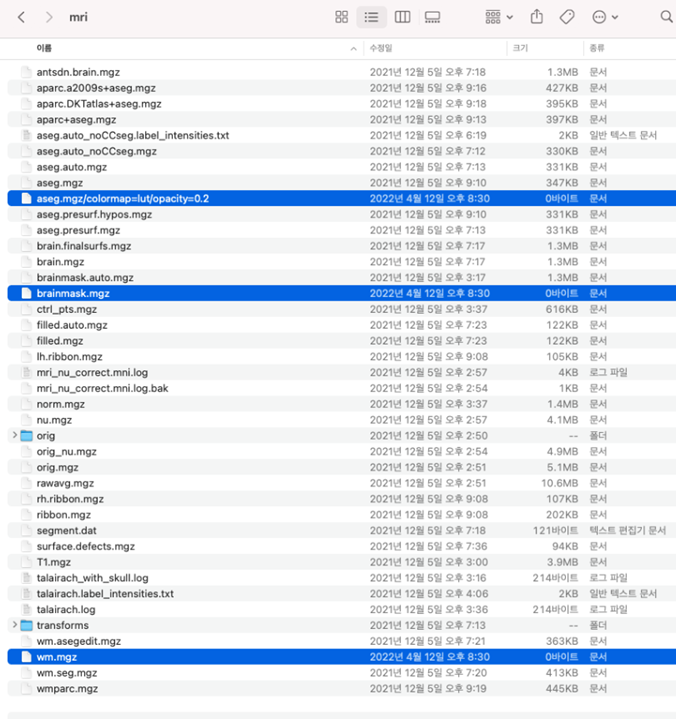
I also found out that the originally converted mri.mgz , brainmask.mgz files are probably re-written - its file size changed to 0kB after I ran the code I sent in my previous email.
Where do you think I went wrong?
Thanks for your help.
H
From: freesurfer-bounces@nmr.mgh.harvard.edu freesurfer-bounces@nmr.mgh.harvard.edu On Behalf Of HYE JUNG YOUN Sent: Wednesday, April 13, 2022 9:39 AM To: freesurfer@nmr.mgh.harvard.edu Subject: [Freesurfer] Failed to load MRI error
External Email - Use Caution
Dear freesurfer devleopers,
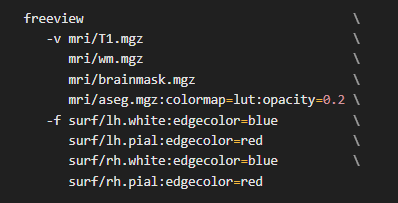
I am experiencing an error while loading freeview using the following code:
This always worked for me but now when I try to load and view it, a message "failed to load MRI" pops up on freeview after loading T1.mgz.
From the terminal it says:
error: mghRead(/Applications/freesurfer/7.2.0/subjects/211025/1079_4/mri/wm.mgz, -1): read error
MRIread failed: Unable to read from /Applications/freesurfer/7.2.0/subjects/211025/1079_4/mri/wm.mgz
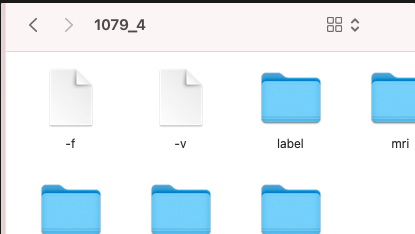
Also, when I check the mri containing file, eg: 1079_4 folder, after loading freeview, the folder contains automatically generated -v and -f file.
I have seen a few similar errors on google and mail archive but they did not solve my issue.
I would very much appreciate any solution to this.
Thank you in advance.
Best,
HJ

What is inside your mri folder? And make sure you are not running out of disk space as that would cause the 0 length files Cheers Bruce
On Apr 17, 2022, at 9:04 PM, HYE JUNG YOUN hyejung7890@amc.seoul.kr wrote:
External Email - Use Caution Hi,
Just re-sending this message in case it didn’t go through to the developers, I am still searching for a solution to this problem.
I also found out that the originally converted mri.mgz , brainmask.mgz files are probably re-written – its file size changed to 0kB after I ran the code I sent in my previous email. Where do you think I went wrong?
Thanks for your help. H
From: freesurfer-bounces@nmr.mgh.harvard.edu freesurfer-bounces@nmr.mgh.harvard.edu On Behalf Of HYE JUNG YOUN Sent: Wednesday, April 13, 2022 9:39 AM To: freesurfer@nmr.mgh.harvard.edu Subject: [Freesurfer] Failed to load MRI error
External Email - Use Caution Dear freesurfer devleopers,
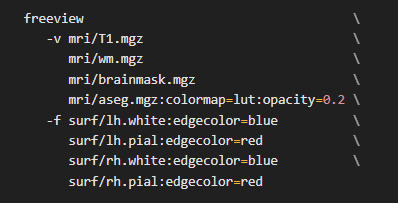
I am experiencing an error while loading freeview using the following code: [image001.png]
This always worked for me but now when I try to load and view it, a message “failed to load MRI” pops up on freeview after loading T1.mgz.
From the terminal it says:
error: mghRead(/Applications/freesurfer/7.2.0/subjects/211025/1079_4/mri/wm.mgz, -1): read error
MRIread failed: Unable to read from /Applications/freesurfer/7.2.0/subjects/211025/1079_4/mri/wm.mgz
Also, when I check the mri containing file, eg: 1079_4 folder, after loading freeview, the folder contains automatically generated –v and –f file.
[image002.png] I have seen a few similar errors on google and mail archive but they did not solve my issue. I would very much appreciate any solution to this.
Thank you in advance.
Best, HJ _______________________________________________ Freesurfer mailing list Freesurfer@nmr.mgh.harvard.edu https://mail.nmr.mgh.harvard.edu/mailman/listinfo/freesurfer
External Email - Use Caution
Hi Bruce,
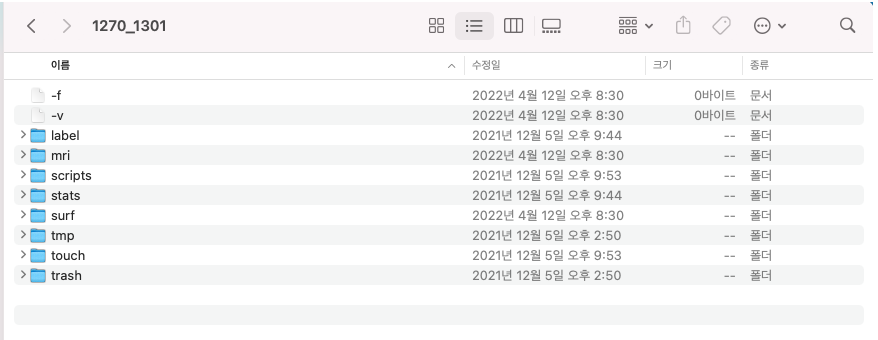
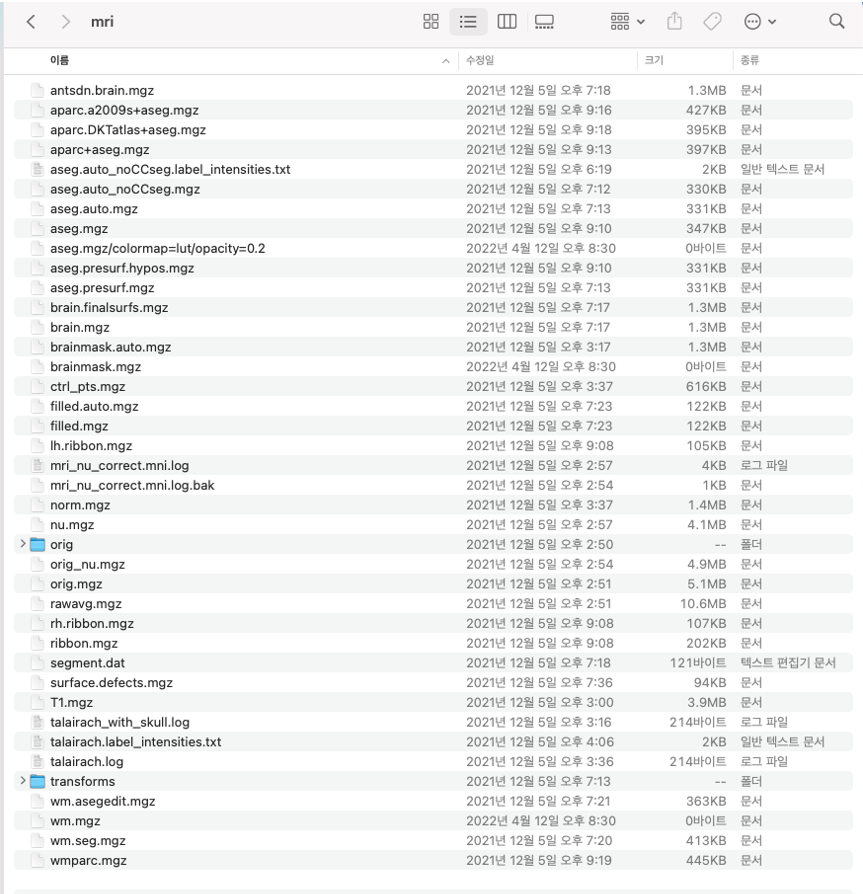
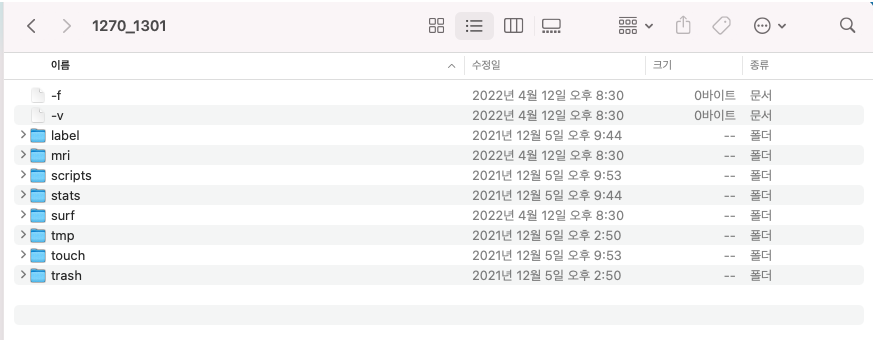
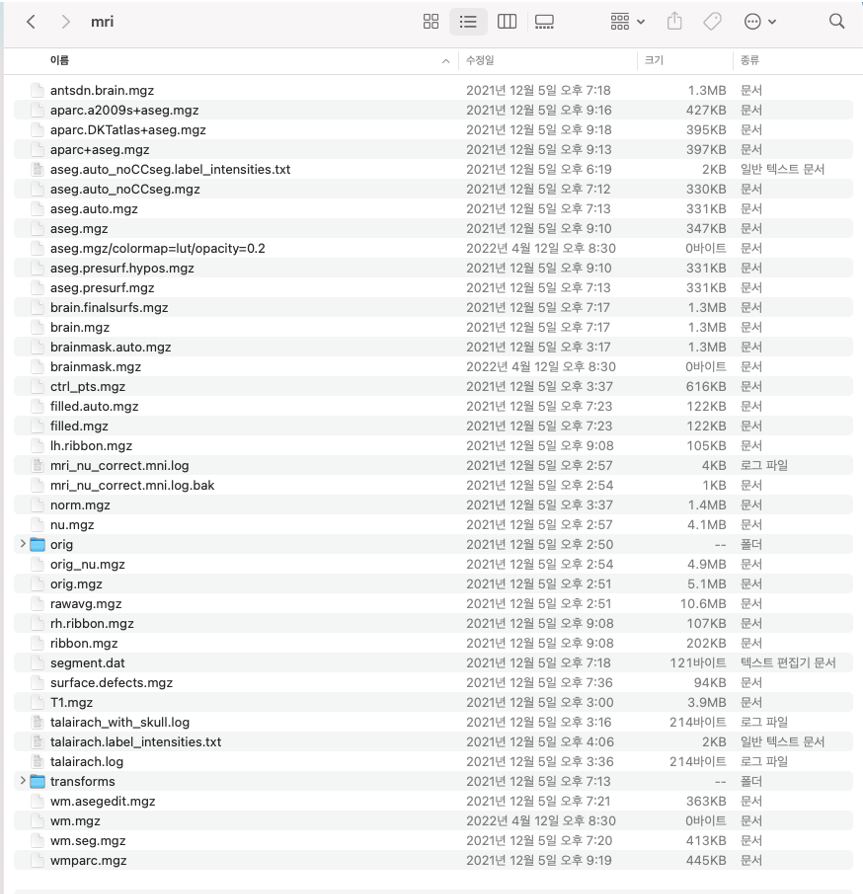
Here’s what it looks like :
I got enough disk space.
Thanks!
H
From: freesurfer-bounces@nmr.mgh.harvard.edu freesurfer-bounces@nmr.mgh.harvard.edu On Behalf Of Fischl, Bruce Sent: Monday, April 18, 2022 10:08 AM To: Freesurfer support list freesurfer@nmr.mgh.harvard.edu Subject: Re: [Freesurfer] Failed to load MRI error
What is inside your mri folder? And make sure you are not running out of disk space as that would cause the 0 length files
Cheers
Bruce
On Apr 17, 2022, at 9:04 PM, HYE JUNG YOUN <hyejung7890@amc.seoul.kr mailto:hyejung7890@amc.seoul.kr > wrote:
External Email - Use Caution
Hi,
Just re-sending this message in case it didn’t go through to the developers, I am still searching for a solution to this problem.
I also found out that the originally converted mri.mgz , brainmask.mgz files are probably re-written – its file size changed to 0kB after I ran the code I sent in my previous email.
Where do you think I went wrong?
Thanks for your help.
H
From: freesurfer-bounces@nmr.mgh.harvard.edu mailto:freesurfer-bounces@nmr.mgh.harvard.edu <freesurfer-bounces@nmr.mgh.harvard.edu mailto:freesurfer-bounces@nmr.mgh.harvard.edu > On Behalf Of HYE JUNG YOUN Sent: Wednesday, April 13, 2022 9:39 AM To: freesurfer@nmr.mgh.harvard.edu mailto:freesurfer@nmr.mgh.harvard.edu Subject: [Freesurfer] Failed to load MRI error
External Email - Use Caution
Dear freesurfer devleopers,
I am experiencing an error while loading freeview using the following code:
This always worked for me but now when I try to load and view it, a message “failed to load MRI” pops up on freeview after loading T1.mgz.
From the terminal it says:
error: mghRead(/Applications/freesurfer/7.2.0/subjects/211025/1079_4/mri/wm.mgz, -1): read error
MRIread failed: Unable to read from /Applications/freesurfer/7.2.0/subjects/211025/1079_4/mri/wm.mgz
Also, when I check the mri containing file, eg: 1079_4 folder, after loading freeview, the folder contains automatically generated –v and –f file.
I have seen a few similar errors on google and mail archive but they did not solve my issue.
I would very much appreciate any solution to this.
Thank you in advance.
Best,
HJ
_______________________________________________ Freesurfer mailing list Freesurfer@nmr.mgh.harvard.edu mailto:Freesurfer@nmr.mgh.harvard.edu https://secure-web.cisco.com/1ZmwWGKHrQWCPm8fK7XhdeZpGYWQjUpWeL2xrbVxFDPlEUy...
Can you send us the recon-all.log file from the scripts dir?
On Apr 17, 2022, at 9:35 PM, HYE JUNG YOUN hyejung7890@amc.seoul.kr wrote:
External Email - Use Caution Hi Bruce,
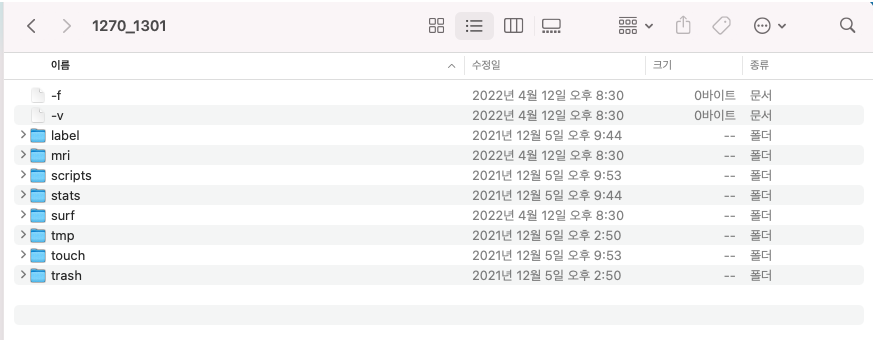
Here’s what it looks like : [image003.png] [image004.png]
I got enough disk space.
Thanks!
H
From: freesurfer-bounces@nmr.mgh.harvard.edu freesurfer-bounces@nmr.mgh.harvard.edu On Behalf Of Fischl, Bruce Sent: Monday, April 18, 2022 10:08 AM To: Freesurfer support list freesurfer@nmr.mgh.harvard.edu Subject: Re: [Freesurfer] Failed to load MRI error
What is inside your mri folder? And make sure you are not running out of disk space as that would cause the 0 length files Cheers Bruce
On Apr 17, 2022, at 9:04 PM, HYE JUNG YOUN <hyejung7890@amc.seoul.krmailto:hyejung7890@amc.seoul.kr> wrote:
External Email - Use Caution Hi,
Just re-sending this message in case it didn’t go through to the developers, I am still searching for a solution to this problem.
I also found out that the originally converted mri.mgz , brainmask.mgz files are probably re-written – its file size changed to 0kB after I ran the code I sent in my previous email. Where do you think I went wrong?
Thanks for your help. H
From: freesurfer-bounces@nmr.mgh.harvard.edumailto:freesurfer-bounces@nmr.mgh.harvard.edu <freesurfer-bounces@nmr.mgh.harvard.edumailto:freesurfer-bounces@nmr.mgh.harvard.edu> On Behalf Of HYE JUNG YOUN Sent: Wednesday, April 13, 2022 9:39 AM To: freesurfer@nmr.mgh.harvard.edumailto:freesurfer@nmr.mgh.harvard.edu Subject: [Freesurfer] Failed to load MRI error
External Email - Use Caution Dear freesurfer devleopers,
I am experiencing an error while loading freeview using the following code: [image005.png]
This always worked for me but now when I try to load and view it, a message “failed to load MRI” pops up on freeview after loading T1.mgz.
From the terminal it says:
error: mghRead(/Applications/freesurfer/7.2.0/subjects/211025/1079_4/mri/wm.mgz, -1): read error
MRIread failed: Unable to read from /Applications/freesurfer/7.2.0/subjects/211025/1079_4/mri/wm.mgz
Also, when I check the mri containing file, eg: 1079_4 folder, after loading freeview, the folder contains automatically generated –v and –f file.
[image006.png] I have seen a few similar errors on google and mail archive but they did not solve my issue. I would very much appreciate any solution to this.
Thank you in advance.
Best, HJ _______________________________________________ Freesurfer mailing list Freesurfer@nmr.mgh.harvard.edumailto:Freesurfer@nmr.mgh.harvard.edu MailScanner has detected a possible fraud attempt from "secure-web.cisco.com" claiming to be https://mail.nmr.mgh.harvard.edu/mailman/listinfo/freesurferhttps://secure-web.cisco.com/1ZmwWGKHrQWCPm8fK7XhdeZpGYWQjUpWeL2xrbVxFDPlEUyJki9Cpto93jjT6E3kBudpId-QDN_rwRbK3NwjQtJRYT9do3euQz1x5mydfJnzQ14JelzFbwIKuNazG5bnDJfxifHap_UM6aVulQjk5qy5kPKFOPEviPlflnrRvZqp6W3lCLWS1hKAm-me1Jm3Qr8c1XrPk1kxGExd0vXmvXLN7-xojQip7J9mMPxPz198Vv19CKsoaiEtNbzwRpOIRC8ohNIqxHxmUgEOB6kdsI_3jPAHKs9TcN1dZHXyZkZYwdUE7fFrrFZqj0-CTruQTsAWzBYGgF4PWVStEWuU9uA/https%3A%2F%2Fmail.nmr.mgh.harvard.edu%2Fmailman%2Flistinfo%2Ffreesurfer _______________________________________________ Freesurfer mailing list Freesurfer@nmr.mgh.harvard.edu https://mail.nmr.mgh.harvard.edu/mailman/listinfo/freesurfer
External Email - Use Caution
Hi Bruce,
Please find the attached log file.
Thanks.
H
Is this for a subject that you can’t load the wm.mgz for? It doesn’t show any errors. Is the wm.mgz zero length? I don’t see how those things can both be true unless you overwrote it at some point. If you haven’t manually edited this subject maybe you should just rerun it?
From: freesurfer-bounces@nmr.mgh.harvard.edu freesurfer-bounces@nmr.mgh.harvard.edu On Behalf Of HYE JUNG YOUN Sent: Monday, April 18, 2022 2:44 AM To: 'Freesurfer support list' freesurfer@nmr.mgh.harvard.edu Subject: Re: [Freesurfer] Failed to load MRI error
External Email - Use Caution Hi Bruce, Please find the attached log file.
Thanks.
H
External Email - Use Caution
Hi Bruce,
Do you mean that I should re-do the recon-all process?
I tried to re run freeview but it did not work. And Yes I think the files have been overwritten at some point which I am trying to figure out to avoid making the same mistake in the future.
However, the question is I have done the exact same process I always did to view mri files on freeview. I have set and used the same subject directory, used the same code, and etc.
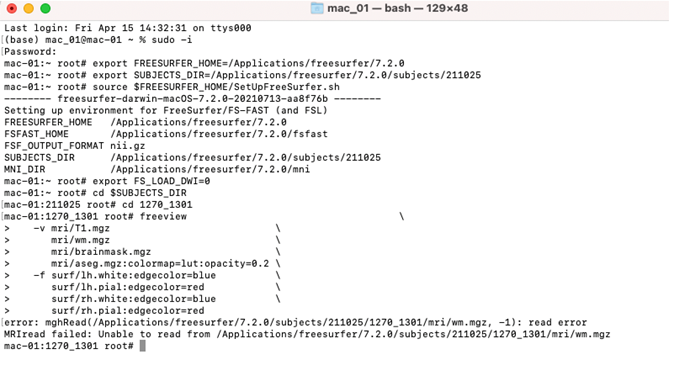
Here’s the code I used:
Which gives me this:
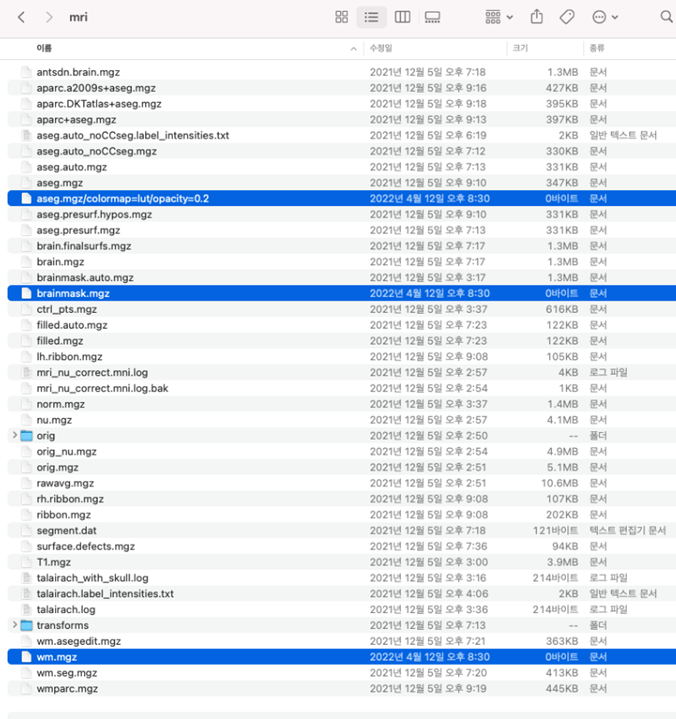
Then, when I check mri folder, notice the selected files have been overwritten (I think) and are shown as 0 byte in size.
Can you see where I went wrong to overwrite those files?
Thank you for your help.
Best, H
From: freesurfer-bounces@nmr.mgh.harvard.edu freesurfer-bounces@nmr.mgh.harvard.edu On Behalf Of Fischl, Bruce Sent: Monday, April 18, 2022 10:35 PM To: Freesurfer support list freesurfer@nmr.mgh.harvard.edu Subject: Re: [Freesurfer] Failed to load MRI error
Is this for a subject that you can’t load the wm.mgz for? It doesn’t show any errors. Is the wm.mgz zero length? I don’t see how those things can both be true unless you overwrote it at some point. If you haven’t manually edited this subject maybe you should just rerun it?
From: freesurfer-bounces@nmr.mgh.harvard.edu mailto:freesurfer-bounces@nmr.mgh.harvard.edu <freesurfer-bounces@nmr.mgh.harvard.edu mailto:freesurfer-bounces@nmr.mgh.harvard.edu > On Behalf Of HYE JUNG YOUN Sent: Monday, April 18, 2022 2:44 AM To: 'Freesurfer support list' <freesurfer@nmr.mgh.harvard.edu mailto:freesurfer@nmr.mgh.harvard.edu > Subject: Re: [Freesurfer] Failed to load MRI error
External Email - Use Caution
Hi Bruce,
Please find the attached log file.
Thanks.
H

It might be that the wm.mgz file is corrupted. What happens if you run mri_info wm.mgz
On 4/18/2022 8:02 PM, HYE JUNG YOUN wrote:
External Email - Use Caution
Hi Bruce,
Do you mean that I should re-do the recon-all process?
I tried to re run freeview but it did not work. And Yes I think the files have been overwritten at some point which I am trying to figure out to avoid making the same mistake in the future.
However, the question is I have done the exact same process I always did to view mri files on freeview. I have set and used the same subject directory, used the same code, and etc.
Here’s the code I used:
Which gives me this:
Then, when I check mri folder, notice the selected files have been overwritten (I think) and are shown as 0 byte in size.
Can you see where I went wrong to overwrite those files?
Thank you for your help.
Best, H
*From:*freesurfer-bounces@nmr.mgh.harvard.edu freesurfer-bounces@nmr.mgh.harvard.edu *On Behalf Of *Fischl, Bruce *Sent:* Monday, April 18, 2022 10:35 PM *To:* Freesurfer support list freesurfer@nmr.mgh.harvard.edu *Subject:* Re: [Freesurfer] Failed to load MRI error
Is this for a subject that you can’t load the wm.mgz for? It doesn’t show any errors. Is the wm.mgz zero length? I don’t see how those things can both be true unless you overwrote it at some point. If you haven’t manually edited this subject maybe you should just rerun it?
*From:*freesurfer-bounces@nmr.mgh.harvard.edu freesurfer-bounces@nmr.mgh.harvard.edu *On Behalf Of *HYE JUNG YOUN *Sent:* Monday, April 18, 2022 2:44 AM *To:* 'Freesurfer support list' freesurfer@nmr.mgh.harvard.edu *Subject:* Re: [Freesurfer] Failed to load MRI error
* External Email - Use Caution *
Hi Bruce,
Please find the attached log file.
Thanks.
H
Freesurfer mailing list Freesurfer@nmr.mgh.harvard.edu https://mail.nmr.mgh.harvard.edu/mailman/listinfo/freesurfer
External Email - Use Caution
Hi,
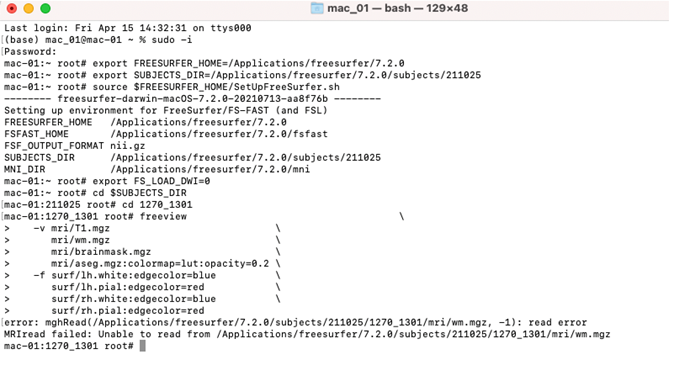
Then I get :
Error: mghRead(/Applications/Freesurfer/7.2.0/subjects/211025/1270_1301/mri/wm.mgz, -1): read error
Should I go through recon all process for all files I have ?
Can you perhaps tell me where I have possibly gone wrong?
I simply just used the code I always used for freeview then this happened. I’d like to avoid making same mistakes I might have made.
Thanks for your help!
From: freesurfer-bounces@nmr.mgh.harvard.edu freesurfer-bounces@nmr.mgh.harvard.edu On Behalf Of Douglas N. Greve Sent: Friday, April 22, 2022 2:59 AM To: freesurfer@nmr.mgh.harvard.edu Subject: Re: [Freesurfer] Failed to load MRI error
It might be that the wm.mgz file is corrupted. What happens if you run mri_info wm.mgz
On 4/18/2022 8:02 PM, HYE JUNG YOUN wrote:
External Email - Use Caution
Hi Bruce,
Do you mean that I should re-do the recon-all process?
I tried to re run freeview but it did not work. And Yes I think the files have been overwritten at some point which I am trying to figure out to avoid making the same mistake in the future.
However, the question is I have done the exact same process I always did to view mri files on freeview. I have set and used the same subject directory, used the same code, and etc.
Here’s the code I used:
Which gives me this:
Then, when I check mri folder, notice the selected files have been overwritten (I think) and are shown as 0 byte in size.
Can you see where I went wrong to overwrite those files?
Thank you for your help.
Best, H
From: freesurfer-bounces@nmr.mgh.harvard.edu mailto:freesurfer-bounces@nmr.mgh.harvard.edu mailto:freesurfer-bounces@nmr.mgh.harvard.edu freesurfer-bounces@nmr.mgh.harvard.edu On Behalf Of Fischl, Bruce Sent: Monday, April 18, 2022 10:35 PM To: Freesurfer support list mailto:freesurfer@nmr.mgh.harvard.edu freesurfer@nmr.mgh.harvard.edu Subject: Re: [Freesurfer] Failed to load MRI error
Is this for a subject that you can’t load the wm.mgz for? It doesn’t show any errors. Is the wm.mgz zero length? I don’t see how those things can both be true unless you overwrote it at some point. If you haven’t manually edited this subject maybe you should just rerun it?
From: freesurfer-bounces@nmr.mgh.harvard.edu mailto:freesurfer-bounces@nmr.mgh.harvard.edu <freesurfer-bounces@nmr.mgh.harvard.edu mailto:freesurfer-bounces@nmr.mgh.harvard.edu > On Behalf Of HYE JUNG YOUN Sent: Monday, April 18, 2022 2:44 AM To: 'Freesurfer support list' <freesurfer@nmr.mgh.harvard.edu mailto:freesurfer@nmr.mgh.harvard.edu > Subject: Re: [Freesurfer] Failed to load MRI error
External Email - Use Caution
Hi Bruce,
Please find the attached log file.
Thanks.
H
_______________________________________________ Freesurfer mailing list Freesurfer@nmr.mgh.harvard.edu mailto:Freesurfer@nmr.mgh.harvard.edu https://secure-web.cisco.com/177KXi_rtP18HYBBhhrD-_-8LWtyCLOd2W44TrhMzVO8z07...

I don't know where you went wrong. You can try to regenerate just that file with cd $SUBJECTS_DIR/subject/mri mri_pretess wm.asegedit.mgz wm norm.mgz wm.mgz delete the old wm.mgz first
On 4/21/2022 9:48 PM, HYE JUNG YOUN wrote:
External Email - Use Caution
Hi,
Then I get :
Error: mghRead(/Applications/Freesurfer/7.2.0/subjects/211025/1270_1301/mri/wm.mgz, -1): read error
Should I go through recon all process for all files I have ?
Can you perhaps tell me where I have possibly gone wrong?
I simply just used the code I always used for freeview then this happened. I’d like to avoid making same mistakes I might have made.
Thanks for your help!
*From:*freesurfer-bounces@nmr.mgh.harvard.edu freesurfer-bounces@nmr.mgh.harvard.edu *On Behalf Of *Douglas N. Greve *Sent:* Friday, April 22, 2022 2:59 AM *To:* freesurfer@nmr.mgh.harvard.edu *Subject:* Re: [Freesurfer] Failed to load MRI error
It might be that the wm.mgz file is corrupted. What happens if you run mri_info wm.mgz
On 4/18/2022 8:02 PM, HYE JUNG YOUN wrote:
*        External Email - Use Caution *

Hi Bruce,

Do you mean that I should re-do the recon-all process?

I tried to re run freeview but it did not work. And Yes I  think
the files have been overwritten at some point which I am trying to
figure out to avoid making the same mistake in the future.

However, the question is I have done the exact same process I
always did to view mri files on freeview. I have set and used the
same subject directory, used the same code, and etc.

Here’s the code I used:

Which gives me this:

Then, when I check mri folder, notice the selected files have been
overwritten (I think) and are shown as 0 byte in size.

Can you see where I went wrong to overwrite those files?

Thank you for your help.

Best,
H

*From:*freesurfer-bounces@nmr.mgh.harvard.edu
<freesurfer-bounces@nmr.mgh.harvard.edu>
<mailto:freesurfer-bounces@nmr.mgh.harvard.edu> *On Behalf Of
*Fischl, Bruce
*Sent:* Monday, April 18, 2022 10:35 PM
*To:* Freesurfer support list <freesurfer@nmr.mgh.harvard.edu>
<mailto:freesurfer@nmr.mgh.harvard.edu>
*Subject:* Re: [Freesurfer] Failed to load MRI error

Is this for a subject that you can’t load the wm.mgz for? It
doesn’t show any errors. Is the wm.mgz zero length? I don’t see
how those things can both be true unless you overwrote it at some
point. If you haven’t manually edited this subject maybe you
should just rerun it?

*From:*freesurfer-bounces@nmr.mgh.harvard.edu
<freesurfer-bounces@nmr.mgh.harvard.edu> *On Behalf Of *HYE JUNG YOUN
*Sent:* Monday, April 18, 2022 2:44 AM
*To:* 'Freesurfer support list' <freesurfer@nmr.mgh.harvard.edu>
*Subject:* Re: [Freesurfer] Failed to load MRI error

*        External Email - Use Caution *

Hi Bruce,

Please find the attached log file.

Thanks.

H


_______________________________________________

Freesurfer mailing list

Freesurfer@nmr.mgh.harvard.edu

*MailScanner has detected a possible fraud attempt from
"secure-web.cisco.com" claiming to be*
https://mail.nmr.mgh.harvard.edu/mailman/listinfo/freesurfer
<https://secure-web.cisco.com/177KXi_rtP18HYBBhhrD-_-8LWtyCLOd2W44TrhMzVO8z07DC89yLCaPVxeC217TCLMuRz_l9W0gM-5vfgg2Po9kjjQOlX6-XL1-5Pbf4AOReb_JMsTDgBdXdbXq61DeY2zwJEb5QJnjuFBGJgfIHMSE2AaBQFd4_RwTGLtDH3gbJEmsG4pSdebK3KjlebZyg6vl5TcQtGEmOsCqeHFlp_Br1G9b4yWnS7qf5lDHsB_ABvqEL4tR895nBKrslbvrdK6blGAMi2kzgxutTQcD3KALsnlFtFa-uK8aThf5XSy-tHflISFYQNwKuvRjLONO8vcl52vt6OsRaL7VR5UUo4A/https%3A%2F%2Fmail.nmr.mgh.harvard.edu%2Fmailman%2Flistinfo%2Ffreesurfer>
Freesurfer mailing list Freesurfer@nmr.mgh.harvard.edu https://mail.nmr.mgh.harvard.edu/mailman/listinfo/freesurfer
freesurfer@nmr.mgh.harvard.edu
-
 Douglas N. Greve
 -
 Fischl, Bruce
 -
 HYE JUNG YOUN