
Dear Freesurfer Community,
I am very new to Freesurfer and am trying to work my way through the tutorial. I am currently stuck at the mkcontrast-sess -analysis my-workmem.sm05.lh -contrast encode-v-base -a 1 section, having received the error: ERROR: cannot find matlab. Is it in your path?
I have searched the forums and found one instance of this being reported, but the suggested solutions did not resolve the problem. Is there anyway further recommendations you might make?
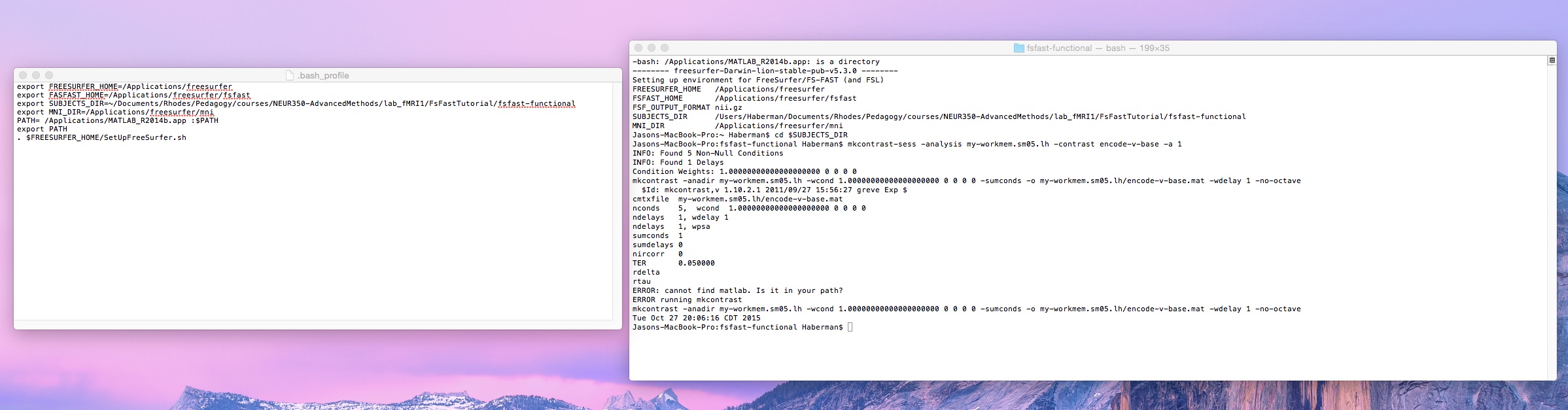
I have attached a screenshot of my .bash_profile and of my attempts to run mkcontrast. I would be most grateful for any assistance you might offer.
Warm Regards, Jason
[image: Inline image 1]

Hi Jason
do you have matlab installed? If so, you need to setup your environment so that it is in your path. This doesn't really have anything to do with FreeSurfer - you need to be able to type "matlab" from the command line and have it find the binary
cheers Bruce On Wed, 28 Oct 2015, Jason Haberman wrote:
Dear Freesurfer Community, I am very new to Freesurfer and am trying to work my way through the tutorial. I am currently stuck at the mkcontrast-sess -analysis my-workmem.sm05.lh -contrast encode-v-base -a 1 section, having received the error: ERROR: cannot find matlab. Is it in your path?
I have searched the forums and found one instance of this being reported, but the suggested solutions did not resolve the problem. Is there anyway further recommendations you might make?
I have attached a screenshot of my .bash_profile and of my attempts to run mkcontrast. I would be most grateful for any assistance you might offer.
Warm Regards, Jason
Inline image 1
--
Jason Haberman Assistant Professor of Psychology Rhodes College Clough Hall 119 901-843-3231 http://jasonmarchaberman.wordpress.com/
Hi Bruce,
Thanks so much for your response. I can only start Matlab from the terminal when I use the following command within the Matlab applications folder:
./matlab
Am I to understand that the matlab command must be globally accessible? If so, how might I achieve that?
Thanks so much, Jason
On Wed, Oct 28, 2015 at 8:39 AM, Bruce Fischl fischl@nmr.mgh.harvard.edu wrote:
Hi Jason
do you have matlab installed? If so, you need to setup your environment so that it is in your path. This doesn't really have anything to do with FreeSurfer - you need to be able to type "matlab" from the command line and have it find the binary
cheers Bruce On Wed, 28 Oct 2015, Jason Haberman wrote:
Dear Freesurfer Community,
I am very new to Freesurfer and am trying to work my way through the tutorial. I am currently stuck at the mkcontrast-sess -analysis my-workmem.sm05.lh -contrast encode-v-base -a 1 section, having received the error: ERROR: cannot find matlab. Is it in your path?
I have searched the forums and found one instance of this being reported, but the suggested solutions did not resolve the problem. Is there anyway further recommendations you might make?
I have attached a screenshot of my .bash_profile and of my attempts to run mkcontrast. I would be most grateful for any assistance you might offer.
Warm Regards, Jason
Inline image 1
--
Jason Haberman Assistant Professor of Psychology Rhodes College Clough Hall 119 901-843-3231 http://jasonmarchaberman.wordpress.com/
Freesurfer mailing list Freesurfer@nmr.mgh.harvard.edu https://mail.nmr.mgh.harvard.edu/mailman/listinfo/freesurfer
The information in this e-mail is intended only for the person to whom it is addressed. If you believe this e-mail was sent to you in error and the e-mail contains patient information, please contact the Partners Compliance HelpLine at http://www.partners.org/complianceline . If the e-mail was sent to you in error but does not contain patient information, please contact the sender and properly dispose of the e-mail.
Hi Jason
you need to talk to a local sysadmin, but basically you need to add the path to matlab to your path environment variable. The syntax for this depends on the shell you are using, but for example in csh/tcsh it would be something like (in your .cshrc file in your home directory)
set path = ($path /usr/local/matlab/bin) rehash
or wherever matlab is
cheers Bruce
On Wed, 28 Oct 2015, Jason Haberman wrote:
Hi Bruce, Thanks so much for your response. I can only start Matlab from the terminal when I use the following command within the Matlab applications folder:
./matlab
Am I to understand that the matlab command must be globally accessible? If so, how might I achieve that?
Thanks so much, Jason
On Wed, Oct 28, 2015 at 8:39 AM, Bruce Fischl fischl@nmr.mgh.harvard.edu wrote: Hi Jason
  do you have matlab installed? If so, you need to setup your
  environment so that it is in your path. This doesn't really have
  anything to do with FreeSurfer - you need to be able to type
  "matlab" from the command line and have it find the binary

  cheers
  Bruce
  On Wed, 28 Oct 2015, Jason Haberman wrote:

        Dear Freesurfer Community,
        I am very new to Freesurfer and am trying to work my
        way through the
        tutorial. I am currently stuck at the
        mkcontrast-sess -analysis my-workmem.sm05.lh
        -contrast encode-v-base -a 1
        section, having received the error:
        ERROR: cannot find matlab. Is it in your path?

        I have searched the forums and found one instance of
        this being reported,
        but the suggested solutions did not resolve the
        problem. Is there anyway
        further recommendations you might make?

        I have attached a screenshot of my .bash_profile and
        of my attempts to run
        mkcontrast. I would be most grateful for any
        assistance you might offer.

        Warm Regards,
        Jason

        Inline image 1

        --

        Jason Haberman
        Assistant Professor of Psychology
        Rhodes College
        Clough Hall 119
        901-843-3231
        http://jasonmarchaberman.wordpress.com/


  _______________________________________________
  Freesurfer mailing list
  Freesurfer@nmr.mgh.harvard.edu
  https://mail.nmr.mgh.harvard.edu/mailman/listinfo/freesurfer


  The information in this e-mail is intended only for the person
  to whom it is
  addressed. If you believe this e-mail was sent to you in error
  and the e-mail
  contains patient information, please contact the Partners
  Compliance HelpLine at
  http://www.partners.org/complianceline . If the e-mail was sent
  to you in error
  but does not contain patient information, please contact the
  sender and properly
  dispose of the e-mail.
--
Jason Haberman Assistant Professor of Psychology Rhodes College Clough Hall 119 901-843-3231 http://jasonmarchaberman.wordpress.com/
freesurfer@nmr.mgh.harvard.edu
-
 Bruce Fischl
 -
 Jason Haberman