
I have two subjects, subA and subB. subA has a binary ROI mask, native space, that I'd like to place in subB's native space. Both subjects have been run through all stages of recon, edited, etc. Is there a better or easier way to achieve this than what I've run?:
#Resample the native space binary ROI file into "brainmask" space mri_convert -rl /subA/mri/brainmask.mgz -rt nearest --no_scale 1 ROI.nii.gz /subA/mri/ROI.mgz
#Convert ROI file into a label mri_cor2label --id 1 --c /subA/mri --i ROI.mgz --l ROI.label
#Move label from subA to subB mri_label2label --srcsubject subA --srclabel /subA/mri/ROI.label --trgsubject subB --trglabel /subB/mri/ROI_to_subB.label --regmethod volume
#Convert warped ROI label to a volume mri_label2vol --label /subB/mri/ROI_to_subB.label \ --subject subB \ --temp brainmask.mgz \ --regheader brainmask.mgz \ --o /subB/mri/ROI_to_subB.mgz
#Convert the volume back to native subB space mri_convert -rl subB_native.nii.gz -rt nearest --no_scale 1 /subB/mri/ROI_to_subB.mgz ROI_to_subB_native.nii.gz
A few follow-up questions:
1) When running mri_label2label, is better to use surface or volume for the "regmethod"? Which method will give me a better fit for my output? 2) The output I'm getting looks striped (there are holes in the binary mask) and doesn't quite fit the anatomy (the final file is shifted up and away from where I would expect it to be although in the general vicinity of what I would expect). It's almost as if I've chosen a wrong target or file along the way. I don't expect the fit to be perfect, but did I do something wrong?
Thanks in advance to any and all replies.
________________________________ Notice: This UI Health Care e-mail (including attachments) is covered by the Electronic Communications Privacy Act, 18 U.S.C. 2510-2521 and is intended only for the use of the individual or entity to which it is addressed, and may contain information that is privileged, confidential, and exempt from disclosure under applicable law. If you are not the intended recipient, any dissemination, distribution or copying of this communication is strictly prohibited. If you have received this communication in error, please notify the sender immediately and delete or destroy all copies of the original message and attachments thereto. Email sent to or from UI Health Care may be retained as required by law or regulation. Thank you. ________________________________
Anyone have any thoughts on this?
On 09/21/2016 04:18 PM, Joel Bruss wrote:
I have two subjects, subA and subB. subA has a binary ROI mask, native space, that I'd like to place in subB's native space. Both subjects have been run through all stages of recon, edited, etc. Is there a better or easier way to achieve this than what I've run?:
#Resample the native space binary ROI file into "brainmask" space mri_convert -rl /subA/mri/brainmask.mgz -rt nearest --no_scale 1 ROI.nii.gz /subA/mri/ROI.mgz
#Convert ROI file into a label mri_cor2label --id 1 --c /subA/mri --i ROI.mgz --l ROI.label
#Move label from subA to subB mri_label2label --srcsubject subA --srclabel /subA/mri/ROI.label --trgsubject subB --trglabel /subB/mri/ROI_to_subB.label --regmethod volume
#Convert warped ROI label to a volume mri_label2vol --label /subB/mri/ROI_to_subB.label \ --subject subB \ --temp brainmask.mgz \ --regheader brainmask.mgz \ --o /subB/mri/ROI_to_subB.mgz
#Convert the volume back to native subB space mri_convert -rl subB_native.nii.gz -rt nearest --no_scale 1 /subB/mri/ROI_to_subB.mgz ROI_to_subB_native.nii.gz
A few follow-up questions:
- When running mri_label2label, is better to use surface or volume for
the "regmethod"? Which method will give me a better fit for my output? 2) The output I'm getting looks striped (there are holes in the binary mask) and doesn't quite fit the anatomy (the final file is shifted up and away from where I would expect it to be although in the general vicinity of what I would expect). It's almost as if I've chosen a wrong target or file along the way. I don't expect the fit to be perfect, but did I do something wrong?
Thanks in advance to any and all replies.
Notice: This UI Health Care e-mail (including attachments) is covered by the Electronic Communications Privacy Act, 18 U.S.C. 2510-2521 and is intended only for the use of the individual or entity to which it is addressed, and may contain information that is privileged, confidential, and exempt from disclosure under applicable law. If you are not the intended recipient, any dissemination, distribution or copying of this communication is strictly prohibited. If you have received this communication in error, please notify the sender immediately and delete or destroy all copies of the original message and attachments thereto. Email sent to or from UI Health Care may be retained as required by law or regulation. Thank you. ________________________________
Freesurfer mailing list Freesurfer@nmr.mgh.harvard.edu https://mail.nmr.mgh.harvard.edu/mailman/listinfo/freesurfer
The information in this e-mail is intended only for the person to whom it is addressed. If you believe this e-mail was sent to you in error and the e-mail contains patient information, please contact the Partners Compliance HelpLine at http://www.partners.org/complianceline . If the e-mail was sent to you in error but does not contain patient information, please contact the sender and properly dispose of the e-mail.
________________________________ Notice: This UI Health Care e-mail (including attachments) is covered by the Electronic Communications Privacy Act, 18 U.S.C. 2510-2521 and is intended only for the use of the individual or entity to which it is addressed, and may contain information that is privileged, confidential, and exempt from disclosure under applicable law. If you are not the intended recipient, any dissemination, distribution or copying of this communication is strictly prohibited. If you have received this communication in error, please notify the sender immediately and delete or destroy all copies of the original message and attachments thereto. Email sent to or from UI Health Care may be retained as required by law or regulation. Thank you. ________________________________
Another bump.
On 09/21/2016 04:18 PM, Joel Bruss wrote:
I have two subjects, subA and subB. subA has a binary ROI mask, native space, that I'd like to place in subB's native space. Both subjects have been run through all stages of recon, edited, etc. Is there a better or easier way to achieve this than what I've run?:
#Resample the native space binary ROI file into "brainmask" space mri_convert -rl /subA/mri/brainmask.mgz -rt nearest --no_scale 1 ROI.nii.gz /subA/mri/ROI.mgz
#Convert ROI file into a label mri_cor2label --id 1 --c /subA/mri --i ROI.mgz --l ROI.label
#Move label from subA to subB mri_label2label --srcsubject subA --srclabel /subA/mri/ROI.label --trgsubject subB --trglabel /subB/mri/ROI_to_subB.label --regmethod volume
#Convert warped ROI label to a volume mri_label2vol --label /subB/mri/ROI_to_subB.label \ --subject subB \ --temp brainmask.mgz \ --regheader brainmask.mgz \ --o /subB/mri/ROI_to_subB.mgz
#Convert the volume back to native subB space mri_convert -rl subB_native.nii.gz -rt nearest --no_scale 1 /subB/mri/ROI_to_subB.mgz ROI_to_subB_native.nii.gz
A few follow-up questions:
- When running mri_label2label, is better to use surface or volume for
the "regmethod"? Which method will give me a better fit for my output? 2) The output I'm getting looks striped (there are holes in the binary mask) and doesn't quite fit the anatomy (the final file is shifted up and away from where I would expect it to be although in the general vicinity of what I would expect). It's almost as if I've chosen a wrong target or file along the way. I don't expect the fit to be perfect, but did I do something wrong?
Thanks in advance to any and all replies.
Notice: This UI Health Care e-mail (including attachments) is covered by the Electronic Communications Privacy Act, 18 U.S.C. 2510-2521 and is intended only for the use of the individual or entity to which it is addressed, and may contain information that is privileged, confidential, and exempt from disclosure under applicable law. If you are not the intended recipient, any dissemination, distribution or copying of this communication is strictly prohibited. If you have received this communication in error, please notify the sender immediately and delete or destroy all copies of the original message and attachments thereto. Email sent to or from UI Health Care may be retained as required by law or regulation. Thank you. ________________________________
Freesurfer mailing list Freesurfer@nmr.mgh.harvard.edu https://mail.nmr.mgh.harvard.edu/mailman/listinfo/freesurfer
The information in this e-mail is intended only for the person to whom it is addressed. If you believe this e-mail was sent to you in error and the e-mail contains patient information, please contact the Partners Compliance HelpLine at http://www.partners.org/complianceline . If the e-mail was sent to you in error but does not contain patient information, please contact the sender and properly dispose of the e-mail.
________________________________ Notice: This UI Health Care e-mail (including attachments) is covered by the Electronic Communications Privacy Act, 18 U.S.C. 2510-2521 and is intended only for the use of the individual or entity to which it is addressed, and may contain information that is privileged, confidential, and exempt from disclosure under applicable law. If you are not the intended recipient, any dissemination, distribution or copying of this communication is strictly prohibited. If you have received this communication in error, please notify the sender immediately and delete or destroy all copies of the original message and attachments thereto. Email sent to or from UI Health Care may be retained as required by law or regulation. Thank you. ________________________________

The way you have it configured now, this is a volume-based ROI, so you need to use the volume-based reg method. This will map between the two subjects using the affine (12 dof) talairach registration which will not be as accurate as the surface-based registration. If this is a cortical ROI, I can show you how to redo this using a surface-based label.
On 09/29/2016 11:37 AM, Joel Bruss wrote:
Another bump.
On 09/21/2016 04:18 PM, Joel Bruss wrote:
I have two subjects, subA and subB. subA has a binary ROI mask, native space, that I'd like to place in subB's native space. Both subjects have been run through all stages of recon, edited, etc. Is there a better or easier way to achieve this than what I've run?:
#Resample the native space binary ROI file into "brainmask" space mri_convert -rl /subA/mri/brainmask.mgz -rt nearest --no_scale 1 ROI.nii.gz /subA/mri/ROI.mgz
#Convert ROI file into a label mri_cor2label --id 1 --c /subA/mri --i ROI.mgz --l ROI.label
#Move label from subA to subB mri_label2label --srcsubject subA --srclabel /subA/mri/ROI.label --trgsubject subB --trglabel /subB/mri/ROI_to_subB.label --regmethod volume
#Convert warped ROI label to a volume mri_label2vol --label /subB/mri/ROI_to_subB.label \ --subject subB \ --temp brainmask.mgz \ --regheader brainmask.mgz \ --o /subB/mri/ROI_to_subB.mgz
#Convert the volume back to native subB space mri_convert -rl subB_native.nii.gz -rt nearest --no_scale 1 /subB/mri/ROI_to_subB.mgz ROI_to_subB_native.nii.gz
A few follow-up questions:
- When running mri_label2label, is better to use surface or volume for
the "regmethod"? Which method will give me a better fit for my output? 2) The output I'm getting looks striped (there are holes in the binary mask) and doesn't quite fit the anatomy (the final file is shifted up and away from where I would expect it to be although in the general vicinity of what I would expect). It's almost as if I've chosen a wrong target or file along the way. I don't expect the fit to be perfect, but did I do something wrong?
Thanks in advance to any and all replies.
Notice: This UI Health Care e-mail (including attachments) is covered by the Electronic Communications Privacy Act, 18 U.S.C. 2510-2521 and is intended only for the use of the individual or entity to which it is addressed, and may contain information that is privileged, confidential, and exempt from disclosure under applicable law. If you are not the intended recipient, any dissemination, distribution or copying of this communication is strictly prohibited. If you have received this communication in error, please notify the sender immediately and delete or destroy all copies of the original message and attachments thereto. Email sent to or from UI Health Care may be retained as required by law or regulation. Thank you. ________________________________
Freesurfer mailing list Freesurfer@nmr.mgh.harvard.edu https://mail.nmr.mgh.harvard.edu/mailman/listinfo/freesurfer
The information in this e-mail is intended only for the person to whom it is addressed. If you believe this e-mail was sent to you in error and the e-mail contains patient information, please contact the Partners Compliance HelpLine at http://www.partners.org/complianceline . If the e-mail was sent to you in error but does not contain patient information, please contact the sender and properly dispose of the e-mail.
Notice: This UI Health Care e-mail (including attachments) is covered by the Electronic Communications Privacy Act, 18 U.S.C. 2510-2521 and is intended only for the use of the individual or entity to which it is addressed, and may contain information that is privileged, confidential, and exempt from disclosure under applicable law. If you are not the intended recipient, any dissemination, distribution or copying of this communication is strictly prohibited. If you have received this communication in error, please notify the sender immediately and delete or destroy all copies of the original message and attachments thereto. Email sent to or from UI Health Care may be retained as required by law or regulation. Thank you. ________________________________
Freesurfer mailing list Freesurfer@nmr.mgh.harvard.edu https://mail.nmr.mgh.harvard.edu/mailman/listinfo/freesurfer
Ah, I see. The ROI will be subject-dependent (I want to do this for multiple subjects) but the majority, if not all, should be cortical. Any help you'd be willing to provide would be much appreciated.
On 09/29/2016 11:31 AM, Douglas N Greve wrote:
The way you have it configured now, this is a volume-based ROI, so you need to use the volume-based reg method. This will map between the two subjects using the affine (12 dof) talairach registration which will not be as accurate as the surface-based registration. If this is a cortical ROI, I can show you how to redo this using a surface-based label.
On 09/29/2016 11:37 AM, Joel Bruss wrote:
Another bump.
On 09/21/2016 04:18 PM, Joel Bruss wrote:
I have two subjects, subA and subB. subA has a binary ROI mask, native space, that I'd like to place in subB's native space. Both subjects have been run through all stages of recon, edited, etc. Is there a better or easier way to achieve this than what I've run?:
#Resample the native space binary ROI file into "brainmask" space mri_convert -rl /subA/mri/brainmask.mgz -rt nearest --no_scale 1 ROI.nii.gz /subA/mri/ROI.mgz
#Convert ROI file into a label mri_cor2label --id 1 --c /subA/mri --i ROI.mgz --l ROI.label
#Move label from subA to subB mri_label2label --srcsubject subA --srclabel /subA/mri/ROI.label --trgsubject subB --trglabel /subB/mri/ROI_to_subB.label --regmethod volume
#Convert warped ROI label to a volume mri_label2vol --label /subB/mri/ROI_to_subB.label \ --subject subB \ --temp brainmask.mgz \ --regheader brainmask.mgz \ --o /subB/mri/ROI_to_subB.mgz
#Convert the volume back to native subB space mri_convert -rl subB_native.nii.gz -rt nearest --no_scale 1 /subB/mri/ROI_to_subB.mgz ROI_to_subB_native.nii.gz
A few follow-up questions:
- When running mri_label2label, is better to use surface or volume for
the "regmethod"? Which method will give me a better fit for my output? 2) The output I'm getting looks striped (there are holes in the binary mask) and doesn't quite fit the anatomy (the final file is shifted up and away from where I would expect it to be although in the general vicinity of what I would expect). It's almost as if I've chosen a wrong target or file along the way. I don't expect the fit to be perfect, but did I do something wrong?
Thanks in advance to any and all replies.
Notice: This UI Health Care e-mail (including attachments) is covered by the Electronic Communications Privacy Act, 18 U.S.C. 2510-2521 and is intended only for the use of the individual or entity to which it is addressed, and may contain information that is privileged, confidential, and exempt from disclosure under applicable law. If you are not the intended recipient, any dissemination, distribution or copying of this communication is strictly prohibited. If you have received this communication in error, please notify the sender immediately and delete or destroy all copies of the original message and attachments thereto. Email sent to or from UI Health Care may be retained as required by law or regulation. Thank you. ________________________________
Freesurfer mailing list Freesurfer@nmr.mgh.harvard.edu https://mail.nmr.mgh.harvard.edu/mailman/listinfo/freesurfer
The information in this e-mail is intended only for the person to whom it is addressed. If you believe this e-mail was sent to you in error and the e-mail contains patient information, please contact the Partners Compliance HelpLine at http://www.partners.org/complianceline . If the e-mail was sent to you in error but does not contain patient information, please contact the sender and properly dispose of the e-mail.
Notice: This UI Health Care e-mail (including attachments) is covered by the Electronic Communications Privacy Act, 18 U.S.C. 2510-2521 and is intended only for the use of the individual or entity to which it is addressed, and may contain information that is privileged, confidential, and exempt from disclosure under applicable law. If you are not the intended recipient, any dissemination, distribution or copying of this communication is strictly prohibited. If you have received this communication in error, please notify the sender immediately and delete or destroy all copies of the original message and attachments thereto. Email sent to or from UI Health Care may be retained as required by law or regulation. Thank you. ________________________________
Freesurfer mailing list Freesurfer@nmr.mgh.harvard.edu https://mail.nmr.mgh.harvard.edu/mailman/listinfo/freesurfer
________________________________ Notice: This UI Health Care e-mail (including attachments) is covered by the Electronic Communications Privacy Act, 18 U.S.C. 2510-2521 and is intended only for the use of the individual or entity to which it is addressed, and may contain information that is privileged, confidential, and exempt from disclosure under applicable law. If you are not the intended recipient, any dissemination, distribution or copying of this communication is strictly prohibited. If you have received this communication in error, please notify the sender immediately and delete or destroy all copies of the original message and attachments thereto. Email sent to or from UI Health Care may be retained as required by law or regulation. Thank you. ________________________________
First, bring up the ROI on the volume along with the surface in the volume. You can do this with FreeView. Make sure that the ROI intersects the surface. Then run mri_vol2surf so sample the binary ROI volume onto the surface. You can view the ROI on the surface by loading it as an overlay. Then run mri_cor2label using the surface-sampled ROI as input and specifying --surf (see the --help) to make this a surface-based label. You can also view this label in the surface in freeview. Finally, run mri_label2label using the --regmethod surface
On 09/29/2016 01:58 PM, Joel Bruss wrote:
Ah, I see. The ROI will be subject-dependent (I want to do this for multiple subjects) but the majority, if not all, should be cortical. Any help you'd be willing to provide would be much appreciated.
On 09/29/2016 11:31 AM, Douglas N Greve wrote:
The way you have it configured now, this is a volume-based ROI, so you need to use the volume-based reg method. This will map between the two subjects using the affine (12 dof) talairach registration which will not be as accurate as the surface-based registration. If this is a cortical ROI, I can show you how to redo this using a surface-based label.
On 09/29/2016 11:37 AM, Joel Bruss wrote:
Another bump.
On 09/21/2016 04:18 PM, Joel Bruss wrote:
I have two subjects, subA and subB. subA has a binary ROI mask, native space, that I'd like to place in subB's native space. Both subjects have been run through all stages of recon, edited, etc. Is there a better or easier way to achieve this than what I've run?:
#Resample the native space binary ROI file into "brainmask" space mri_convert -rl /subA/mri/brainmask.mgz -rt nearest --no_scale 1 ROI.nii.gz /subA/mri/ROI.mgz
#Convert ROI file into a label mri_cor2label --id 1 --c /subA/mri --i ROI.mgz --l ROI.label
#Move label from subA to subB mri_label2label --srcsubject subA --srclabel /subA/mri/ROI.label --trgsubject subB --trglabel /subB/mri/ROI_to_subB.label --regmethod volume
#Convert warped ROI label to a volume mri_label2vol --label /subB/mri/ROI_to_subB.label \ --subject subB \ --temp brainmask.mgz \ --regheader brainmask.mgz \ --o /subB/mri/ROI_to_subB.mgz
#Convert the volume back to native subB space mri_convert -rl subB_native.nii.gz -rt nearest --no_scale 1 /subB/mri/ROI_to_subB.mgz ROI_to_subB_native.nii.gz
A few follow-up questions:
- When running mri_label2label, is better to use surface or volume for
the "regmethod"? Which method will give me a better fit for my output? 2) The output I'm getting looks striped (there are holes in the binary mask) and doesn't quite fit the anatomy (the final file is shifted up and away from where I would expect it to be although in the general vicinity of what I would expect). It's almost as if I've chosen a wrong target or file along the way. I don't expect the fit to be perfect, but did I do something wrong?
Thanks in advance to any and all replies.
Notice: This UI Health Care e-mail (including attachments) is covered by the Electronic Communications Privacy Act, 18 U.S.C. 2510-2521 and is intended only for the use of the individual or entity to which it is addressed, and may contain information that is privileged, confidential, and exempt from disclosure under applicable law. If you are not the intended recipient, any dissemination, distribution or copying of this communication is strictly prohibited. If you have received this communication in error, please notify the sender immediately and delete or destroy all copies of the original message and attachments thereto. Email sent to or from UI Health Care may be retained as required by law or regulation. Thank you. ________________________________
Freesurfer mailing list Freesurfer@nmr.mgh.harvard.edu https://mail.nmr.mgh.harvard.edu/mailman/listinfo/freesurfer
The information in this e-mail is intended only for the person to whom it is addressed. If you believe this e-mail was sent to you in error and the e-mail contains patient information, please contact the Partners Compliance HelpLine at http://www.partners.org/complianceline . If the e-mail was sent to you in error but does not contain patient information, please contact the sender and properly dispose of the e-mail.
Notice: This UI Health Care e-mail (including attachments) is covered by the Electronic Communications Privacy Act, 18 U.S.C. 2510-2521 and is intended only for the use of the individual or entity to which it is addressed, and may contain information that is privileged, confidential, and exempt from disclosure under applicable law. If you are not the intended recipient, any dissemination, distribution or copying of this communication is strictly prohibited. If you have received this communication in error, please notify the sender immediately and delete or destroy all copies of the original message and attachments thereto. Email sent to or from UI Health Care may be retained as required by law or regulation. Thank you. ________________________________
Freesurfer mailing list Freesurfer@nmr.mgh.harvard.edu https://mail.nmr.mgh.harvard.edu/mailman/listinfo/freesurfer
Notice: This UI Health Care e-mail (including attachments) is covered by the Electronic Communications Privacy Act, 18 U.S.C. 2510-2521 and is intended only for the use of the individual or entity to which it is addressed, and may contain information that is privileged, confidential, and exempt from disclosure under applicable law. If you are not the intended recipient, any dissemination, distribution or copying of this communication is strictly prohibited. If you have received this communication in error, please notify the sender immediately and delete or destroy all copies of the original message and attachments thereto. Email sent to or from UI Health Care may be retained as required by law or regulation. Thank you. ________________________________
Freesurfer mailing list Freesurfer@nmr.mgh.harvard.edu https://mail.nmr.mgh.harvard.edu/mailman/listinfo/freesurfer
Thanks a lot. I'll try this out.
On 09/30/2016 02:00 PM, Douglas N Greve wrote:
First, bring up the ROI on the volume along with the surface in the volume. You can do this with FreeView. Make sure that the ROI intersects the surface. Then run mri_vol2surf so sample the binary ROI volume onto the surface. You can view the ROI on the surface by loading it as an overlay. Then run mri_cor2label using the surface-sampled ROI as input and specifying --surf (see the --help) to make this a surface-based label. You can also view this label in the surface in freeview. Finally, run mri_label2label using the --regmethod surface
On 09/29/2016 01:58 PM, Joel Bruss wrote:
Ah, I see. The ROI will be subject-dependent (I want to do this for multiple subjects) but the majority, if not all, should be cortical. Any help you'd be willing to provide would be much appreciated.
On 09/29/2016 11:31 AM, Douglas N Greve wrote:
The way you have it configured now, this is a volume-based ROI, so you need to use the volume-based reg method. This will map between the two subjects using the affine (12 dof) talairach registration which will not be as accurate as the surface-based registration. If this is a cortical ROI, I can show you how to redo this using a surface-based label.
On 09/29/2016 11:37 AM, Joel Bruss wrote:
Another bump.
On 09/21/2016 04:18 PM, Joel Bruss wrote:
I have two subjects, subA and subB. subA has a binary ROI mask, native space, that I'd like to place in subB's native space. Both subjects have been run through all stages of recon, edited, etc. Is there a better or easier way to achieve this than what I've run?:
#Resample the native space binary ROI file into "brainmask" space mri_convert -rl /subA/mri/brainmask.mgz -rt nearest --no_scale 1 ROI.nii.gz /subA/mri/ROI.mgz
#Convert ROI file into a label mri_cor2label --id 1 --c /subA/mri --i ROI.mgz --l ROI.label
#Move label from subA to subB mri_label2label --srcsubject subA --srclabel /subA/mri/ROI.label --trgsubject subB --trglabel /subB/mri/ROI_to_subB.label --regmethod volume
#Convert warped ROI label to a volume mri_label2vol --label /subB/mri/ROI_to_subB.label \ --subject subB \ --temp brainmask.mgz \ --regheader brainmask.mgz \ --o /subB/mri/ROI_to_subB.mgz
#Convert the volume back to native subB space mri_convert -rl subB_native.nii.gz -rt nearest --no_scale 1 /subB/mri/ROI_to_subB.mgz ROI_to_subB_native.nii.gz
A few follow-up questions:
- When running mri_label2label, is better to use surface or volume for
the "regmethod"? Which method will give me a better fit for my output? 2) The output I'm getting looks striped (there are holes in the binary mask) and doesn't quite fit the anatomy (the final file is shifted up and away from where I would expect it to be although in the general vicinity of what I would expect). It's almost as if I've chosen a wrong target or file along the way. I don't expect the fit to be perfect, but did I do something wrong?
Thanks in advance to any and all replies.
Notice: This UI Health Care e-mail (including attachments) is covered by the Electronic Communications Privacy Act, 18 U.S.C. 2510-2521 and is intended only for the use of the individual or entity to which it is addressed, and may contain information that is privileged, confidential, and exempt from disclosure under applicable law. If you are not the intended recipient, any dissemination, distribution or copying of this communication is strictly prohibited. If you have received this communication in error, please notify the sender immediately and delete or destroy all copies of the original message and attachments thereto. Email sent to or from UI Health Care may be retained as required by law or regulation. Thank you. ________________________________
Freesurfer mailing list Freesurfer@nmr.mgh.harvard.edu https://mail.nmr.mgh.harvard.edu/mailman/listinfo/freesurfer
The information in this e-mail is intended only for the person to whom it is addressed. If you believe this e-mail was sent to you in error and the e-mail contains patient information, please contact the Partners Compliance HelpLine at http://www.partners.org/complianceline . If the e-mail was sent to you in error but does not contain patient information, please contact the sender and properly dispose of the e-mail.
Notice: This UI Health Care e-mail (including attachments) is covered by the Electronic Communications Privacy Act, 18 U.S.C. 2510-2521 and is intended only for the use of the individual or entity to which it is addressed, and may contain information that is privileged, confidential, and exempt from disclosure under applicable law. If you are not the intended recipient, any dissemination, distribution or copying of this communication is strictly prohibited. If you have received this communication in error, please notify the sender immediately and delete or destroy all copies of the original message and attachments thereto. Email sent to or from UI Health Care may be retained as required by law or regulation. Thank you. ________________________________
Freesurfer mailing list Freesurfer@nmr.mgh.harvard.edu https://mail.nmr.mgh.harvard.edu/mailman/listinfo/freesurfer
Notice: This UI Health Care e-mail (including attachments) is covered by the Electronic Communications Privacy Act, 18 U.S.C. 2510-2521 and is intended only for the use of the individual or entity to which it is addressed, and may contain information that is privileged, confidential, and exempt from disclosure under applicable law. If you are not the intended recipient, any dissemination, distribution or copying of this communication is strictly prohibited. If you have received this communication in error, please notify the sender immediately and delete or destroy all copies of the original message and attachments thereto. Email sent to or from UI Health Care may be retained as required by law or regulation. Thank you. ________________________________
Freesurfer mailing list Freesurfer@nmr.mgh.harvard.edu https://mail.nmr.mgh.harvard.edu/mailman/listinfo/freesurfer
________________________________ Notice: This UI Health Care e-mail (including attachments) is covered by the Electronic Communications Privacy Act, 18 U.S.C. 2510-2521 and is intended only for the use of the individual or entity to which it is addressed, and may contain information that is privileged, confidential, and exempt from disclosure under applicable law. If you are not the intended recipient, any dissemination, distribution or copying of this communication is strictly prohibited. If you have received this communication in error, please notify the sender immediately and delete or destroy all copies of the original message and attachments thereto. Email sent to or from UI Health Care may be retained as required by law or regulation. Thank you. ________________________________
Doug-
I'm really sorry to keep pestering you about this but I just can't seem to get this to work. See my replies below:
On 09/30/2016 02:00 PM, Douglas N Greve wrote:
First, bring up the ROI on the volume along with the surface in the volume. You can do this with FreeView. Make sure that the ROI intersects the surface.
Yes, this looks fine
Then run mri_vol2surf so sample the binary ROI volume onto the surface.
This is what I ran: mri_vol2surf --src $SUBJECTS_DIR/subA/tmpdir/roi.mgz \ --out $SUBJECTS_DIR/subA/tmpdir/rh.roiS.mgh \ --regheader subA --hemi rh --surf pial
You can view the ROI on the surface by loading it as an overlay.
This is a volume or a surface now? Is it just a volume resampled to the surface space? I can't get it to load in freeview as a surface (it just crashes), and it doesn't look like anything as an overlay.
Then run mri_cor2label using the surface-sampled ROI as input and specifying --surf (see the --help) to make this a surface-based label. You can also view this label in the surface in freeview. Finally, run mri_label2label using the --regmethod surface
________________________________ Notice: This UI Health Care e-mail (including attachments) is covered by the Electronic Communications Privacy Act, 18 U.S.C. 2510-2521 and is intended only for the use of the individual or entity to which it is addressed, and may contain information that is privileged, confidential, and exempt from disclosure under applicable law. If you are not the intended recipient, any dissemination, distribution or copying of this communication is strictly prohibited. If you have received this communication in error, please notify the sender immediately and delete or destroy all copies of the original message and attachments thereto. Email sent to or from UI Health Care may be retained as required by law or regulation. Thank you. ________________________________

I think it might have to do with the format of your output file - perhaps try .mgz? This is what I used.
Then open the surface and use the "overlay" option to overlay your ROI as a surface overlay.
Trisanna
-- Ph.D. Candidate McGill University Integrated Program in Neuroscience Psychology
On Mon, Oct 3, 2016 at 3:14 PM, Joel Bruss brussj@healthcare.uiowa.edu wrote:
Doug-
I'm really sorry to keep pestering you about this but I just can't seem to get this to work. See my replies below:
On 09/30/2016 02:00 PM, Douglas N Greve wrote:
First, bring up the ROI on the volume along with the surface in the volume. You can do this with FreeView. Make sure that the ROI intersects the surface.
Yes, this looks fine
Then run mri_vol2surf so sample the binary ROI volume onto the surface.
This is what I ran: mri_vol2surf --src $SUBJECTS_DIR/subA/tmpdir/roi.mgz \ --out $SUBJECTS_DIR/subA/tmpdir/rh.roiS.mgh \ --regheader subA --hemi rh --surf pial
You can view the ROI on the surface by loading it as an overlay.
This is a volume or a surface now? Is it just a volume resampled to the surface space? I can't get it to load in freeview as a surface (it just crashes), and it doesn't look like anything as an overlay.
Then run mri_cor2label using the surface-sampled ROI as input and specifying --surf (see the --help) to make this a surface-based label. You can also view this label in the surface in freeview. Finally, run mri_label2label using the --regmethod surface
Notice: This UI Health Care e-mail (including attachments) is covered by the Electronic Communications Privacy Act, 18 U.S.C. 2510-2521 and is intended only for the use of the individual or entity to which it is addressed, and may contain information that is privileged, confidential, and exempt from disclosure under applicable law. If you are not the intended recipient, any dissemination, distribution or copying of this communication is strictly prohibited. If you have received this communication in error, please notify the sender immediately and delete or destroy all copies of the original message and attachments thereto. Email sent to or from UI Health Care may be retained as required by law or regulation. Thank you. ________________________________
Freesurfer mailing list Freesurfer@nmr.mgh.harvard.edu https://mail.nmr.mgh.harvard.edu/mailman/listinfo/freesurfer
The information in this e-mail is intended only for the person to whom it is addressed. If you believe this e-mail was sent to you in error and the e-mail contains patient information, please contact the Partners Compliance HelpLine at http://www.partners.org/complianceline . If the e-mail was sent to you in error but does not contain patient information, please contact the sender and properly dispose of the e-mail.
.mgz format made no difference. I see no option for "overlay" in freeview., I only get that option with tksurfer. The image is blank when loaded as a volume in freeview. It loads forever when I try to load it as a surface (I just get the 0-100% progress bar conintually loading with no end). If I try to load the rh.pial as a surface, then load the file as a volume overlay, it crashes freeview.
A few days back, Anna Crawford had a thread entitled "Volume to Surface" where she provided a pic of the inflated surface and the output of wmparc on the surface. If I try to run the exact same commands she did, I can't get any pics in freeview and it just crashes on me. FWIW, I'm running freesurfer-Linux-centos6_x86_64-stable-pub-v5.3.0.
On 10/03/2016 04:08 PM, Trisanna Sprung-Much wrote:
I think it might have to do with the format of your output file - perhaps try .mgz? This is what I used.
Then open the surface and use the "overlay" option to overlay your ROI as a surface overlay.
________________________________ Notice: This UI Health Care e-mail (including attachments) is covered by the Electronic Communications Privacy Act, 18 U.S.C. 2510-2521 and is intended only for the use of the individual or entity to which it is addressed, and may contain information that is privileged, confidential, and exempt from disclosure under applicable law. If you are not the intended recipient, any dissemination, distribution or copying of this communication is strictly prohibited. If you have received this communication in error, please notify the sender immediately and delete or destroy all copies of the original message and attachments thereto. Email sent to or from UI Health Care may be retained as required by law or regulation. Thank you. ________________________________

Hi Joel
can you include the entire thread when responding? Usually overlay is a suboption in freeview. So it would probably be something like:
freeview -f lh.inflated:overlay=lh.overlay.mgz
cheers Bruce
On Tue, 4 Oct 2016, Joel Bruss wrote:
.mgz format made no difference. I see no option for "overlay" in freeview., I only get that option with tksurfer. The image is blank when loaded as a volume in freeview. It loads forever when I try to load it as a surface (I just get the 0-100% progress bar conintually loading with no end). If I try to load the rh.pial as a surface, then load the file as a volume overlay, it crashes freeview.
A few days back, Anna Crawford had a thread entitled "Volume to Surface" where she provided a pic of the inflated surface and the output of wmparc on the surface. If I try to run the exact same commands she did, I can't get any pics in freeview and it just crashes on me. FWIW, I'm running freesurfer-Linux-centos6_x86_64-stable-pub-v5.3.0.
On 10/03/2016 04:08 PM, Trisanna Sprung-Much wrote:
I think it might have to do with the format of your output file - perhaps try .mgz? This is what I used.
Then open the surface and use the "overlay" option to overlay your ROI as a surface overlay.
Notice: This UI Health Care e-mail (including attachments) is covered by the Electronic Communications Privacy Act, 18 U.S.C. 2510-2521 and is intended only for the use of the individual or entity to which it is addressed, and may contain information that is privileged, confidential, and exempt from disclosure under applicable law. If you are not the intended recipient, any dissemination, distribution or copying of this communication is strictly prohibited. If you have received this communication in error, please notify the sender immediately and delete or destroy all copies of the original message and attachments thereto. Email sent to or from UI Health Care may be retained as required by law or regulation. Thank you. ________________________________
Freesurfer mailing list Freesurfer@nmr.mgh.harvard.edu https://mail.nmr.mgh.harvard.edu/mailman/listinfo/freesurfer
Sorry, it sent before I finished. I'll try this again.
On 09/30/2016 02:00 PM, Douglas N Greve wrote:
First, bring up the ROI on the volume along with the surface in the volume. You can do this with FreeView. Make sure that the ROI intersects the surface.
Yes, this looks fine
Then run mri_vol2surf so sample the binary ROI volume onto the surface.
This is what I ran:
mri_vol2surf --src $SUBJECTS_DIR/subA/tmpdir/roi.mgz \ --out $SUBJECTS_DIR/subA/tmpdir/rh.roiS.mgh \
You can view the ROI on the surface by loading it as an overlay.
This is a volume or a surface now? Is it just a volume resampled to the
surface space? I can't get it to load in freeview as a surface (it just crashes), and it doesn't look like anything as an overlay.
Then run mri_cor2label using the surface-sampled ROI as input and specifying --surf (see the --help) to make this a surface-based label.
I next ran this: mri_cor2label --id 1 --c $SUBJECTS_DIR \ --i $SUBJECTS_DIR/subA/tmpdir/rh.roiS.mgh \ --l $SUBJECTS_DIR/subA/tmpdir/rh.roi.label \ --surf subA rh
You can also view this label in the surface in freeview.
At this point, it just kept loading and loading and loading and I'd finally have to kill the process. I never could visualize this output.
Finally, run mri_label2label using the --regmethod surface
At this point, I must just be feeding bad data into good commands: mri_label2vol --label $SUBJECTS_DIR/subA/tmpdir/rh.roi_to_subB.label \ --subject subB \ --temp brainmask.mgz \ --regheader brainmask.mgz \ --o $SUBJECTS_DIR/subA/tmpdir/roi_to_subB.mgz \ --surf pial
I don't know where things went wrong or how to view the output to diagnose.
________________________________ Notice: This UI Health Care e-mail (including attachments) is covered by the Electronic Communications Privacy Act, 18 U.S.C. 2510-2521 and is intended only for the use of the individual or entity to which it is addressed, and may contain information that is privileged, confidential, and exempt from disclosure under applicable law. If you are not the intended recipient, any dissemination, distribution or copying of this communication is strictly prohibited. If you have received this communication in error, please notify the sender immediately and delete or destroy all copies of the original message and attachments thereto. Email sent to or from UI Health Care may be retained as required by law or regulation. Thank you. ________________________________
The rh.roiS.mgh file is a surface overlay (ie, one value per vertex), not a surface itself (which would have a list of vertices, the XYZ for each, and neighborhood relations). When you loaded rh.roiS.mgh as a surface overlay, did you change the threshold to be 0.5? The default is 2, and if your ROI is binary (0,1), then no voxels would ever appear above threshold
On 10/03/2016 03:20 PM, Joel Bruss wrote:
Sorry, it sent before I finished. I'll try this again.
On 09/30/2016 02:00 PM, Douglas N Greve wrote:
First, bring up the ROI on the volume along with the surface in the volume. You can do this with FreeView. Make sure that the ROI intersects the surface.
Yes, this looks fine
Then run mri_vol2surf so sample the binary ROI volume onto the surface.
This is what I ran:
mri_vol2surf --src $SUBJECTS_DIR/subA/tmpdir/roi.mgz \ --out $SUBJECTS_DIR/subA/tmpdir/rh.roiS.mgh \
You can view the ROI on the surface by loading it as an overlay.
This is a volume or a surface now? Is it just a volume resampled to the
surface space? I can't get it to load in freeview as a surface (it just crashes), and it doesn't look like anything as an overlay.
Then run mri_cor2label using the surface-sampled ROI as input and specifying --surf (see the --help) to make this a surface-based label.
I next ran this: mri_cor2label --id 1 --c $SUBJECTS_DIR \ --i $SUBJECTS_DIR/subA/tmpdir/rh.roiS.mgh \ --l $SUBJECTS_DIR/subA/tmpdir/rh.roi.label \ --surf subA rh
You can also view this label in the surface in freeview.
At this point, it just kept loading and loading and loading and I'd finally have to kill the process. I never could visualize this output.
Finally, run mri_label2label using the --regmethod surface
At this point, I must just be feeding bad data into good commands: mri_label2vol --label $SUBJECTS_DIR/subA/tmpdir/rh.roi_to_subB.label \ --subject subB \ --temp brainmask.mgz \ --regheader brainmask.mgz \ --o $SUBJECTS_DIR/subA/tmpdir/roi_to_subB.mgz \ --surf pial
I don't know where things went wrong or how to view the output to diagnose.
Notice: This UI Health Care e-mail (including attachments) is covered by the Electronic Communications Privacy Act, 18 U.S.C. 2510-2521 and is intended only for the use of the individual or entity to which it is addressed, and may contain information that is privileged, confidential, and exempt from disclosure under applicable law. If you are not the intended recipient, any dissemination, distribution or copying of this communication is strictly prohibited. If you have received this communication in error, please notify the sender immediately and delete or destroy all copies of the original message and attachments thereto. Email sent to or from UI Health Care may be retained as required by law or regulation. Thank you. ________________________________
Freesurfer mailing list Freesurfer@nmr.mgh.harvard.edu https://mail.nmr.mgh.harvard.edu/mailman/listinfo/freesurfer
Doug (Bruce and Trisanna)-
Thank you all for your help. I do, indeed, have a volume, then label, and see now how to load and view this properly. I've gotten through the "label2label" step and now have a label (from subA) in subB space. If I now want to back-project this label to subB's input MRI volume, would I run the following?
(Assuming I invert the steps I did to get the original binary mask to subA's surface, as a label)
mri_label2vol --label $SUBJECTS_DIR/subA/tmpdir/rh.roi_to_subB.label \ --subject subB \ --temp brainmask.mgz \ --regheader brainmask.mgz \ --o $SUBJECTS_DIR/subA/tmpdir/roi_to_subB.mgz \ --surf pial
mri_surf2vol --surfval $SUBJECTS_DIR/subA/tmpdir/roi_to_subB.mgz \ --volregidentity subB --template $SUBJECTS_DIR/subB/mri/orig.mgz --hemi rh \ --o $SUBJECTS_DIR/subA/tmpdir/roi_to_subB_orig.mgz
"label2vol" works but I'm now stuck on the "surf2vol" command. I end up with the following error:
ERROR: dimension inconsistency in source data Number of surface vertices = 128997 Number of value vertices = 16777216
-Joel
On 10/04/2016 02:45 PM, Douglas N Greve wrote:
The rh.roiS.mgh file is a surface overlay (ie, one value per vertex), not a surface itself (which would have a list of vertices, the XYZ for each, and neighborhood relations). When you loaded rh.roiS.mgh as a surface overlay, did you change the threshold to be 0.5? The default is 2, and if your ROI is binary (0,1), then no voxels would ever appear above threshold
On 10/03/2016 03:20 PM, Joel Bruss wrote:
Sorry, it sent before I finished. I'll try this again.
On 09/30/2016 02:00 PM, Douglas N Greve wrote:
First, bring up the ROI on the volume along with the surface in the volume. You can do this with FreeView. Make sure that the ROI intersects the surface.
Yes, this looks fine
Then run mri_vol2surf so sample the binary ROI volume onto the surface.
This is what I ran:
mri_vol2surf --src $SUBJECTS_DIR/subA/tmpdir/roi.mgz \ --out $SUBJECTS_DIR/subA/tmpdir/rh.roiS.mgh \
You can view the ROI on the surface by loading it as an overlay.
This is a volume or a surface now? Is it just a volume resampled to the
surface space? I can't get it to load in freeview as a surface (it just crashes), and it doesn't look like anything as an overlay.
Then run mri_cor2label using the surface-sampled ROI as input and specifying --surf (see the --help) to make this a surface-based label.
I next ran this: mri_cor2label --id 1 --c $SUBJECTS_DIR \ --i $SUBJECTS_DIR/subA/tmpdir/rh.roiS.mgh \ --l $SUBJECTS_DIR/subA/tmpdir/rh.roi.label \ --surf subA rh
You can also view this label in the surface in freeview.
At this point, it just kept loading and loading and loading and I'd finally have to kill the process. I never could visualize this output.
Finally,run mri_label2label using the --regmethod surface
At this point, I must just be feeding bad data into good commands: mri_label2vol --label $SUBJECTS_DIR/subA/tmpdir/rh.roi_to_subB.label \ --subject subB \ --temp brainmask.mgz \ --regheader brainmask.mgz \ --o $SUBJECTS_DIR/subA/tmpdir/roi_to_subB.mgz \ --surf pial
I don't know where things went wrong or how to view the output to diagnose.
Notice: This UI Health Care e-mail (including attachments) is covered by the Electronic Communications Privacy Act, 18 U.S.C. 2510-2521 and is intended only for the use of the individual or entity to which it is addressed, and may contain information that is privileged, confidential, and exempt from disclosure under applicable law. If you are not the intended recipient, any dissemination, distribution or copying of this communication is strictly prohibited. If you have received this communication in error, please notify the sender immediately and delete or destroy all copies of the original message and attachments thereto. Email sent to or from UI Health Care may be retained as required by law or regulation. Thank you. ________________________________
Freesurfer mailing list Freesurfer@nmr.mgh.harvard.edu https://mail.nmr.mgh.harvard.edu/mailman/listinfo/freesurfer
________________________________ Notice: This UI Health Care e-mail (including attachments) is covered by the Electronic Communications Privacy Act, 18 U.S.C. 2510-2521 and is intended only for the use of the individual or entity to which it is addressed, and may contain information that is privileged, confidential, and exempt from disclosure under applicable law. If you are not the intended recipient, any dissemination, distribution or copying of this communication is strictly prohibited. If you have received this communication in error, please notify the sender immediately and delete or destroy all copies of the original message and attachments thereto. Email sent to or from UI Health Care may be retained as required by law or regulation. Thank you. ________________________________
mri_label2vol will transfer it into the volume, no need for surf2vol
On 10/04/2016 03:54 PM, Joel Bruss wrote:
Doug (Bruce and Trisanna)-
Thank you all for your help. I do, indeed, have a volume, then label, and see now how to load and view this properly. I've gotten through the "label2label" step and now have a label (from subA) in subB space. If I now want to back-project this label to subB's input MRI volume, would I run the following?
(Assuming I invert the steps I did to get the original binary mask to subA's surface, as a label)
mri_label2vol --label $SUBJECTS_DIR/subA/tmpdir/rh.roi_to_subB.label \ --subject subB \ --temp brainmask.mgz \ --regheader brainmask.mgz \ --o $SUBJECTS_DIR/subA/tmpdir/roi_to_subB.mgz \ --surf pial
mri_surf2vol --surfval $SUBJECTS_DIR/subA/tmpdir/roi_to_subB.mgz \ --volregidentity subB --template $SUBJECTS_DIR/subB/mri/orig.mgz --hemi rh \ --o $SUBJECTS_DIR/subA/tmpdir/roi_to_subB_orig.mgz
"label2vol" works but I'm now stuck on the "surf2vol" command. I end up with the following error:
ERROR: dimension inconsistency in source data Number of surface vertices = 128997 Number of value vertices = 16777216
-Joel
On 10/04/2016 02:45 PM, Douglas N Greve wrote:
The rh.roiS.mgh file is a surface overlay (ie, one value per vertex), not a surface itself (which would have a list of vertices, the XYZ for each, and neighborhood relations). When you loaded rh.roiS.mgh as a surface overlay, did you change the threshold to be 0.5? The default is 2, and if your ROI is binary (0,1), then no voxels would ever appear above threshold
On 10/03/2016 03:20 PM, Joel Bruss wrote:
Sorry, it sent before I finished. I'll try this again.
On 09/30/2016 02:00 PM, Douglas N Greve wrote:
First, bring up the ROI on the volume along with the surface in the volume. You can do this with FreeView. Make sure that the ROI intersects the surface.
Yes, this looks fine
Then run mri_vol2surf so sample the binary ROI volume onto the surface.
This is what I ran:
mri_vol2surf --src $SUBJECTS_DIR/subA/tmpdir/roi.mgz \ --out $SUBJECTS_DIR/subA/tmpdir/rh.roiS.mgh \
You can view the ROI on the surface by loading it as an overlay.
This is a volume or a surface now? Is it just a volume resampled to the
surface space? I can't get it to load in freeview as a surface (it just crashes), and it doesn't look like anything as an overlay.
Then run mri_cor2label using the surface-sampled ROI as input and specifying --surf (see the --help) to make this a surface-based label.
I next ran this: mri_cor2label --id 1 --c $SUBJECTS_DIR \ --i $SUBJECTS_DIR/subA/tmpdir/rh.roiS.mgh \ --l $SUBJECTS_DIR/subA/tmpdir/rh.roi.label \ --surf subA rh
You can also view this label in the surface in freeview.
At this point, it just kept loading and loading and loading and I'd finally have to kill the process. I never could visualize this output.
Finally,run mri_label2label using the --regmethod surface
At this point, I must just be feeding bad data into good commands: mri_label2vol --label $SUBJECTS_DIR/subA/tmpdir/rh.roi_to_subB.label \ --subject subB \ --temp brainmask.mgz \ --regheader brainmask.mgz \ --o $SUBJECTS_DIR/subA/tmpdir/roi_to_subB.mgz \ --surf pial
I don't know where things went wrong or how to view the output to diagnose.
Notice: This UI Health Care e-mail (including attachments) is covered by the Electronic Communications Privacy Act, 18 U.S.C. 2510-2521 and is intended only for the use of the individual or entity to which it is addressed, and may contain information that is privileged, confidential, and exempt from disclosure under applicable law. If you are not the intended recipient, any dissemination, distribution or copying of this communication is strictly prohibited. If you have received this communication in error, please notify the sender immediately and delete or destroy all copies of the original message and attachments thereto. Email sent to or from UI Health Care may be retained as required by law or regulation. Thank you. ________________________________
Freesurfer mailing list Freesurfer@nmr.mgh.harvard.edu https://mail.nmr.mgh.harvard.edu/mailman/listinfo/freesurfer
Notice: This UI Health Care e-mail (including attachments) is covered by the Electronic Communications Privacy Act, 18 U.S.C. 2510-2521 and is intended only for the use of the individual or entity to which it is addressed, and may contain information that is privileged, confidential, and exempt from disclosure under applicable law. If you are not the intended recipient, any dissemination, distribution or copying of this communication is strictly prohibited. If you have received this communication in error, please notify the sender immediately and delete or destroy all copies of the original message and attachments thereto. Email sent to or from UI Health Care may be retained as required by law or regulation. Thank you. ________________________________
Freesurfer mailing list Freesurfer@nmr.mgh.harvard.edu https://mail.nmr.mgh.harvard.edu/mailman/listinfo/freesurfer
Doug-
I'm sooo close but something isn't right. I've run:
1)mri_vol2sur to sampel the ROI in subA surface space
2) mri_cor2label to convert it to a label
3) mri_label2lable to push it to subB
4) mri_label2vol to get back to a a volume
Steps 1-3 look great. The output of step 4, loaded on subB inflated surface looks cut off. I suspect this is because it's actually down in volume space now? If I load the ROI over the wmparc file for subB, it fits, it's just that I only have a strip of voxels on the WM surface only. I chose the wmparc.mgz file for subB for both "--temp" and ''--regheader." The result is the same if specify "--surf pial" or choose nothing, it's also the same if I chose orig.mgz or brainmask.mgz for the temp/header options. How do I get the ROI to "fill in" like it is in subA, originally?
I've attached a composite of the steps I've run. I really hate to keep pestering the listserv with this. My apologies.
-Joel
On 10/04/2016 03:03 PM, Douglas N Greve wrote:
mri_label2vol will transfer it into the volume, no need for surf2vol
On 10/04/2016 03:54 PM, Joel Bruss wrote:
Doug (Bruce and Trisanna)-
Thank you all for your help. I do, indeed, have a volume, then label, and see now how to load and view this properly. I've gotten through the "label2label" step and now have a label (from subA) in subB space. If I now want to back-project this label to subB's input MRI volume, would I run the following?
(Assuming I invert the steps I did to get the original binary mask to subA's surface, as a label)
mri_label2vol --label $SUBJECTS_DIR/subA/tmpdir/rh.roi_to_subB.label \ --subject subB \ --temp brainmask.mgz \ --regheader brainmask.mgz \ --o $SUBJECTS_DIR/subA/tmpdir/roi_to_subB.mgz \ --surf pial
mri_surf2vol --surfval $SUBJECTS_DIR/subA/tmpdir/roi_to_subB.mgz \ --volregidentity subB --template $SUBJECTS_DIR/subB/mri/orig.mgz --hemi rh \ --o $SUBJECTS_DIR/subA/tmpdir/roi_to_subB_orig.mgz
"label2vol" works but I'm now stuck on the "surf2vol" command. I end up with the following error:
ERROR: dimension inconsistency in source data Number of surface vertices = 128997 Number of value vertices = 16777216
-Joel
On 10/04/2016 02:45 PM, Douglas N Greve wrote:
The rh.roiS.mgh file is a surface overlay (ie, one value per vertex), not a surface itself (which would have a list of vertices, the XYZ for each, and neighborhood relations). When you loaded rh.roiS.mgh as a surface overlay, did you change the threshold to be 0.5? The default is 2, and if your ROI is binary (0,1), then no voxels would ever appear above threshold
On 10/03/2016 03:20 PM, Joel Bruss wrote:
Sorry, it sent before I finished. I'll try this again.
On 09/30/2016 02:00 PM, Douglas N Greve wrote:
First, bring up the ROI on the volume along with the surface in the volume. You can do this with FreeView. Make sure that the ROI intersects the surface.
Yes, this looks fine
Then run mri_vol2surf so sample the binary ROI volume onto the surface.
This is what I ran:
mri_vol2surf --src $SUBJECTS_DIR/subA/tmpdir/roi.mgz \ --out $SUBJECTS_DIR/subA/tmpdir/rh.roiS.mgh \
You can view the ROI on the surface by loading it as an overlay.
This is a volume or a surface now? Is it just a volume resampled to the
surface space? I can't get it to load in freeview as a surface (it just crashes), and it doesn't look like anything as an overlay.
Then run mri_cor2label using the surface-sampled ROI as input and specifying --surf (see the --help) to make this a surface-based label.
I next ran this: mri_cor2label --id 1 --c $SUBJECTS_DIR \ --i $SUBJECTS_DIR/subA/tmpdir/rh.roiS.mgh \ --l $SUBJECTS_DIR/subA/tmpdir/rh.roi.label \ --surf subA rh
You can also view this label in the surface in freeview.
At this point, it just kept loading and loading and loading and I'd finally have to kill the process. I never could visualize this output.
Finally,run mri_label2label using the --regmethod surface
At this point, I must just be feeding bad data into good commands: mri_label2vol --label $SUBJECTS_DIR/subA/tmpdir/rh.roi_to_subB.label \ --subject subB \ --temp brainmask.mgz \ --regheader brainmask.mgz \ --o $SUBJECTS_DIR/subA/tmpdir/roi_to_subB.mgz \ --surf pial
I don't know where things went wrong or how to view the output to diagnose.
Notice: This UI Health Care e-mail (including attachments) is covered by the Electronic Communications Privacy Act, 18 U.S.C. 2510-2521 and is intended only for the use of the individual or entity to which it is addressed, and may contain information that is privileged, confidential, and exempt from disclosure under applicable law. If you are not the intended recipient, any dissemination, distribution or copying of this communication is strictly prohibited. If you have received this communication in error, please notify the sender immediately and delete or destroy all copies of the original message and attachments thereto. Email sent to or from UI Health Care may be retained as required by law or regulation. Thank you. ________________________________
Freesurfer mailing list Freesurfer@nmr.mgh.harvard.edu https://mail.nmr.mgh.harvard.edu/mailman/listinfo/freesurfer
Notice: This UI Health Care e-mail (including attachments) is covered by the Electronic Communications Privacy Act, 18 U.S.C. 2510-2521 and is intended only for the use of the individual or entity to which it is addressed, and may contain information that is privileged, confidential, and exempt from disclosure under applicable law. If you are not the intended recipient, any dissemination, distribution or copying of this communication is strictly prohibited. If you have received this communication in error, please notify the sender immediately and delete or destroy all copies of the original message and attachments thereto. Email sent to or from UI Health Care may be retained as required by law or regulation. Thank you. ________________________________
Freesurfer mailing list Freesurfer@nmr.mgh.harvard.edu https://mail.nmr.mgh.harvard.edu/mailman/listinfo/freesurfer
________________________________ Notice: This UI Health Care e-mail (including attachments) is covered by the Electronic Communications Privacy Act, 18 U.S.C. 2510-2521 and is intended only for the use of the individual or entity to which it is addressed, and may contain information that is privileged, confidential, and exempt from disclosure under applicable law. If you are not the intended recipient, any dissemination, distribution or copying of this communication is strictly prohibited. If you have received this communication in error, please notify the sender immediately and delete or destroy all copies of the original message and attachments thereto. Email sent to or from UI Health Care may be retained as required by law or regulation. Thank you. ________________________________
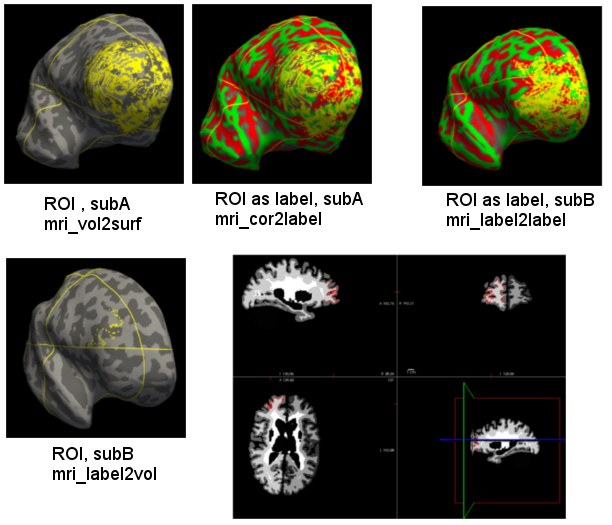
Doug-
Any further thoughts on this?
On 10/05/2016 04:47 PM, Joel Bruss wrote:
Doug-
I'm sooo close but something isn't right. I've run:
1)mri_vol2sur to sampel the ROI in subA surface space
mri_cor2label to convert it to a label
mri_label2lable to push it to subB
mri_label2vol to get back to a a volume
Steps 1-3 look great. The output of step 4, loaded on subB inflated surface looks cut off. I suspect this is because it's actually down in volume space now? If I load the ROI over the wmparc file for subB, it fits, it's just that I only have a strip of voxels on the WM surface only. I chose the wmparc.mgz file for subB for both "--temp" and ''--regheader." The result is the same if specify "--surf pial" or choose nothing, it's also the same if I chose orig.mgz or brainmask.mgz for the temp/header options. How do I get the ROI to "fill in" like it is in subA, originally?
I've attached a composite of the steps I've run. I really hate to keep pestering the listserv with this. My apologies.
-Joel
On 10/04/2016 03:03 PM, Douglas N Greve wrote:
mri_label2vol will transfer it into the volume, no need for surf2vol
On 10/04/2016 03:54 PM, Joel Bruss wrote:
Doug (Bruce and Trisanna)-
Thank you all for your help. I do, indeed, have a volume, then label, and see now how to load and view this properly. I've gotten through the "label2label" step and now have a label (from subA) in subB space. If I now want to back-project this label to subB's input MRI volume, would I run the following?
(Assuming I invert the steps I did to get the original binary mask to subA's surface, as a label)
mri_label2vol --label $SUBJECTS_DIR/subA/tmpdir/rh.roi_to_subB.label \ --subject subB \ --temp brainmask.mgz \ --regheader brainmask.mgz \ --o $SUBJECTS_DIR/subA/tmpdir/roi_to_subB.mgz \ --surf pial
mri_surf2vol --surfval $SUBJECTS_DIR/subA/tmpdir/roi_to_subB.mgz \ --volregidentity subB --template $SUBJECTS_DIR/subB/mri/orig.mgz --hemi rh \ --o $SUBJECTS_DIR/subA/tmpdir/roi_to_subB_orig.mgz
"label2vol" works but I'm now stuck on the "surf2vol" command. I end up with the following error:
ERROR: dimension inconsistency in source data Number of surface vertices = 128997 Number of value vertices = 16777216
-Joel
On 10/04/2016 02:45 PM, Douglas N Greve wrote:
The rh.roiS.mgh file is a surface overlay (ie, one value per vertex), not a surface itself (which would have a list of vertices, the XYZ for each, and neighborhood relations). When you loaded rh.roiS.mgh as a surface overlay, did you change the threshold to be 0.5? The default is 2, and if your ROI is binary (0,1), then no voxels would ever appear above threshold
On 10/03/2016 03:20 PM, Joel Bruss wrote:
Sorry, it sent before I finished. I'll try this again.
On 09/30/2016 02:00 PM, Douglas N Greve wrote:
First, bring up the ROI on the volume along with the surface in the volume. You can do this with FreeView. Make sure that the ROI intersects the surface.
Yes, this looks fine
Then run mri_vol2surf so sample the binary ROI volume onto the surface.
This is what I ran:
mri_vol2surf --src $SUBJECTS_DIR/subA/tmpdir/roi.mgz \ --out $SUBJECTS_DIR/subA/tmpdir/rh.roiS.mgh \
You can view the ROI on the surface by loading it as an overlay.
This is a volume or a surface now? Is it just a volume resampled to the
surface space? I can't get it to load in freeview as a surface (it just crashes), and it doesn't look like anything as an overlay.
Then run mri_cor2label using the surface-sampled ROI as input and specifying --surf (see the --help) to make this a surface-based label.
I next ran this: mri_cor2label --id 1 --c $SUBJECTS_DIR \ --i $SUBJECTS_DIR/subA/tmpdir/rh.roiS.mgh \ --l $SUBJECTS_DIR/subA/tmpdir/rh.roi.label \ --surf subA rh
You can also view this label in the surface in freeview.
At this point, it just kept loading and loading and loading and I'd finally have to kill the process. I never could visualize this output.
Finally,run mri_label2label using the --regmethod surface
At this point, I must just be feeding bad data into good commands: mri_label2vol --label $SUBJECTS_DIR/subA/tmpdir/rh.roi_to_subB.label \ --subject subB \ --temp brainmask.mgz \ --regheader brainmask.mgz \ --o $SUBJECTS_DIR/subA/tmpdir/roi_to_subB.mgz \ --surf pial
I don't know where things went wrong or how to view the output to diagnose.
Notice: This UI Health Care e-mail (including attachments) is covered by the Electronic Communications Privacy Act, 18 U.S.C. 2510-2521 and is intended only for the use of the individual or entity to which it is addressed, and may contain information that is privileged, confidential, and exempt from disclosure under applicable law. If you are not the intended recipient, any dissemination, distribution or copying of this communication is strictly prohibited. If you have received this communication in error, please notify the sender immediately and delete or destroy all copies of the original message and attachments thereto. Email sent to or from UI Health Care may be retained as required by law or regulation. Thank you. ________________________________
Freesurfer mailing list Freesurfer@nmr.mgh.harvard.edu https://mail.nmr.mgh.harvard.edu/mailman/listinfo/freesurfer
Notice: This UI Health Care e-mail (including attachments) is covered by the Electronic Communications Privacy Act, 18 U.S.C. 2510-2521 and is intended only for the use of the individual or entity to which it is addressed, and may contain information that is privileged, confidential, and exempt from disclosure under applicable law. If you are not the intended recipient, any dissemination, distribution or copying of this communication is strictly prohibited. If you have received this communication in error, please notify the sender immediately and delete or destroy all copies of the original message and attachments thereto. Email sent to or from UI Health Care may be retained as required by law or regulation. Thank you. ________________________________
Freesurfer mailing list Freesurfer@nmr.mgh.harvard.edu https://mail.nmr.mgh.harvard.edu/mailman/listinfo/freesurfer
Notice: This UI Health Care e-mail (including attachments) is covered by the Electronic Communications Privacy Act, 18 U.S.C. 2510-2521 and is intended only for the use of the individual or entity to which it is addressed, and may contain information that is privileged, confidential, and exempt from disclosure under applicable law. If you are not the intended recipient, any dissemination, distribution or copying of this communication is strictly prohibited. If you have received this communication in error, please notify the sender immediately and delete or destroy all copies of the original message and attachments thereto. Email sent to or from UI Health Care may be retained as required by law or regulation. Thank you. ________________________________
Freesurfer mailing list Freesurfer@nmr.mgh.harvard.edu https://mail.nmr.mgh.harvard.edu/mailman/listinfo/freesurfer
The information in this e-mail is intended only for the person to whom it is addressed. If you believe this e-mail was sent to you in error and the e-mail contains patient information, please contact the Partners Compliance HelpLine at http://www.partners.org/complianceline . If the e-mail was sent to you in error but does not contain patient information, please contact the sender and properly dispose of the e-mail.
________________________________ Notice: This UI Health Care e-mail (including attachments) is covered by the Electronic Communications Privacy Act, 18 U.S.C. 2510-2521 and is intended only for the use of the individual or entity to which it is addressed, and may contain information that is privileged, confidential, and exempt from disclosure under applicable law. If you are not the intended recipient, any dissemination, distribution or copying of this communication is strictly prohibited. If you have received this communication in error, please notify the sender immediately and delete or destroy all copies of the original message and attachments thereto. Email sent to or from UI Health Care may be retained as required by law or regulation. Thank you. ________________________________
So the result of step 4 looks ok on the volume but not on the surface? How are you putting the volume-based ROI back on the surface? This is tricky because now it will be a 1mm thin label. You should use mri_vol2surf for this, maybe selecting the --projfrac-max to make sure that it grabs the value.
On 10/5/16 5:47 PM, Joel Bruss wrote:
Doug-
I'm sooo close but something isn't right. I've run:
1)mri_vol2sur to sampel the ROI in subA surface space
mri_cor2label to convert it to a label
mri_label2lable to push it to subB
mri_label2vol to get back to a a volume
Steps 1-3 look great. The output of step 4, loaded on subB inflated surface looks cut off. I suspect this is because it's actually down in volume space now? If I load the ROI over the wmparc file for subB, it fits, it's just that I only have a strip of voxels on the WM surface only. I chose the wmparc.mgz file for subB for both "--temp" and ''--regheader." The result is the same if specify "--surf pial" or choose nothing, it's also the same if I chose orig.mgz or brainmask.mgz for the temp/header options. How do I get the ROI to "fill in" like it is in subA, originally?
I've attached a composite of the steps I've run. I really hate to keep pestering the listserv with this. My apologies.
-Joel
On 10/04/2016 03:03 PM, Douglas N Greve wrote:
mri_label2vol will transfer it into the volume, no need for surf2vol
On 10/04/2016 03:54 PM, Joel Bruss wrote:
Doug (Bruce and Trisanna)-
Thank you all for your help. I do, indeed, have a volume, then label, and see now how to load and view this properly. I've gotten through the "label2label" step and now have a label (from subA) in subB space. If I now want to back-project this label to subB's input MRI volume, would I run the following?
(Assuming I invert the steps I did to get the original binary mask to subA's surface, as a label)
mri_label2vol --label $SUBJECTS_DIR/subA/tmpdir/rh.roi_to_subB.label \ --subject subB \ --temp brainmask.mgz \ --regheader brainmask.mgz \ --o $SUBJECTS_DIR/subA/tmpdir/roi_to_subB.mgz \ --surf pial
mri_surf2vol --surfval $SUBJECTS_DIR/subA/tmpdir/roi_to_subB.mgz \ --volregidentity subB --template $SUBJECTS_DIR/subB/mri/orig.mgz --hemi rh \ --o $SUBJECTS_DIR/subA/tmpdir/roi_to_subB_orig.mgz
"label2vol" works but I'm now stuck on the "surf2vol" command. I end up with the following error:
ERROR: dimension inconsistency in source data Number of surface vertices = 128997 Number of value vertices = 16777216
-Joel
On 10/04/2016 02:45 PM, Douglas N Greve wrote:
The rh.roiS.mgh file is a surface overlay (ie, one value per vertex), not a surface itself (which would have a list of vertices, the XYZ for each, and neighborhood relations). When you loaded rh.roiS.mgh as a surface overlay, did you change the threshold to be 0.5? The default is 2, and if your ROI is binary (0,1), then no voxels would ever appear above threshold
On 10/03/2016 03:20 PM, Joel Bruss wrote:
Sorry, it sent before I finished. I'll try this again.
On 09/30/2016 02:00 PM, Douglas N Greve wrote:
First, bring up the ROI on the volume along with the surface in the volume. You can do this with FreeView. Make sure that the ROI intersects the surface.
Yes, this looks fine
Then run mri_vol2surf so sample the binary ROI volume onto the surface.
This is what I ran:
mri_vol2surf --src $SUBJECTS_DIR/subA/tmpdir/roi.mgz \ --out $SUBJECTS_DIR/subA/tmpdir/rh.roiS.mgh \
You can view the ROI on the surface by loading it as an overlay.
This is a volume or a surface now? Is it just a volume resampled to the
surface space? I can't get it to load in freeview as a surface (it just crashes), and it doesn't look like anything as an overlay.
Then run mri_cor2label using the surface-sampled ROI as input and specifying --surf (see the --help) to make this a surface-based label.
I next ran this: mri_cor2label --id 1 --c $SUBJECTS_DIR \ --i $SUBJECTS_DIR/subA/tmpdir/rh.roiS.mgh \ --l $SUBJECTS_DIR/subA/tmpdir/rh.roi.label \ --surf subA rh
You can also view this label in the surface in freeview.
At this point, it just kept loading and loading and loading and I'd finally have to kill the process. I never could visualize this output.
Finally,run mri_label2label using the --regmethod surface
At this point, I must just be feeding bad data into good commands: mri_label2vol --label $SUBJECTS_DIR/subA/tmpdir/rh.roi_to_subB.label \ --subject subB \ --temp brainmask.mgz \ --regheader brainmask.mgz \ --o $SUBJECTS_DIR/subA/tmpdir/roi_to_subB.mgz \ --surf pial
I don't know where things went wrong or how to view the output to diagnose.
Notice: This UI Health Care e-mail (including attachments) is covered by the Electronic Communications Privacy Act, 18 U.S.C. 2510-2521 and is intended only for the use of the individual or entity to which it is addressed, and may contain information that is privileged, confidential, and exempt from disclosure under applicable law. If you are not the intended recipient, any dissemination, distribution or copying of this communication is strictly prohibited. If you have received this communication in error, please notify the sender immediately and delete or destroy all copies of the original message and attachments thereto. Email sent to or from UI Health Care may be retained as required by law or regulation. Thank you. ________________________________
Freesurfer mailing list Freesurfer@nmr.mgh.harvard.edu https://mail.nmr.mgh.harvard.edu/mailman/listinfo/freesurfer
Notice: This UI Health Care e-mail (including attachments) is covered by the Electronic Communications Privacy Act, 18 U.S.C. 2510-2521 and is intended only for the use of the individual or entity to which it is addressed, and may contain information that is privileged, confidential, and exempt from disclosure under applicable law. If you are not the intended recipient, any dissemination, distribution or copying of this communication is strictly prohibited. If you have received this communication in error, please notify the sender immediately and delete or destroy all copies of the original message and attachments thereto. Email sent to or from UI Health Care may be retained as required by law or regulation. Thank you. ________________________________
Freesurfer mailing list Freesurfer@nmr.mgh.harvard.edu https://mail.nmr.mgh.harvard.edu/mailman/listinfo/freesurfer
Notice: This UI Health Care e-mail (including attachments) is covered by the Electronic Communications Privacy Act, 18 U.S.C. 2510-2521 and is intended only for the use of the individual or entity to which it is addressed, and may contain information that is privileged, confidential, and exempt from disclosure under applicable law. If you are not the intended recipient, any dissemination, distribution or copying of this communication is strictly prohibited. If you have received this communication in error, please notify the sender immediately and delete or destroy all copies of the original message and attachments thereto. Email sent to or from UI Health Care may be retained as required by law or regulation. Thank you. ________________________________
Freesurfer mailing list Freesurfer@nmr.mgh.harvard.edu https://mail.nmr.mgh.harvard.edu/mailman/listinfo/freesurfer
freesurfer@nmr.mgh.harvard.edu
-
 Bruce Fischl
 -
 Douglas Greve
 -
Douglas N Greve
-
 Joel Bruss
 -
 Trisanna Sprung-Much