
Hi Bruce and Sita:
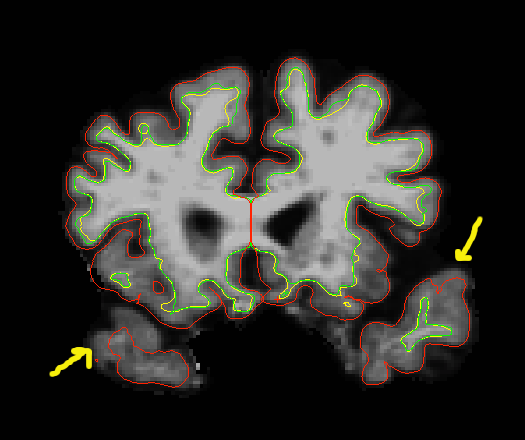
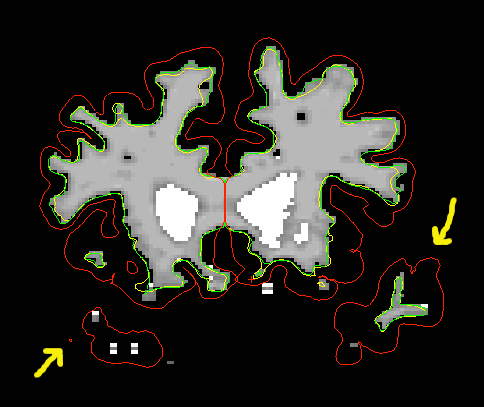
Thanks for your relay. And Here are the images.
Jing
From: Jing Ming [mj_coming@hotmail.com]
Sent: Thursday, September 15, 2011 7:31 PM
To: Vy Dinh
Subject: FW: [Freesurfer] manual editting problem
CC: mj_coming@hotmail.com; jennifer_g_goldman@rush.edu; vydinh@rush.edu; freesurfer@nmr.mgh.harvard.edu
From: fischl@nmr.mgh.harvard.edu
Subject: Re: [Freesurfer] manual editting problem
Date: Thu, 15 Sep 2011 20:07:41 -0400
To: sita@nmr.mgh.harvard.edu
Can you send an image?
On Sep 15, 2011, at 6:38 PM, Sita Kakunoori sita@nmr.mgh.harvard.edu wrote:
How does the wm.mgz look. Correcting the white surface will correct the
pial surface as well.
Sita.
On Thu, 15 Sep 2011, Jing Ming wrote:
Hi Surfers:
We have been coming
across several gray matter regions that are not included within the pial
surface (red line) when it should be (e.g., very anterior parts of the
temporal lobe). From my understanding of similar posts on the forum, it
seems that there isn't a way to add this region to the pial surface so
that the missing brain matter is included. We have tried using the clone
tool to fill in this region, as per the tutorial and have experimented
with this tool using the tutorial data. I followed the steps in the
tutorial but could not observe any changes when the middle button was
selected. Does anyone have any ideas on how to troubleshoot this
issue? Can someone please explain to me why this is not possible? Also
how does Freesurfer determine what regions to include within the pial
surface? If there is a way that has been developed recently, please
enlighten me.
-Jing
Freesurfer mailing list
Freesurfer@nmr.mgh.harvard.edu
https://mail.nmr.mgh.harvard.edu/mailman/listinfo/freesurfer
The information in this e-mail is intended only for the person to whom it is
addressed. If you believe this e-mail was sent to you in error and the e-mail
contains patient information, please contact the Partners Compliance HelpLine at
http://www.partners.org/complianceline . If the e-mail was sent to you in error
but does not contain patient information, please contact the sender and properly
dispose of the e-mail.

Hi Jing,
You have some white matter voxels missing in the wm.mgz for the rh. You can add some wm to that volume using the edit tool or you can also try control points. If you are adding wm, make sure you select the aux volume on the brush info toolbox. Fill in wm voxels for all slices. Control points would help with extending the pial surf on the lh.
-Khoa
Hi Bruce and Sita:
Thanks for your relay. And Here are the images.
Jing
From: Jing Ming [mj_coming@hotmail.com]
Sent: Thursday, September 15, 2011 7:31 PM
To: Vy Dinh
Subject: FW: [Freesurfer] manual editting problem
CC: mj_coming@hotmail.com; jennifer_g_goldman@rush.edu; vydinh@rush.edu; freesurfer@nmr.mgh.harvard.edu
From: fischl@nmr.mgh.harvard.edu
Subject: Re: [Freesurfer] manual editting problem
Date: Thu, 15 Sep 2011 20:07:41 -0400
To: sita@nmr.mgh.harvard.edu
Can you send an image?
On Sep 15, 2011, at 6:38 PM, Sita Kakunoori sita@nmr.mgh.harvard.edu wrote:
How does the wm.mgz look. Correcting the white surface will correct
the
pial surface as well.
Sita.
On Thu, 15 Sep 2011, Jing Ming wrote:
Hi Surfers:
We have been coming
across several gray matter regions that are not included within the
pial
surface (red line) when it should be (e.g., very anterior parts of
the
temporal lobe). From my understanding of similar posts on the forum,
it
seems that there isn't a way to add this region to the pial surface
so
that the missing brain matter is included. We have tried using the
clone
tool to fill in this region, as per the tutorial and have
experimented
with this tool using the tutorial data. I followed the steps in the
tutorial but could not observe any changes when the middle button was
selected. Does anyone have any ideas on how to troubleshoot this
issue? Can someone please explain to me why this is not possible?
Also
how does Freesurfer determine what regions to include within the pial
surface? If there is a way that has been developed recently, please
enlighten me.
-Jing
Freesurfer mailing list
Freesurfer@nmr.mgh.harvard.edu
https://mail.nmr.mgh.harvard.edu/mailman/listinfo/freesurfer
The information in this e-mail is intended only for the person to whom it is
addressed. If you believe this e-mail was sent to you in error and the e-mail
contains patient information, please contact the Partners Compliance HelpLine at
http://www.partners.org/complianceline . If the e-mail was sent to you in error
but does not contain patient information, please contact the sender and properly
dispose of the e-mail.
_______________________________________________Freesurfer mailing list Freesurfer@nmr.mgh.harvard.edu https://mail.nmr.mgh.harvard.edu/mailman/listinfo/freesurfer

p.s. you also have topological defects there, which you can tell as the orig (green) surface doesn't follow the voxels in the wm.mgz. The interventions Khoa suggests should help this as well. If you are missing that much wm you probably want to use control points.
cheers Bruce
On Thu, 15 Sep 2011, Khoa@nmr.mgh.harvard.edu wrote:
Hi Jing,
You have some white matter voxels missing in the wm.mgz for the rh. You can add some wm to that volume using the edit tool or you can also try control points. If you are adding wm, make sure you select the aux volume on the brush info toolbox. Fill in wm voxels for all slices. Control points would help with extending the pial surf on the lh.
-Khoa
Hi Bruce and Sita:
Thanks for your relay. And Here are the images.
Jing
From: Jing Ming [mj_coming@hotmail.com]
Sent: Thursday, September 15, 2011 7:31 PM
To: Vy Dinh
Subject: FW: [Freesurfer] manual editting problem
CC: mj_coming@hotmail.com; jennifer_g_goldman@rush.edu; vydinh@rush.edu; freesurfer@nmr.mgh.harvard.edu
From: fischl@nmr.mgh.harvard.edu
Subject: Re: [Freesurfer] manual editting problem
Date: Thu, 15 Sep 2011 20:07:41 -0400
To: sita@nmr.mgh.harvard.edu
Can you send an image?
On Sep 15, 2011, at 6:38 PM, Sita Kakunoori sita@nmr.mgh.harvard.edu wrote:
How does the wm.mgz look. Correcting the white surface will correct
the
pial surface as well.
Sita.
On Thu, 15 Sep 2011, Jing Ming wrote:
Hi Surfers:
We have been coming
across several gray matter regions that are not included within the
pial
surface (red line) when it should be (e.g., very anterior parts of
the
temporal lobe). From my understanding of similar posts on the forum,
it
seems that there isn't a way to add this region to the pial surface
so
that the missing brain matter is included. We have tried using the
clone
tool to fill in this region, as per the tutorial and have
experimented
with this tool using the tutorial data. I followed the steps in the
tutorial but could not observe any changes when the middle button was
selected. Does anyone have any ideas on how to troubleshoot this
issue? Can someone please explain to me why this is not possible?
Also
how does Freesurfer determine what regions to include within the pial
surface? If there is a way that has been developed recently, please
enlighten me.
-Jing
Freesurfer mailing list
Freesurfer@nmr.mgh.harvard.edu
https://mail.nmr.mgh.harvard.edu/mailman/listinfo/freesurfer
The information in this e-mail is intended only for the person to whom it is
addressed. If you believe this e-mail was sent to you in error and the e-mail
contains patient information, please contact the Partners Compliance HelpLine at
http://www.partners.org/complianceline . If the e-mail was sent to you in error
but does not contain patient information, please contact the sender and properly
dispose of the e-mail.
_______________________________________________Freesurfer mailing list Freesurfer@nmr.mgh.harvard.edu https://mail.nmr.mgh.harvard.edu/mailman/listinfo/freesurfer
Thanks Bruce.
Jing
Date: Fri, 16 Sep 2011 08:38:55 -0400 From: fischl@nmr.mgh.harvard.edu To: Khoa@nmr.mgh.harvard.edu CC: sita@nmr.mgh.harvard.edu; jennifer_g_goldman@rush.edu; vy_dinh@rush.edu; freesurfer@nmr.mgh.harvard.edu; mj_coming@hotmail.com Subject: Re: [Freesurfer] manual editting problem
p.s. you also have topological defects there, which you can tell as the orig (green) surface doesn't follow the voxels in the wm.mgz. The interventions Khoa suggests should help this as well. If you are missing that much wm you probably want to use control points.
cheers Bruce
On Thu, 15 Sep 2011, Khoa@nmr.mgh.harvard.edu wrote:
Hi Jing,
You have some white matter voxels missing in the wm.mgz for the rh. You can add some wm to that volume using the edit tool or you can also try control points. If you are adding wm, make sure you select the aux volume on the brush info toolbox. Fill in wm voxels for all slices. Control points would help with extending the pial surf on the lh.
-Khoa
Hi Bruce and Sita:
Thanks for your relay. And Here are the images.
Jing
From: Jing Ming [mj_coming@hotmail.com]
Sent: Thursday, September 15, 2011 7:31 PM
To: Vy Dinh
Subject: FW: [Freesurfer] manual editting problem
CC: mj_coming@hotmail.com; jennifer_g_goldman@rush.edu; vydinh@rush.edu; freesurfer@nmr.mgh.harvard.edu
From: fischl@nmr.mgh.harvard.edu
Subject: Re: [Freesurfer] manual editting problem
Date: Thu, 15 Sep 2011 20:07:41 -0400
To: sita@nmr.mgh.harvard.edu
Can you send an image?
On Sep 15, 2011, at 6:38 PM, Sita Kakunoori sita@nmr.mgh.harvard.edu wrote:
How does the wm.mgz look. Correcting the white surface will correct
the
pial surface as well.
Sita.
On Thu, 15 Sep 2011, Jing Ming wrote:
Hi Surfers:
We have been coming
across several gray matter regions that are not included within the
pial
surface (red line) when it should be (e.g., very anterior parts of
the
temporal lobe). From my understanding of similar posts on the forum,
it
seems that there isn't a way to add this region to the pial surface
so
that the missing brain matter is included. We have tried using the
clone
tool to fill in this region, as per the tutorial and have
experimented
with this tool using the tutorial data. I followed the steps in the
tutorial but could not observe any changes when the middle button was
selected. Does anyone have any ideas on how to troubleshoot this
issue? Can someone please explain to me why this is not possible?
Also
how does Freesurfer determine what regions to include within the pial
surface? If there is a way that has been developed recently, please
enlighten me.
-Jing
Freesurfer mailing list
Freesurfer@nmr.mgh.harvard.edu
https://mail.nmr.mgh.harvard.edu/mailman/listinfo/freesurfer
The information in this e-mail is intended only for the person to whom it is
addressed. If you believe this e-mail was sent to you in error and the e-mail
contains patient information, please contact the Partners Compliance HelpLine at
http://www.partners.org/complianceline . If the e-mail was sent to you in error
but does not contain patient information, please contact the sender and properly
dispose of the e-mail.
_______________________________________________Freesurfer mailing list Freesurfer@nmr.mgh.harvard.edu https://mail.nmr.mgh.harvard.edu/mailman/listinfo/freesurfer
Freesurfer mailing list Freesurfer@nmr.mgh.harvard.edu https://mail.nmr.mgh.harvard.edu/mailman/listinfo/freesurfer

Thank you Bruce and Khoa for the suggestions. We used control points to add wm regions and this corrected the pial surface as you mentioned. We also filled in the topological defects in the wm.mgz file (using add voxels tool) and ran autorecon2. However, we noticed that the new wm segment now has black voxels (~1 each) that were not present in the previous segment. Do you have any ideas about what may be the cause? How significant are these one voxel defects?
Also, is there a suggested order for running autorecon2? Based on the responses, it appears that we should run autorecon2 for white matter segment and control points simultaneously and later regenerate the pial surface.
Vy T.U. Dinh Research Assistant, Neurological Sciences Rush University Medical Center Phone: (312) 563-3853 Fax: (312) 563-4660 Email: Vy_dinh@rush.edu
________________________________________ From: Bruce Fischl [fischl@nmr.mgh.harvard.edu] Sent: Friday, September 16, 2011 7:38 AM To: Khoa@nmr.mgh.harvard.edu Cc: Jing Ming; sita@nmr.mgh.harvard.edu; Jennifer G Goldman; Vy Dinh; Freesurfer Subject: Re: [Freesurfer] manual editting problem
p.s. you also have topological defects there, which you can tell as the orig (green) surface doesn't follow the voxels in the wm.mgz. The interventions Khoa suggests should help this as well. If you are missing that much wm you probably want to use control points.
cheers Bruce
On Thu, 15 Sep 2011, Khoa@nmr.mgh.harvard.edu wrote:
Hi Jing,
You have some white matter voxels missing in the wm.mgz for the rh. You can add some wm to that volume using the edit tool or you can also try control points. If you are adding wm, make sure you select the aux volume on the brush info toolbox. Fill in wm voxels for all slices. Control points would help with extending the pial surf on the lh.
-Khoa
Hi Bruce and Sita:
Thanks for your relay. And Here are the images.
Jing
From: Jing Ming [mj_coming@hotmail.com]
Sent: Thursday, September 15, 2011 7:31 PM
To: Vy Dinh
Subject: FW: [Freesurfer] manual editting problem
CC: mj_coming@hotmail.com; jennifer_g_goldman@rush.edu; vydinh@rush.edu; freesurfer@nmr.mgh.harvard.edu
From: fischl@nmr.mgh.harvard.edu
Subject: Re: [Freesurfer] manual editting problem
Date: Thu, 15 Sep 2011 20:07:41 -0400
To: sita@nmr.mgh.harvard.edu
Can you send an image?
On Sep 15, 2011, at 6:38 PM, Sita Kakunoori sita@nmr.mgh.harvard.edu wrote:
How does the wm.mgz look. Correcting the white surface will correct
the
pial surface as well.
Sita.
On Thu, 15 Sep 2011, Jing Ming wrote:
Hi Surfers:
We have been coming
across several gray matter regions that are not included within the
pial
surface (red line) when it should be (e.g., very anterior parts of
the
temporal lobe). From my understanding of similar posts on the forum,
it
seems that there isn't a way to add this region to the pial surface
so
that the missing brain matter is included. We have tried using the
clone
tool to fill in this region, as per the tutorial and have
experimented
with this tool using the tutorial data. I followed the steps in the
tutorial but could not observe any changes when the middle button was
selected. Does anyone have any ideas on how to troubleshoot this
issue? Can someone please explain to me why this is not possible?
Also
how does Freesurfer determine what regions to include within the pial
surface? If there is a way that has been developed recently, please
enlighten me.
-Jing
Freesurfer mailing list
Freesurfer@nmr.mgh.harvard.edu
https://mail.nmr.mgh.harvard.edu/mailman/listinfo/freesurfer
The information in this e-mail is intended only for the person to whom it is
addressed. If you believe this e-mail was sent to you in error and the e-mail
contains patient information, please contact the Partners Compliance HelpLine at
http://www.partners.org/complianceline . If the e-mail was sent to you in error
but does not contain patient information, please contact the sender and properly
dispose of the e-mail.
_______________________________________________Freesurfer mailing list Freesurfer@nmr.mgh.harvard.edu https://mail.nmr.mgh.harvard.edu/mailman/listinfo/freesurfer
Hi,
Do you mind sending a snapshot so I see what the black voxels look like?
If you add control points and make wm edits and pial edits, running -autorecon2 -autorecon3 should take care of everything. If you're only making wm and pial edits, then run -autorecon2-wm -autorecon3. If only pial edits, then run -autorecon-pial. Here's a wiki page of all the recon steps. On there you can also find the OtherUsefulFlags page with different flags you can use when running your recons.
http://surfer.nmr.mgh.harvard.edu/fswiki/ReconAllDevTable
-Khoa
On Wed, 21 Sep 2011, Vy Dinh wrote:
Thank you Bruce and Khoa for the suggestions. We used control points to add wm regions and this corrected the pial surface as you mentioned. We also filled in the topological defects in the wm.mgz file (using add voxels tool) and ran autorecon2. However, we noticed that the new wm segment now has black voxels (~1 each) that were not present in the previous segment. Do you have any ideas about what may be the cause? How significant are these one voxel defects?
Also, is there a suggested order for running autorecon2? Based on the responses, it appears that we should run autorecon2 for white matter segment and control points simultaneously and later regenerate the pial surface.
Vy T.U. Dinh Research Assistant, Neurological Sciences Rush University Medical Center Phone: (312) 563-3853 Fax: (312) 563-4660 Email: Vy_dinh@rush.edu
From: Bruce Fischl [fischl@nmr.mgh.harvard.edu] Sent: Friday, September 16, 2011 7:38 AM To: Khoa@nmr.mgh.harvard.edu Cc: Jing Ming; sita@nmr.mgh.harvard.edu; Jennifer G Goldman; Vy Dinh; Freesurfer Subject: Re: [Freesurfer] manual editting problem
p.s. you also have topological defects there, which you can tell as the orig (green) surface doesn't follow the voxels in the wm.mgz. The interventions Khoa suggests should help this as well. If you are missing that much wm you probably want to use control points.
cheers Bruce
On Thu, 15 Sep 2011, Khoa@nmr.mgh.harvard.edu wrote:
Hi Jing,
You have some white matter voxels missing in the wm.mgz for the rh. You can add some wm to that volume using the edit tool or you can also try control points. If you are adding wm, make sure you select the aux volume on the brush info toolbox. Fill in wm voxels for all slices. Control points would help with extending the pial surf on the lh.
-Khoa
Hi Bruce and Sita:
Thanks for your relay. And Here are the images.
Jing
From: Jing Ming [mj_coming@hotmail.com]
Sent: Thursday, September 15, 2011 7:31 PM
To: Vy Dinh
Subject: FW: [Freesurfer] manual editting problem
CC: mj_coming@hotmail.com; jennifer_g_goldman@rush.edu; vydinh@rush.edu; freesurfer@nmr.mgh.harvard.edu
From: fischl@nmr.mgh.harvard.edu
Subject: Re: [Freesurfer] manual editting problem
Date: Thu, 15 Sep 2011 20:07:41 -0400
To: sita@nmr.mgh.harvard.edu
Can you send an image?
On Sep 15, 2011, at 6:38 PM, Sita Kakunoori sita@nmr.mgh.harvard.edu wrote:
How does the wm.mgz look. Correcting the white surface will correct
the
pial surface as well.
Sita.
On Thu, 15 Sep 2011, Jing Ming wrote:
Hi Surfers:
We have been coming
across several gray matter regions that are not included within the
pial
surface (red line) when it should be (e.g., very anterior parts of
the
temporal lobe). From my understanding of similar posts on the forum,
it
seems that there isn't a way to add this region to the pial surface
so
that the missing brain matter is included. We have tried using the
clone
tool to fill in this region, as per the tutorial and have
experimented
with this tool using the tutorial data. I followed the steps in the
tutorial but could not observe any changes when the middle button was
selected. Does anyone have any ideas on how to troubleshoot this
issue? Can someone please explain to me why this is not possible?
Also
how does Freesurfer determine what regions to include within the pial
surface? If there is a way that has been developed recently, please
enlighten me.
-Jing
Freesurfer mailing list
Freesurfer@nmr.mgh.harvard.edu
https://mail.nmr.mgh.harvard.edu/mailman/listinfo/freesurfer
The information in this e-mail is intended only for the person to whom it is
addressed. If you believe this e-mail was sent to you in error and the e-mail
contains patient information, please contact the Partners Compliance HelpLine at
http://www.partners.org/complianceline . If the e-mail was sent to you in error
but does not contain patient information, please contact the sender and properly
dispose of the e-mail.
_______________________________________________Freesurfer mailing list Freesurfer@nmr.mgh.harvard.edu https://mail.nmr.mgh.harvard.edu/mailman/listinfo/freesurfer
Hi Khoa,
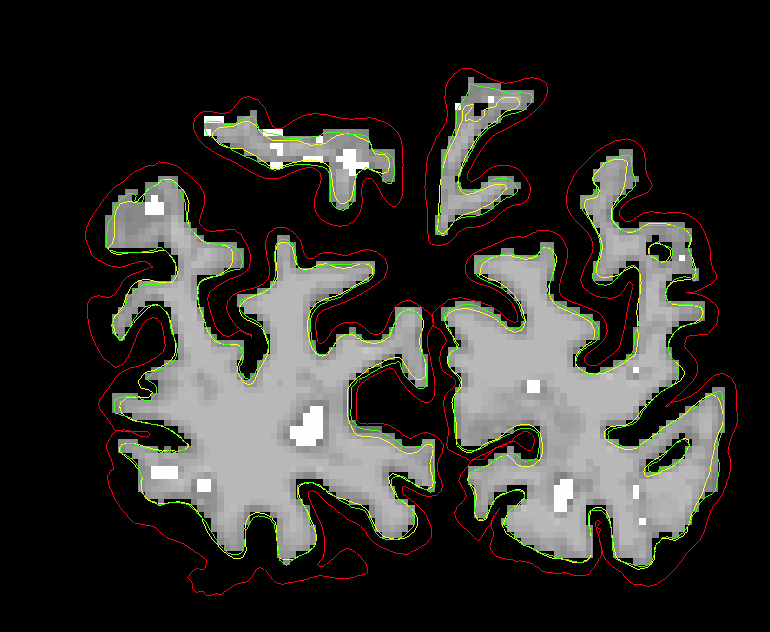
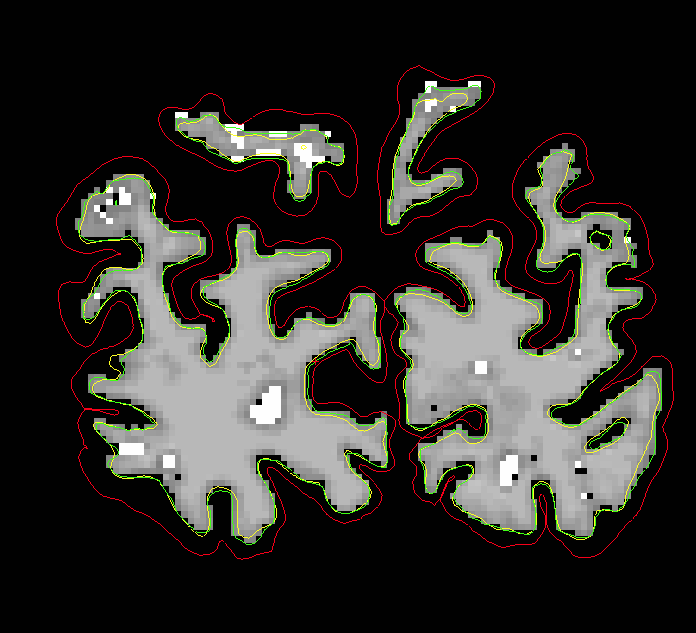
Thanks for the fast reply! I've attached the pictures of the wm.mgz before and after we ran autorecon2 and autorecon3. Initially, we made corrections to wm edits, added control points, and corrected pial surface.
We used the command:
recon-all -autorecon2-wm -autorecon2-pial -autorecon2-cp -autorecon3 -subjid anon
The control points over extended the pial surface in some regions, so we conclude that it's better to correct the pial surface after we had regenerated the surfaces for the control points.
Vy T.U. Dinh Research Assistant, Neurological Sciences Rush University Medical Center Phone: (312) 563-3853 Fax: (312) 563-4660 Email: Vy_dinh@rush.edu
________________________________________ From: Khoa Nguyen [khoa@nmr.mgh.harvard.edu] Sent: Wednesday, September 21, 2011 3:58 PM To: Vy Dinh Cc: Bruce Fischl; Jing Ming; sita@nmr.mgh.harvard.edu; Jennifer G Goldman; Freesurfer Subject: RE: [Freesurfer] manual editting problem
Hi,
Do you mind sending a snapshot so I see what the black voxels look like?
If you add control points and make wm edits and pial edits, running -autorecon2 -autorecon3 should take care of everything. If you're only making wm and pial edits, then run -autorecon2-wm -autorecon3. If only pial edits, then run -autorecon-pial. Here's a wiki page of all the recon steps. On there you can also find the OtherUsefulFlags page with different flags you can use when running your recons.
http://surfer.nmr.mgh.harvard.edu/fswiki/ReconAllDevTable
-Khoa
On Wed, 21 Sep 2011, Vy Dinh wrote:
Thank you Bruce and Khoa for the suggestions. We used control points to add wm regions and this corrected the pial surface as you mentioned. We also filled in the topological defects in the wm.mgz file (using add voxels tool) and ran autorecon2. However, we noticed that the new wm segment now has black voxels (~1 each) that were not present in the previous segment. Do you have any ideas about what may be the cause? How significant are these one voxel defects?
Also, is there a suggested order for running autorecon2? Based on the responses, it appears that we should run autorecon2 for white matter segment and control points simultaneously and later regenerate the pial surface.
Vy T.U. Dinh Research Assistant, Neurological Sciences Rush University Medical Center Phone: (312) 563-3853 Fax: (312) 563-4660 Email: Vy_dinh@rush.edu
From: Bruce Fischl [fischl@nmr.mgh.harvard.edu] Sent: Friday, September 16, 2011 7:38 AM To: Khoa@nmr.mgh.harvard.edu Cc: Jing Ming; sita@nmr.mgh.harvard.edu; Jennifer G Goldman; Vy Dinh; Freesurfer Subject: Re: [Freesurfer] manual editting problem
p.s. you also have topological defects there, which you can tell as the orig (green) surface doesn't follow the voxels in the wm.mgz. The interventions Khoa suggests should help this as well. If you are missing that much wm you probably want to use control points.
cheers Bruce
On Thu, 15 Sep 2011, Khoa@nmr.mgh.harvard.edu wrote:
Hi Jing,
You have some white matter voxels missing in the wm.mgz for the rh. You can add some wm to that volume using the edit tool or you can also try control points. If you are adding wm, make sure you select the aux volume on the brush info toolbox. Fill in wm voxels for all slices. Control points would help with extending the pial surf on the lh.
-Khoa
Hi Bruce and Sita:
Thanks for your relay. And Here are the images.
Jing
From: Jing Ming [mj_coming@hotmail.com]
Sent: Thursday, September 15, 2011 7:31 PM
To: Vy Dinh
Subject: FW: [Freesurfer] manual editting problem
CC: mj_coming@hotmail.com; jennifer_g_goldman@rush.edu; vydinh@rush.edu; freesurfer@nmr.mgh.harvard.edu
From: fischl@nmr.mgh.harvard.edu
Subject: Re: [Freesurfer] manual editting problem
Date: Thu, 15 Sep 2011 20:07:41 -0400
To: sita@nmr.mgh.harvard.edu
Can you send an image?
On Sep 15, 2011, at 6:38 PM, Sita Kakunoori sita@nmr.mgh.harvard.edu wrote:
How does the wm.mgz look. Correcting the white surface will correct
the
pial surface as well.
Sita.
On Thu, 15 Sep 2011, Jing Ming wrote:
Hi Surfers:
We have been coming
across several gray matter regions that are not included within the
pial
surface (red line) when it should be (e.g., very anterior parts of
the
temporal lobe). From my understanding of similar posts on the forum,
it
seems that there isn't a way to add this region to the pial surface
so
that the missing brain matter is included. We have tried using the
clone
tool to fill in this region, as per the tutorial and have
experimented
with this tool using the tutorial data. I followed the steps in the
tutorial but could not observe any changes when the middle button was
selected. Does anyone have any ideas on how to troubleshoot this
issue? Can someone please explain to me why this is not possible?
Also
how does Freesurfer determine what regions to include within the pial
surface? If there is a way that has been developed recently, please
enlighten me.
-Jing
Freesurfer mailing list
Freesurfer@nmr.mgh.harvard.edu
https://mail.nmr.mgh.harvard.edu/mailman/listinfo/freesurfer
The information in this e-mail is intended only for the person to whom it is
addressed. If you believe this e-mail was sent to you in error and the e-mail
contains patient information, please contact the Partners Compliance HelpLine at
http://www.partners.org/complianceline . If the e-mail was sent to you in error
but does not contain patient information, please contact the sender and properly
dispose of the e-mail.
_______________________________________________Freesurfer mailing list Freesurfer@nmr.mgh.harvard.edu https://mail.nmr.mgh.harvard.edu/mailman/listinfo/freesurfer
Hi Vy,
You shouldn't worry about those black voxels as long as the surfaces are ok. As for the command, you only need to run:
recon-all -autorecon2 -autorecon3 -subjid anon
-autorecon2-wm and -autorecon2-pial are both downstream from -autorecon2 so you do not need to include those flags. -autorecon2-cp is the same as -autorecon2 so you can start from the beginning of -autorecon2 whenever you use control points.
For pial surf editing, you only need to make these edits when the pial surf includes remaining dura/skull. If you want to extend pial surf to include more gm, you need to make edits to the wm.mgz or add control points. If your subject has improved after the control points and wm edits but is not perfect, you can try adding more control points or look for more topological defects to fix.
Hope that helps, -Khoa
On Wed, 21 Sep 2011, Vy Dinh wrote:
Hi Khoa,
Thanks for the fast reply! I've attached the pictures of the wm.mgz before and after we ran autorecon2 and autorecon3. Initially, we made corrections to wm edits, added control points, and corrected pial surface.
We used the command:
recon-all -autorecon2-wm -autorecon2-pial -autorecon2-cp -autorecon3 -subjid anon
The control points over extended the pial surface in some regions, so we conclude that it's better to correct the pial surface after we had regenerated the surfaces for the control points.
Vy T.U. Dinh Research Assistant, Neurological Sciences Rush University Medical Center Phone: (312) 563-3853 Fax: (312) 563-4660 Email: Vy_dinh@rush.edu
________________________________________ From: Khoa Nguyen [khoa@nmr.mgh.harvard.edu] Sent: Wednesday, September 21, 2011 3:58 PM To: Vy Dinh Cc: Bruce Fischl; Jing Ming; sita@nmr.mgh.harvard.edu; Jennifer G Goldman; Freesurfer Subject: RE: [Freesurfer] manual editting problem
Hi,
Do you mind sending a snapshot so I see what the black voxels look like?
If you add control points and make wm edits and pial edits, running -autorecon2 -autorecon3 should take care of everything. If you're only making wm and pial edits, then run -autorecon2-wm -autorecon3. If only pial edits, then run -autorecon-pial. Here's a wiki page of all the recon steps. On there you can also find the OtherUsefulFlags page with different flags you can use when running your recons.
http://surfer.nmr.mgh.harvard.edu/fswiki/ReconAllDevTable
-Khoa
On Wed, 21 Sep 2011, Vy Dinh wrote:
Thank you Bruce and Khoa for the suggestions. We used control points to add wm regions and this corrected the pial surface as you mentioned. We also filled in the topological defects in the wm.mgz file (using add voxels tool) and ran autorecon2. However, we noticed that the new wm segment now has black voxels (~1 each) that were not present in the previous segment. Do you have any ideas about what may be the cause? How significant are these one voxel defects?
Also, is there a suggested order for running autorecon2? Based on the responses, it appears that we should run autorecon2 for white matter segment and control points simultaneously and later regenerate the pial surface.
Vy T.U. Dinh Research Assistant, Neurological Sciences Rush University Medical Center Phone: (312) 563-3853 Fax: (312) 563-4660 Email: Vy_dinh@rush.edu
From: Bruce Fischl [fischl@nmr.mgh.harvard.edu] Sent: Friday, September 16, 2011 7:38 AM To: Khoa@nmr.mgh.harvard.edu Cc: Jing Ming; sita@nmr.mgh.harvard.edu; Jennifer G Goldman; Vy Dinh; Freesurfer Subject: Re: [Freesurfer] manual editting problem
p.s. you also have topological defects there, which you can tell as the orig (green) surface doesn't follow the voxels in the wm.mgz. The interventions Khoa suggests should help this as well. If you are missing that much wm you probably want to use control points.
cheers Bruce
On Thu, 15 Sep 2011, Khoa@nmr.mgh.harvard.edu wrote:
Hi Jing,
You have some white matter voxels missing in the wm.mgz for the rh. You can add some wm to that volume using the edit tool or you can also try control points. If you are adding wm, make sure you select the aux volume on the brush info toolbox. Fill in wm voxels for all slices. Control points would help with extending the pial surf on the lh.
-Khoa
Hi Bruce and Sita:
Thanks for your relay. And Here are the images.
Jing
From: Jing Ming [mj_coming@hotmail.com]
Sent: Thursday, September 15, 2011 7:31 PM
To: Vy Dinh
Subject: FW: [Freesurfer] manual editting problem
CC: mj_coming@hotmail.com; jennifer_g_goldman@rush.edu; vydinh@rush.edu; freesurfer@nmr.mgh.harvard.edu
From: fischl@nmr.mgh.harvard.edu
Subject: Re: [Freesurfer] manual editting problem
Date: Thu, 15 Sep 2011 20:07:41 -0400
To: sita@nmr.mgh.harvard.edu
Can you send an image?
On Sep 15, 2011, at 6:38 PM, Sita Kakunoori sita@nmr.mgh.harvard.edu wrote:
How does the wm.mgz look. Correcting the white surface will correct
the
pial surface as well.
Sita.
On Thu, 15 Sep 2011, Jing Ming wrote:
Hi Surfers:
We have been coming
across several gray matter regions that are not included within the
pial
surface (red line) when it should be (e.g., very anterior parts of
the
temporal lobe). From my understanding of similar posts on the forum,
it
seems that there isn't a way to add this region to the pial surface
so
that the missing brain matter is included. We have tried using the
clone
tool to fill in this region, as per the tutorial and have
experimented
with this tool using the tutorial data. I followed the steps in the
tutorial but could not observe any changes when the middle button was
selected. Does anyone have any ideas on how to troubleshoot this
issue? Can someone please explain to me why this is not possible?
Also
how does Freesurfer determine what regions to include within the pial
surface? If there is a way that has been developed recently, please
enlighten me.
-Jing
Freesurfer mailing list
Freesurfer@nmr.mgh.harvard.edu
https://mail.nmr.mgh.harvard.edu/mailman/listinfo/freesurfer
The information in this e-mail is intended only for the person to whom it is
addressed. If you believe this e-mail was sent to you in error and the e-mail
contains patient information, please contact the Partners Compliance HelpLine at
http://www.partners.org/complianceline . If the e-mail was sent to you in error
but does not contain patient information, please contact the sender and properly
dispose of the e-mail.
_______________________________________________Freesurfer mailing list Freesurfer@nmr.mgh.harvard.edu https://mail.nmr.mgh.harvard.edu/mailman/listinfo/freesurfer
Thanks much Khoa.
Jing
Date: Thu, 15 Sep 2011 22:00:39 -0400 From: Khoa@nmr.mgh.harvard.edu To: mj_coming@hotmail.com CC: sita@nmr.mgh.harvard.edu; jennifer_g_goldman@rush.edu; vy_dinh@rush.edu; freesurfer@nmr.mgh.harvard.edu Subject: Re: [Freesurfer] manual editting problem
Hi Jing,
You have some white matter voxels missing in the wm.mgz for the rh. You can add some wm to that volume using the edit tool or you can also try control points. If you are adding wm, make sure you select the aux volume on the brush info toolbox. Fill in wm voxels for all slices. Control points would help with extending the pial surf on the lh.
-Khoa
Hi Bruce and Sita:
Thanks for your relay. And Here are the images.
Jing
From: Jing Ming [mj_coming@hotmail.com]
Sent: Thursday, September 15, 2011 7:31 PM
To: Vy Dinh
Subject: FW: [Freesurfer] manual editting problem
CC: mj_coming@hotmail.com; jennifer_g_goldman@rush.edu; vydinh@rush.edu; freesurfer@nmr.mgh.harvard.edu
From: fischl@nmr.mgh.harvard.edu
Subject: Re: [Freesurfer] manual editting problem
Date: Thu, 15 Sep 2011 20:07:41 -0400
To: sita@nmr.mgh.harvard.edu
Can you send an image?
On Sep 15, 2011, at 6:38 PM, Sita Kakunoori sita@nmr.mgh.harvard.edu wrote:
How does the wm.mgz look. Correcting the white surface will correct
the
pial surface as well.
Sita.
On Thu, 15 Sep 2011, Jing Ming wrote:
Hi Surfers:
We have been coming
across several gray matter regions that are not included within the
pial
surface (red line) when it should be (e.g., very anterior parts of
the
temporal lobe). From my understanding of similar posts on the forum,
it
seems that there isn't a way to add this region to the pial surface
so
that the missing brain matter is included. We have tried using the
clone
tool to fill in this region, as per the tutorial and have
experimented
with this tool using the tutorial data. I followed the steps in the
tutorial but could not observe any changes when the middle button was
selected. Does anyone have any ideas on how to troubleshoot this
issue? Can someone please explain to me why this is not possible?
Also
how does Freesurfer determine what regions to include within the pial
surface? If there is a way that has been developed recently, please
enlighten me.
-Jing
Freesurfer mailing list
Freesurfer@nmr.mgh.harvard.edu
https://mail.nmr.mgh.harvard.edu/mailman/listinfo/freesurfer
The information in this e-mail is intended only for the person to whom it is
addressed. If you believe this e-mail was sent to you in error and the e-mail
contains patient information, please contact the Partners Compliance HelpLine at
http://www.partners.org/complianceline . If the e-mail was sent to you in error
but does not contain patient information, please contact the sender and properly
dispose of the e-mail.
_______________________________________________Freesurfer mailing list Freesurfer@nmr.mgh.harvard.edu https://mail.nmr.mgh.harvard.edu/mailman/listinfo/freesurfer
Freesurfer mailing list Freesurfer@nmr.mgh.harvard.edu https://mail.nmr.mgh.harvard.edu/mailman/listinfo/freesurfer
freesurfer@nmr.mgh.harvard.edu
-
 Bruce Fischl
 -
 Jing Ming
 -
 Khoa Nguyen
 -
Khoa@nmr.mgh.harvard.edu
-
 Vy Dinh