
Hello,
I ran recon-all -all on my subject. The process ended after several minutes with this message at the end: recon-all -s 350_FS exited with ERRORS at Fri Nov 30 17:57:59 PST 2012
I tried loading the pial and white surfaces for editing using this command: tkmedit 350_FS brainmask.mgz rh.white -aux-surface lh.white
but looks like these surfaces do not exist (since the recon-all exited prematurely). When I check the recon-all.log file I do not see any errors except a few MCSRCH errors. So I cannot understand what exactly went wrong in the recon-all. I've attached the recon-all log file. Can someone please tell me what the problem is and how I can fix it?
Many thanks, Negar p.s. I tried on more than one subject and I still face the same issue.
Negar Memarian, MASc, PhD NSERC Postdoctoral Fellow Department of Neurology David Geffen School of Medicine at UCLA

Look like it is running out of memory. How much ram do you have on that machine? Bruce
On Nov 30, 2012, at 9:29 PM, Negar Memarian negar.memarian@utoronto.ca wrote:
Hello,
I ran recon-all -all on my subject. The process ended after several minutes with this message at the end: recon-all -s 350_FS exited with ERRORS at Fri Nov 30 17:57:59 PST 2012
I tried loading the pial and white surfaces for editing using this command: tkmedit 350_FS brainmask.mgz rh.white -aux-surface lh.white
but looks like these surfaces do not exist (since the recon-all exited prematurely). When I check the recon-all.log file I do not see any errors except a few MCSRCH errors. So I cannot understand what exactly went wrong in the recon-all. I've attached the recon-all log file. Can someone please tell me what the problem is and how I can fix it?
Many thanks, Negar p.s. I tried on more than one subject and I still face the same issue.
Negar Memarian, MASc, PhD NSERC Postdoctoral Fellow Department of Neurology David Geffen School of Medicine at UCLA
<recon-all.log> _______________________________________________ Freesurfer mailing list Freesurfer@nmr.mgh.harvard.edu https://mail.nmr.mgh.harvard.edu/mailman/listinfo/freesurfer
Hi Bruce, I have 8 GB ram and have assigned 6GB of it to FreeSurfer. Shall I increase it to 8? Would that be enough or still too low?
Thank you, Negar
On Fri, Nov 30, 2012 at 7:31 PM, Bruce Fischl fischl@nmr.mgh.harvard.eduwrote:
Look like it is running out of memory. How much ram do you have on that machine? Bruce
On Nov 30, 2012, at 9:29 PM, Negar Memarian negar.memarian@utoronto.ca wrote:
Hello,
I ran recon-all -all on my subject. The process ended after several
minutes with this message at the end:
recon-all -s 350_FS exited with ERRORS at Fri Nov 30 17:57:59 PST 2012
I tried loading the pial and white surfaces for editing using this
command:
tkmedit 350_FS brainmask.mgz rh.white -aux-surface lh.white
but looks like these surfaces do not exist (since the recon-all exited
prematurely). When I check the recon-all.log file I do not see any errors except a few MCSRCH errors. So I cannot understand what exactly went wrong in the recon-all. I've attached the recon-all log file. Can someone please tell me what the problem is and how I can fix it?
Many thanks, Negar p.s. I tried on more than one subject and I still face the same issue.
Negar Memarian, MASc, PhD NSERC Postdoctoral Fellow Department of Neurology David Geffen School of Medicine at UCLA
<recon-all.log> _______________________________________________ Freesurfer mailing list Freesurfer@nmr.mgh.harvard.edu https://mail.nmr.mgh.harvard.edu/mailman/listinfo/freesurfer
The information in this e-mail is intended only for the person to whom it is addressed. If you believe this e-mail was sent to you in error and the e-mail contains patient information, please contact the Partners Compliance HelpLine at http://www.partners.org/complianceline . If the e-mail was sent to you in error but does not contain patient information, please contact the sender and properly dispose of the e-mail.
6G should be plenty. Do you have anything else running? Maybe another recon at the same time? On Fri, 30 Nov 2012, Negar Memarian wrote:
Hi Bruce, I have 8 GB ram and have assigned 6GB of it to FreeSurfer. Shall I increase it to 8? Would that be enough or still too low?
Thank you, Negar
On Fri, Nov 30, 2012 at 7:31 PM, Bruce Fischl fischl@nmr.mgh.harvard.edu wrote: Look like it is running out of memory. How much ram do you have on that machine? Bruce
  On Nov 30, 2012, at 9:29 PM, Negar Memarian
  <negar.memarian@utoronto.ca> wrote:

  > Hello,
  >
  > I ran recon-all -all on my subject. The process ended after
  several minutes with this message at the end:
  > recon-all -s 350_FS exited with ERRORS at Fri Nov 30 17:57:59
  PST 2012
  >
  > I tried loading the pial and white surfaces for editing using
  this command:
  > tkmedit 350_FS brainmask.mgz rh.white -aux-surface lh.white
  >
  > but looks like these surfaces do not exist (since the
  recon-all exited prematurely). When I check the recon-all.log
  file I do not see any errors except a few MCSRCH errors. So I
  cannot understand what exactly went wrong in the recon-all. I've
  attached the recon-all log file. Can someone please tell me what
  the problem is and how I can fix it?
  >
  > Many thanks,
  > Negar
  > p.s. I tried on more than one subject and I still face the
  same issue.
  >
  >
  > Negar Memarian, MASc, PhD
  > NSERC Postdoctoral Fellow
  > Department of Neurology
  > David Geffen School of Medicine at UCLA
  >
  > <recon-all.log>
  > _______________________________________________
  > Freesurfer mailing list
  > Freesurfer@nmr.mgh.harvard.edu
  > https://mail.nmr.mgh.harvard.edu/mailman/listinfo/freesurfer


  The information in this e-mail is intended only for the person
  to whom it is
  addressed. If you believe this e-mail was sent to you in error
  and the e-mail
  contains patient information, please contact the Partners
  Compliance HelpLine at
  http://www.partners.org/complianceline . If the e-mail was sent
  to you in error
  but does not contain patient information, please contact the
  sender and properly
  dispose of the e-mail.
No, I tried running just one recon and I only have one xterm window open. Anything I can do to fix this?
On Sat, Dec 1, 2012 at 11:11 AM, Bruce Fischl fischl@nmr.mgh.harvard.eduwrote:
6G should be plenty. Do you have anything else running? Maybe another recon at the same time? On Fri, 30 Nov 2012, Negar Memarian wrote:
Hi Bruce,
I have 8 GB ram and have assigned 6GB of it to FreeSurfer. Shall I increase it to 8? Would that be enough or still too low?
Thank you, Negar
On Fri, Nov 30, 2012 at 7:31 PM, Bruce Fischl <fischl@nmr.mgh.harvard.edu
wrote: Look like it is running out of memory. How much ram do you have on that machine? Bruce
  On Nov 30, 2012, at 9:29 PM, Negar Memarian
  <negar.memarian@utoronto.ca> wrote:

  > Hello,
  >
  > I ran recon-all -all on my subject. The process ended after
  several minutes with this message at the end:
  > recon-all -s 350_FS exited with ERRORS at Fri Nov 30 17:57:59
  PST 2012
  >
  > I tried loading the pial and white surfaces for editing using
  this command:
  > tkmedit 350_FS brainmask.mgz rh.white -aux-surface lh.white
  >
  > but looks like these surfaces do not exist (since the
  recon-all exited prematurely). When I check the recon-all.log
  file I do not see any errors except a few MCSRCH errors. So I
  cannot understand what exactly went wrong in the recon-all. I've
  attached the recon-all log file. Can someone please tell me what
  the problem is and how I can fix it?
  >
  > Many thanks,
  > Negar
  > p.s. I tried on more than one subject and I still face the
  same issue.
  >
  >
  > Negar Memarian, MASc, PhD
  > NSERC Postdoctoral Fellow
  > Department of Neurology
  > David Geffen School of Medicine at UCLA
  >
  > <recon-all.log>
  > ______________________________**_________________
  > Freesurfer mailing list
  > Freesurfer@nmr.mgh.harvard.edu
  > https://mail.nmr.mgh.harvard.**edu/mailman/listinfo/**freesurfer<https://mail.nmr.mgh.harvard.edu/mailman/listinfo/freesurfer>


  The information in this e-mail is intended only for the person
  to whom it is
  addressed. If you believe this e-mail was sent to you in error
  and the e-mail
  contains patient information, please contact the Partners
  Compliance HelpLine at
  http://www.partners.org/**complianceline<http://www.partners.org/complianceline>. If the e-mail was sent
  to you in error
  but does not contain patient information, please contact the
  sender and properly
  dispose of the e-mail.
can you check to see how much you actually have free? You are definitely running out of memory, so something else is using it. What is your hardware/software environment?
On Sat, 1 Dec 2012, Negar Memarian wrote:
No, I tried running just one recon and I only have one xterm window open. Anything I can do to fix this?
On Sat, Dec 1, 2012 at 11:11 AM, Bruce Fischl fischl@nmr.mgh.harvard.edu wrote: 6G should be plenty. Do you have anything else running? Maybe another recon at the same time? On Fri, 30 Nov 2012, Negar Memarian wrote:
        Hi Bruce,
        I have 8 GB ram and have assigned 6GB of it to
        FreeSurfer. Shall I increase
        it to 8? Would that be enough or still too low?

        Thank you,
        Negar


        On Fri, Nov 30, 2012 at 7:31 PM, Bruce Fischl
        <fischl@nmr.mgh.harvard.edu>
        wrote:
              Look like it is running out of memory. How
        much ram do you have
              on that machine?
              Bruce


              On Nov 30, 2012, at 9:29 PM, Negar Memarian
              <negar.memarian@utoronto.ca> wrote:

              > Hello,
              >
              > I ran recon-all -all on my subject. The
        process ended after
              several minutes with this message at the end:
              > recon-all -s 350_FS exited with ERRORS at
        Fri Nov 30 17:57:59
              PST 2012
              >
              > I tried loading the pial and white surfaces
        for editing using
              this command:
              > tkmedit 350_FS brainmask.mgz rh.white
        -aux-surface lh.white
              >
              > but looks like these surfaces do not exist
        (since the
              recon-all exited prematurely). When I check
        the recon-all.log
              file I do not see any errors except a few
        MCSRCH errors. So I
              cannot understand what exactly went wrong in
        the recon-all. I've
              attached the recon-all log file. Can someone
        please tell me what
              the problem is and how I can fix it?
              >
              > Many thanks,
              > Negar
              > p.s. I tried on more than one subject and I
        still face the
              same issue.
              >
              >
              > Negar Memarian, MASc, PhD
              > NSERC Postdoctoral Fellow
              > Department of Neurology
              > David Geffen School of Medicine at UCLA
              >
              > <recon-all.log>
              >
        _______________________________________________
              > Freesurfer mailing list
              > Freesurfer@nmr.mgh.harvard.edu
              >
        https://mail.nmr.mgh.harvard.edu/mailman/listinfo/freesurfer


              The information in this e-mail is intended
        only for the person
              to whom it is
              addressed. If you believe this e-mail was sent
        to you in error
              and the e-mail
              contains patient information, please contact
        the Partners
              Compliance HelpLine at
              http://www.partners.org/complianceline . If
        the e-mail was sent
              to you in error
              but does not contain patient information,
        please contact the
              sender and properly
              dispose of the e-mail.
Thank you for your reply, Bruce. I'm running FreeSurfer using a VMWare virtual machine on Windows 7. I've set the settings of the VM to use 2 CPUs and 6GB ram. Here is the specifications of my computer hardware: OS: Windows 7 professional Processor: Intel Core i7-3770 CPU @ 3.40 GHz RAM: 8 GB System type: 64 bit
Please let me know if you need any other info. Many thanks for your help. -Negar
On Sat, Dec 1, 2012 at 11:52 AM, Bruce Fischl fischl@nmr.mgh.harvard.eduwrote:
can you check to see how much you actually have free? You are definitely running out of memory, so something else is using it. What is your hardware/software environment?
On Sat, 1 Dec 2012, Negar Memarian wrote:
No, I tried running just one recon and I only have one xterm window open.
Anything I can do to fix this?
On Sat, Dec 1, 2012 at 11:11 AM, Bruce Fischl <fischl@nmr.mgh.harvard.edu
wrote: 6G should be plenty. Do you have anything else running? Maybe another recon at the same time? On Fri, 30 Nov 2012, Negar Memarian wrote:
        Hi Bruce,
        I have 8 GB ram and have assigned 6GB of it to
        FreeSurfer. Shall I increase
        it to 8? Would that be enough or still too low?

        Thank you,
        Negar


        On Fri, Nov 30, 2012 at 7:31 PM, Bruce Fischl
        <fischl@nmr.mgh.harvard.edu>
        wrote:
              Look like it is running out of memory. How
        much ram do you have
              on that machine?
              Bruce


              On Nov 30, 2012, at 9:29 PM, Negar Memarian
              <negar.memarian@utoronto.ca> wrote:

              > Hello,
              >
              > I ran recon-all -all on my subject. The
        process ended after
              several minutes with this message at the end:
              > recon-all -s 350_FS exited with ERRORS at
        Fri Nov 30 17:57:59
              PST 2012
              >
              > I tried loading the pial and white surfaces
        for editing using
              this command:
              > tkmedit 350_FS brainmask.mgz rh.white
        -aux-surface lh.white
              >
              > but looks like these surfaces do not exist
        (since the
              recon-all exited prematurely). When I check
        the recon-all.log
              file I do not see any errors except a few
        MCSRCH errors. So I
              cannot understand what exactly went wrong in
        the recon-all. I've
              attached the recon-all log file. Can someone
        please tell me what
              the problem is and how I can fix it?
              >
              > Many thanks,
              > Negar
              > p.s. I tried on more than one subject and I
        still face the
              same issue.
              >
              >
              > Negar Memarian, MASc, PhD
              > NSERC Postdoctoral Fellow
              > Department of Neurology
              > David Geffen School of Medicine at UCLA
              >
              > <recon-all.log>
              >
        ______________________________**_________________
              > Freesurfer mailing list
              > Freesurfer@nmr.mgh.harvard.edu
              >
        https://mail.nmr.mgh.harvard.**edu/mailman/listinfo/**
freesurfer https://mail.nmr.mgh.harvard.edu/mailman/listinfo/freesurfer
              The information in this e-mail is intended
        only for the person
              to whom it is
              addressed. If you believe this e-mail was sent
        to you in error
              and the e-mail
              contains patient information, please contact
        the Partners
              Compliance HelpLine at
              http://www.partners.org/**complianceline<http://www.partners.org/complianceline>. If
        the e-mail was sent
              to you in error
              but does not contain patient information,
        please contact the
              sender and properly
              dispose of the e-mail.
Hi Negar
perhaps Nick or PPJ can comment on how much a virtual box needs? In any case, try increasing the ram and see what happens as the error message is pretty clear. Also, if you can run "top" or something similar (/usr/bin/free) to see how memory is actually available on the system that would help
cheers Bruce
On Sat, 1 Dec 2012, Negar Memarian wrote:
Thank you for your reply, Bruce. I'm running FreeSurfer using a VMWare virtual machine on Windows 7. I've set the settings of the VM to use 2 CPUs and 6GB ram. Here is the specifications of my computer hardware: OS: Windows 7 professional Processor: Intel Core i7-3770 CPU @ 3.40 GHz RAM: 8 GB System type: 64 bit
Please let me know if you need any other info. Many thanks for your help. -Negar
On Sat, Dec 1, 2012 at 11:52 AM, Bruce Fischl fischl@nmr.mgh.harvard.edu wrote: can you check to see how much you actually have free? You are definitely running out of memory, so something else is using it. What is your hardware/software environment?
  On Sat, 1 Dec 2012, Negar Memarian wrote:

        No, I tried running just one recon and I only have
        one xterm window open.
        Anything I can do to fix this?


        On Sat, Dec 1, 2012 at 11:11 AM, Bruce Fischl
        <fischl@nmr.mgh.harvard.edu>
        wrote:
              6G should be plenty. Do you have anything else
        running? Maybe
              another recon at the same time?
              On Fri, 30 Nov 2012, Negar Memarian wrote:

                    Hi Bruce,
                    I have 8 GB ram and have assigned 6GB of
        it to
                    FreeSurfer. Shall I increase
                    it to 8? Would that be enough or still
        too low?

                    Thank you,
                    Negar


                    On Fri, Nov 30, 2012 at 7:31 PM, Bruce
        Fischl
                    <fischl@nmr.mgh.harvard.edu>
                    wrote:
                          Look like it is running out of
        memory. How
                    much ram do you have
                          on that machine?
                          Bruce


                          On Nov 30, 2012, at 9:29 PM, Negar
        Memarian
                          <negar.memarian@utoronto.ca>
        wrote:

                          > Hello,
                          >
                          > I ran recon-all -all on my
        subject. The
                    process ended after
                          several minutes with this message
        at the end:
                          > recon-all -s 350_FS exited with
        ERRORS at
                    Fri Nov 30 17:57:59
                          PST 2012
                          >
                          > I tried loading the pial and
        white surfaces
                    for editing using
                          this command:
                          > tkmedit 350_FS brainmask.mgz
        rh.white
                    -aux-surface lh.white
                          >
                          > but looks like these surfaces do
        not exist
                    (since the
                          recon-all exited prematurely).
        When I check
                    the recon-all.log
                          file I do not see any errors
        except a few
                    MCSRCH errors. So I
                          cannot understand what exactly
        went wrong in
                    the recon-all. I've
                          attached the recon-all log file.
        Can someone
                    please tell me what
                          the problem is and how I can fix
        it?
                          >
                          > Many thanks,
                          > Negar
                          > p.s. I tried on more than one
        subject and I
                    still face the
                          same issue.
                          >
                          >
                          > Negar Memarian, MASc, PhD
                          > NSERC Postdoctoral Fellow
                          > Department of Neurology
                          > David Geffen School of Medicine
        at UCLA
                          >
                          > <recon-all.log>
                          >

        _______________________________________________
                          > Freesurfer mailing list
                          > Freesurfer@nmr.mgh.harvard.edu
                          >

        https://mail.nmr.mgh.harvard.edu/mailman/listinfo/freesurfer


                          The information in this e-mail is
        intended
                    only for the person
                          to whom it is
                          addressed. If you believe this
        e-mail was sent
                    to you in error
                          and the e-mail
                          contains patient information,
        please contact
                    the Partners
                          Compliance HelpLine at

        http://www.partners.org/complianceline . If
                    the e-mail was sent
                          to you in error
                          but does not contain patient
        information,
                    please contact the
                          sender and properly
                          dispose of the e-mail.
Hello,
In the VM setting, I increased the RAM to 8 GB (my computers' maximum) and increased number of working CPUs to 4. Unfortunately the crash still happens in the "EM Registration" stage with a similar error, i.e., gcaAllocMax: node dims 64 64 64 gcaAllocMax: prior dims 128 128 128 gcaAllocMax: max_labels 0 Cannot allocate memory Linux VMprivate 2.6.18-274.18.1.el5 #1 SMP Thu Feb 9 12:45:44 EST 2012 x86_64 x86_64 x86_64 GNU/Linux recon-all -s testimport exited with ERRORS at Mon Dec 3 16:38:39 PST 2012
I have attached screenshots of the result of "top" command, "/usr/bin/free" command, and the VM's system monitor graphs. I have also attached the recon-all.log file.
Would you kindly bring this question to the attention of Nick and PPJ? I really need to get this to work.
Best regards, Negar
On Mon, Dec 3, 2012 at 5:42 AM, Bruce Fischl fischl@nmr.mgh.harvard.eduwrote:
Hi Negar
perhaps Nick or PPJ can comment on how much a virtual box needs? In any case, try increasing the ram and see what happens as the error message is pretty clear. Also, if you can run "top" or something similar (/usr/bin/free) to see how memory is actually available on the system that would help
cheers Bruce
On Sat, 1 Dec 2012, Negar Memarian wrote:
Thank you for your reply, Bruce. I'm running FreeSurfer using a VMWare
virtual machine on Windows 7. I've set the settings of the VM to use 2 CPUs and 6GB ram. Here is the specifications of my computer hardware: OS: Windows 7 professional Processor: Intel Core i7-3770 CPU @ 3.40 GHz RAM: 8 GB System type: 64 bit
Please let me know if you need any other info. Many thanks for your help. -Negar
On Sat, Dec 1, 2012 at 11:52 AM, Bruce Fischl <fischl@nmr.mgh.harvard.edu
wrote: can you check to see how much you actually have free? You are definitely running out of memory, so something else is using it. What is your hardware/software environment?
  On Sat, 1 Dec 2012, Negar Memarian wrote:

        No, I tried running just one recon and I only have
        one xterm window open.
        Anything I can do to fix this?


        On Sat, Dec 1, 2012 at 11:11 AM, Bruce Fischl
        <fischl@nmr.mgh.harvard.edu>
        wrote:
              6G should be plenty. Do you have anything else
        running? Maybe
              another recon at the same time?
              On Fri, 30 Nov 2012, Negar Memarian wrote:

                    Hi Bruce,
                    I have 8 GB ram and have assigned 6GB of
        it to
                    FreeSurfer. Shall I increase
                    it to 8? Would that be enough or still
        too low?

                    Thank you,
                    Negar


                    On Fri, Nov 30, 2012 at 7:31 PM, Bruce
        Fischl
                    <fischl@nmr.mgh.harvard.edu>
                    wrote:
                          Look like it is running out of
        memory. How
                    much ram do you have
                          on that machine?
                          Bruce


                          On Nov 30, 2012, at 9:29 PM, Negar
        Memarian
                          <negar.memarian@utoronto.ca>
        wrote:

                          > Hello,
                          >
                          > I ran recon-all -all on my
        subject. The
                    process ended after
                          several minutes with this message
        at the end:
                          > recon-all -s 350_FS exited with
        ERRORS at
                    Fri Nov 30 17:57:59
                          PST 2012
                          >
                          > I tried loading the pial and
        white surfaces
                    for editing using
                          this command:
                          > tkmedit 350_FS brainmask.mgz
        rh.white
                    -aux-surface lh.white
                          >
                          > but looks like these surfaces do
        not exist
                    (since the
                          recon-all exited prematurely).
        When I check
                    the recon-all.log
                          file I do not see any errors
        except a few
                    MCSRCH errors. So I
                          cannot understand what exactly
        went wrong in
                    the recon-all. I've
                          attached the recon-all log file.
        Can someone
                    please tell me what
                          the problem is and how I can fix
        it?
                          >
                          > Many thanks,
                          > Negar
                          > p.s. I tried on more than one
        subject and I
                    still face the
                          same issue.
                          >
                          >
                          > Negar Memarian, MASc, PhD
                          > NSERC Postdoctoral Fellow
                          > Department of Neurology
                          > David Geffen School of Medicine
        at UCLA
                          >
                          > <recon-all.log>
                          >

        ______________________________**_________________
                          > Freesurfer mailing list
                          > Freesurfer@nmr.mgh.harvard.edu
                          >

        https://mail.nmr.mgh.harvard.**edu/mailman/listinfo/**
freesurfer https://mail.nmr.mgh.harvard.edu/mailman/listinfo/freesurfer
                          The information in this e-mail is
        intended
                    only for the person
                          to whom it is
                          addressed. If you believe this
        e-mail was sent
                    to you in error
                          and the e-mail
                          contains patient information,
        please contact
                    the Partners
                          Compliance HelpLine at

        http://www.partners.org/**complianceline<http://www.partners.org/complianceline>. If
                    the e-mail was sent
                          to you in error
                          but does not contain patient
        information,
                    please contact the
                          sender and properly
                          dispose of the e-mail.
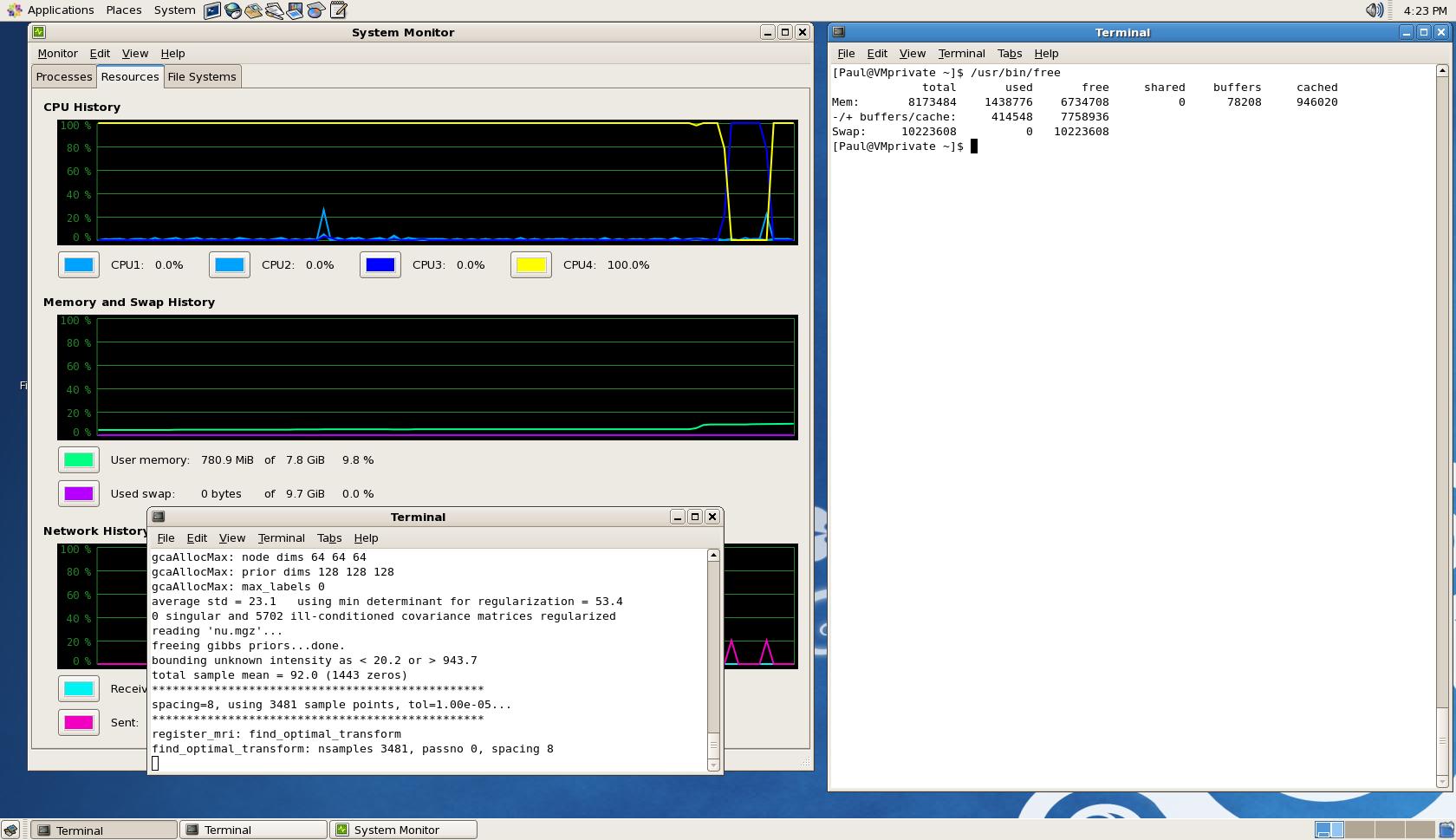
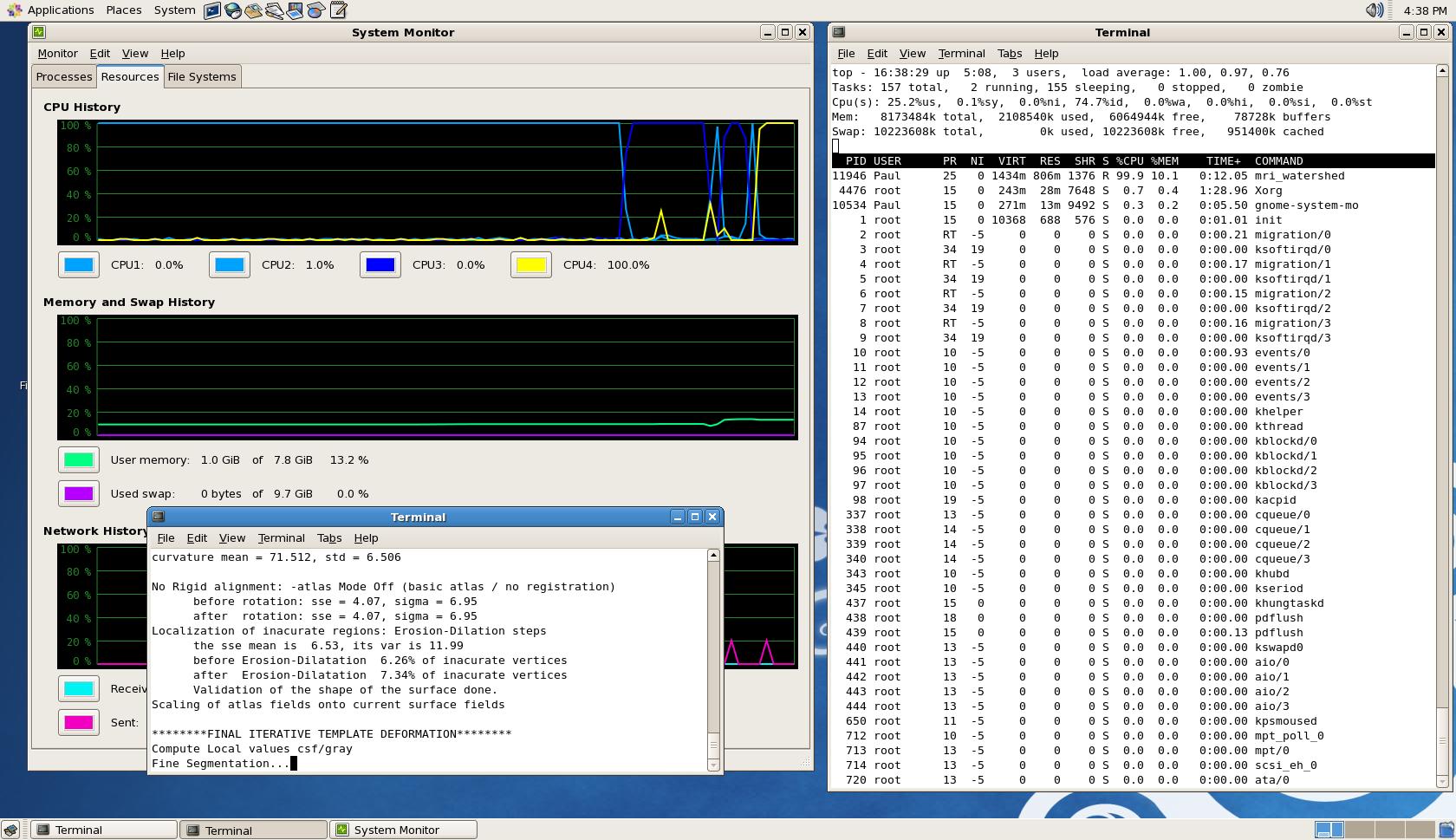
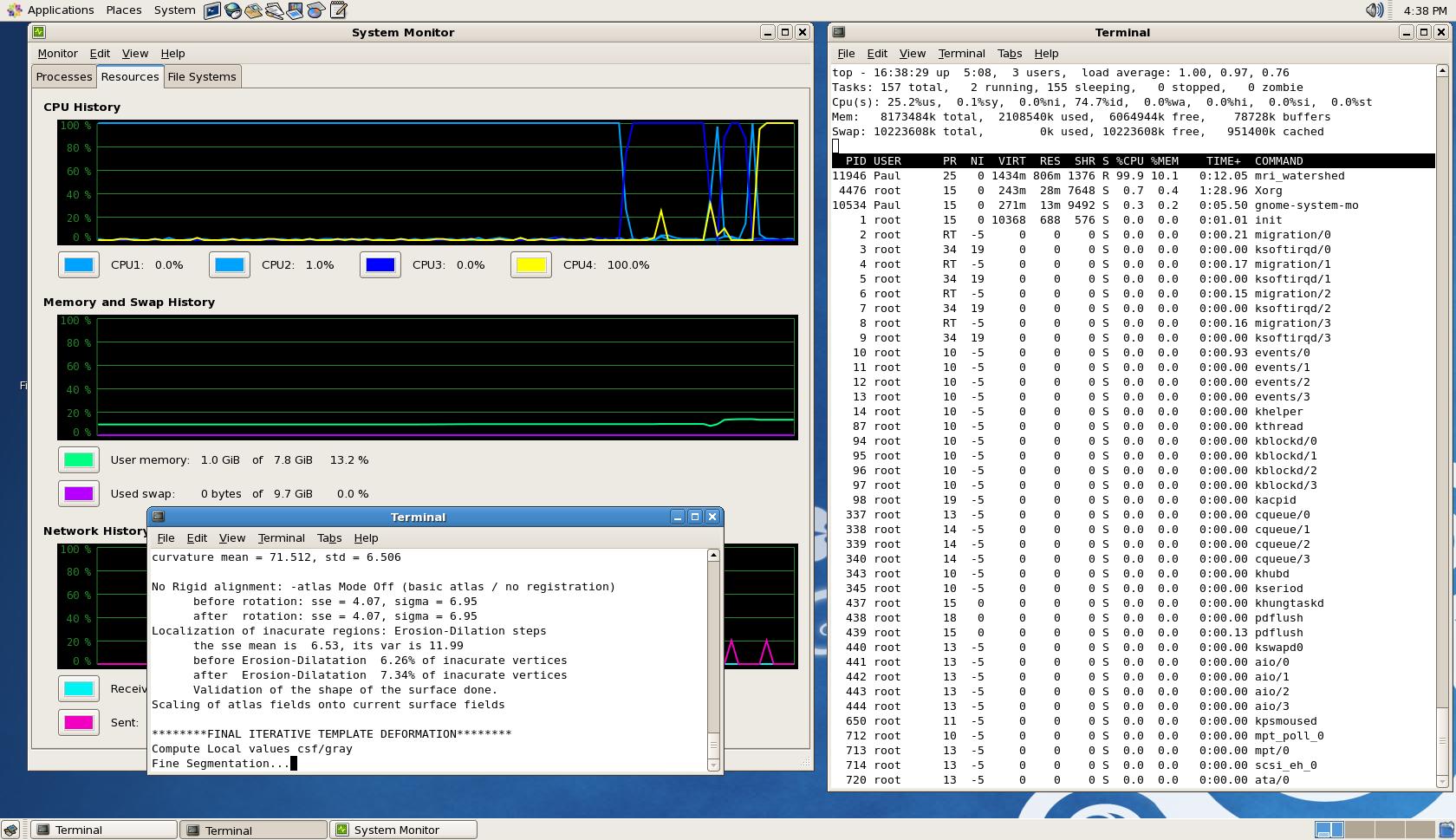
Hello, In the VM setting, I increased the RAM to 8 GB (my computers' maximum) and increased number of working CPUs to 4. Unfortunately the crash still happens in the "EM Registration" stage with a similar error, i.e., gcaAllocMax: node dims 64 64 64 gcaAllocMax: prior dims 128 128 128 gcaAllocMax: max_labels 0 Cannot allocate memory Linux VMprivate 2.6.18-274.18.1.el5 #1 SMP Thu Feb 9 12:45:44 EST 2012 x86_64 x86_64 x86_64 GNU/Linux recon-all -s testimport exited with ERRORS at Mon Dec 3 16:38:39 PST 2012 I have attached a screenshots of the result of "top" command, as well as the VM's system monitor graphs during the recon-all process before it crashed. I have also attached the recon-all.log file. Would you kindly bring this question to the attention of Nick and PPJ? I really need to get this to work.
Best regards, Negar
On Mon, Dec 3, 2012 at 5:42 AM, Bruce Fischl fischl@nmr.mgh.harvard.eduwrote:
Hi Negar
perhaps Nick or PPJ can comment on how much a virtual box needs? In any case, try increasing the ram and see what happens as the error message is pretty clear. Also, if you can run "top" or something similar (/usr/bin/free) to see how memory is actually available on the system that would help
cheers Bruce
On Sat, 1 Dec 2012, Negar Memarian wrote:
Thank you for your reply, Bruce. I'm running FreeSurfer using a VMWare
virtual machine on Windows 7. I've set the settings of the VM to use 2 CPUs and 6GB ram. Here is the specifications of my computer hardware: OS: Windows 7 professional Processor: Intel Core i7-3770 CPU @ 3.40 GHz RAM: 8 GB System type: 64 bit
Please let me know if you need any other info. Many thanks for your help. -Negar
On Sat, Dec 1, 2012 at 11:52 AM, Bruce Fischl <fischl@nmr.mgh.harvard.edu
wrote: can you check to see how much you actually have free? You are definitely running out of memory, so something else is using it. What is your hardware/software environment?
  On Sat, 1 Dec 2012, Negar Memarian wrote:

        No, I tried running just one recon and I only have
        one xterm window open.
        Anything I can do to fix this?


        On Sat, Dec 1, 2012 at 11:11 AM, Bruce Fischl
        <fischl@nmr.mgh.harvard.edu>
        wrote:
              6G should be plenty. Do you have anything else
        running? Maybe
              another recon at the same time?
              On Fri, 30 Nov 2012, Negar Memarian wrote:

                    Hi Bruce,
                    I have 8 GB ram and have assigned 6GB of
        it to
                    FreeSurfer. Shall I increase
                    it to 8? Would that be enough or still
        too low?

                    Thank you,
                    Negar


                    On Fri, Nov 30, 2012 at 7:31 PM, Bruce
        Fischl
                    <fischl@nmr.mgh.harvard.edu>
                    wrote:
                          Look like it is running out of
        memory. How
                    much ram do you have
                          on that machine?
                          Bruce


                          On Nov 30, 2012, at 9:29 PM, Negar
        Memarian
                          <negar.memarian@utoronto.ca>
        wrote:

                          > Hello,
                          >
                          > I ran recon-all -all on my
        subject. The
                    process ended after
                          several minutes with this message
        at the end:
                          > recon-all -s 350_FS exited with
        ERRORS at
                    Fri Nov 30 17:57:59
                          PST 2012
                          >
                          > I tried loading the pial and
        white surfaces
                    for editing using
                          this command:
                          > tkmedit 350_FS brainmask.mgz
        rh.white
                    -aux-surface lh.white
                          >
                          > but looks like these surfaces do
        not exist
                    (since the
                          recon-all exited prematurely).
        When I check
                    the recon-all.log
                          file I do not see any errors
        except a few
                    MCSRCH errors. So I
                          cannot understand what exactly
        went wrong in
                    the recon-all. I've
                          attached the recon-all log file.
        Can someone
                    please tell me what
                          the problem is and how I can fix
        it?
                          >
                          > Many thanks,
                          > Negar
                          > p.s. I tried on more than one
        subject and I
                    still face the
                          same issue.
                          >
                          >
                          > Negar Memarian, MASc, PhD
                          > NSERC Postdoctoral Fellow
                          > Department of Neurology
                          > David Geffen School of Medicine
        at UCLA
                          >
                          > <recon-all.log>
                          >

        ______________________________**_________________
                          > Freesurfer mailing list
                          > Freesurfer@nmr.mgh.harvard.edu
                          >

        https://mail.nmr.mgh.harvard.**edu/mailman/listinfo/**
freesurfer https://mail.nmr.mgh.harvard.edu/mailman/listinfo/freesurfer
                          The information in this e-mail is
        intended
                    only for the person
                          to whom it is
                          addressed. If you believe this
        e-mail was sent
                    to you in error
                          and the e-mail
                          contains patient information,
        please contact
                    the Partners
                          Compliance HelpLine at

        http://www.partners.org/**complianceline<http://www.partners.org/complianceline>. If
                    the e-mail was sent
                          to you in error
                          but does not contain patient
        information,
                    please contact the
                          sender and properly
                          dispose of the e-mail.

Hi Negar,
from your log file: build-stamp.txt: freesurfer-Linux-centos4-stable-pub-v5.1.0 Linux FreeSurfer 2.6.28-11-generic #42-Ubuntu SMP Fri Apr 17 01:57:59 UTC 2009 i686 GNU/Linux
So it looks like you are running the 32bit free surfer version which will be limited to >= 4GB addressable memory, most likely only 2GB. You might want to try again using: ftp://surfer.nmr.mgh.harvard.edu/pub/dist/freesurfer/5.1.0/freesurfer-Linux-centos4_x86_64-stable-pub-v5.1.0.tar.gz That way your memory increase might actually have a chance affecting the free surfer processes :)
Best Sebastian
On Dec 4, 2012, at 09:41 , Negar Memarian wrote:
Hello, In the VM setting, I increased the RAM to 8 GB (my computers' maximum) and increased number of working CPUs to 4. Unfortunately the crash still happens in the "EM Registration" stage with a similar error, i.e., gcaAllocMax: node dims 64 64 64 gcaAllocMax: prior dims 128 128 128 gcaAllocMax: max_labels 0 Cannot allocate memory Linux VMprivate 2.6.18-274.18.1.el5 #1 SMP Thu Feb 9 12:45:44 EST 2012 x86_64 x86_64 x86_64 GNU/Linux recon-all -s testimport exited with ERRORS at Mon Dec 3 16:38:39 PST 2012 I have attached a screenshots of the result of "top" command, as well as the VM's system monitor graphs during the recon-all process before it crashed. I have also attached the recon-all.log file. Would you kindly bring this question to the attention of Nick and PPJ? I really need to get this to work.
Best regards, Negar
On Mon, Dec 3, 2012 at 5:42 AM, Bruce Fischl fischl@nmr.mgh.harvard.edu wrote: Hi Negar
perhaps Nick or PPJ can comment on how much a virtual box needs? In any case, try increasing the ram and see what happens as the error message is pretty clear. Also, if you can run "top" or something similar (/usr/bin/free) to see how memory is actually available on the system that would help
cheers Bruce
On Sat, 1 Dec 2012, Negar Memarian wrote:
Thank you for your reply, Bruce. I'm running FreeSurfer using a VMWare virtual machine on Windows 7. I've set the settings of the VM to use 2 CPUs and 6GB ram. Here is the specifications of my computer hardware: OS: Windows 7 professional Processor: Intel Core i7-3770 CPU @ 3.40 GHz RAM: 8 GB System type: 64 bit
Please let me know if you need any other info. Many thanks for your help. -Negar
On Sat, Dec 1, 2012 at 11:52 AM, Bruce Fischl fischl@nmr.mgh.harvard.edu wrote: can you check to see how much you actually have free? You are definitely running out of memory, so something else is using it. What is your hardware/software environment?
  On Sat, 1 Dec 2012, Negar Memarian wrote:

        No, I tried running just one recon and I only have
        one xterm window open.
        Anything I can do to fix this?


        On Sat, Dec 1, 2012 at 11:11 AM, Bruce Fischl
        <fischl@nmr.mgh.harvard.edu>
        wrote:
              6G should be plenty. Do you have anything else
        running? Maybe
              another recon at the same time?
              On Fri, 30 Nov 2012, Negar Memarian wrote:

                    Hi Bruce,
                    I have 8 GB ram and have assigned 6GB of
        it to
                    FreeSurfer. Shall I increase
                    it to 8? Would that be enough or still
        too low?

                    Thank you,
                    Negar


                    On Fri, Nov 30, 2012 at 7:31 PM, Bruce
        Fischl
                    <fischl@nmr.mgh.harvard.edu>
                    wrote:
                          Look like it is running out of
        memory. How
                    much ram do you have
                          on that machine?
                          Bruce


                          On Nov 30, 2012, at 9:29 PM, Negar
        Memarian
                          <negar.memarian@utoronto.ca>
        wrote:

                          > Hello,
                          >
                          > I ran recon-all -all on my
        subject. The
                    process ended after
                          several minutes with this message
        at the end:
                          > recon-all -s 350_FS exited with
        ERRORS at
                    Fri Nov 30 17:57:59
                          PST 2012
                          >
                          > I tried loading the pial and
        white surfaces
                    for editing using
                          this command:
                          > tkmedit 350_FS brainmask.mgz
        rh.white
                    -aux-surface lh.white
                          >
                          > but looks like these surfaces do
        not exist
                    (since the
                          recon-all exited prematurely).
        When I check
                    the recon-all.log
                          file I do not see any errors
        except a few
                    MCSRCH errors. So I
                          cannot understand what exactly
        went wrong in
                    the recon-all. I've
                          attached the recon-all log file.
        Can someone
                    please tell me what
                          the problem is and how I can fix
        it?
                          >
                          > Many thanks,
                          > Negar
                          > p.s. I tried on more than one
        subject and I
                    still face the
                          same issue.
                          >
                          >
                          > Negar Memarian, MASc, PhD
                          > NSERC Postdoctoral Fellow
                          > Department of Neurology
                          > David Geffen School of Medicine
        at UCLA
                          >
                          > <recon-all.log>
                          >

        _______________________________________________
                          > Freesurfer mailing list
                          > Freesurfer@nmr.mgh.harvard.edu
                          >

        https://mail.nmr.mgh.harvard.edu/mailman/listinfo/freesurfer


                          The information in this e-mail is
        intended
                    only for the person
                          to whom it is
                          addressed. If you believe this
        e-mail was sent
                    to you in error
                          and the e-mail
                          contains patient information,
        please contact
                    the Partners
                          Compliance HelpLine at

        http://www.partners.org/complianceline . If
                    the e-mail was sent
                          to you in error
                          but does not contain patient
        information,
                    please contact the
                          sender and properly
                          dispose of the e-mail.
<screeshot-top.JPG><recon-all.log>_______________________________________________ Freesurfer mailing list Freesurfer@nmr.mgh.harvard.edu https://mail.nmr.mgh.harvard.edu/mailman/listinfo/freesurfer
The information in this e-mail is intended only for the person to whom it is addressed. If you believe this e-mail was sent to you in error and the e-mail contains patient information, please contact the Partners Compliance HelpLine at http://www.partners.org/complianceline . If the e-mail was sent to you in error but does not contain patient information, please contact the sender and properly dispose of the e-mail.
Hi Sebastian,
Thank you for your reply. The virtual machine that I'm using was built by a friend who also uses FreeSurfer and I copied it entirely onto my computer (a huge folder, 263GB). Freesufer works just fine for him. So whatever version of Freesurfer he's using, it's working for him and I'm basically replicating exactly what he has on his computer and yet not able to complete the recon-all -all process. Any ideas?
Thank you, Negar
On Tue, Dec 4, 2012 at 10:57 AM, Sebastian Moeller < sebastian.moeller1@rwth-aachen.de> wrote:
Hi Negar,
from your log file: build-stamp.txt: freesurfer-Linux-centos4-stable-pub-v5.1.0 Linux FreeSurfer 2.6.28-11-generic #42-Ubuntu SMP Fri Apr 17 01:57:59 UTC 2009 i686 GNU/Linux
So it looks like you are running the 32bit free surfer version which will be limited to >= 4GB addressable memory, most likely only 2GB. You might want to try again using:
ftp://surfer.nmr.mgh.harvard.edu/pub/dist/freesurfer/5.1.0/freesurfer-Linux-centos4_x86_64-stable-pub-v5.1.0.tar.gz That way your memory increase might actually have a chance affecting the free surfer processes :)
Best Sebastian
On Dec 4, 2012, at 09:41 , Negar Memarian wrote:
Hello, In the VM setting, I increased the RAM to 8 GB (my computers' maximum)
and increased number of working CPUs to 4. Unfortunately the crash still happens in the "EM Registration" stage with a similar error, i.e.,
gcaAllocMax: node dims 64 64 64 gcaAllocMax: prior dims 128 128 128 gcaAllocMax: max_labels 0 Cannot allocate memory Linux VMprivate 2.6.18-274.18.1.el5 #1 SMP Thu Feb 9 12:45:44 EST 2012
x86_64 x86_64 x86_64 GNU/Linux
recon-all -s testimport exited with ERRORS at Mon Dec 3 16:38:39 PST 2012 I have attached a screenshots of the result of "top" command, as well
as the VM's system monitor graphs during the recon-all process before it crashed. I have also attached the recon-all.log file.
Would you kindly bring this question to the attention of Nick and PPJ? I
really need to get this to work.
Best regards, Negar
On Mon, Dec 3, 2012 at 5:42 AM, Bruce Fischl fischl@nmr.mgh.harvard.edu
wrote:
Hi Negar
perhaps Nick or PPJ can comment on how much a virtual box needs? In any
case, try increasing the ram and see what happens as the error message is pretty clear. Also, if you can run "top" or something similar (/usr/bin/free) to see how memory is actually available on the system that would help
cheers Bruce
On Sat, 1 Dec 2012, Negar Memarian wrote:
Thank you for your reply, Bruce. I'm running FreeSurfer using a VMWare virtual machine on Windows 7. I've set the settings of the VM to use 2
CPUs
and 6GB ram. Here is the specifications of my computer hardware: OS: Windows 7 professional Processor: Intel Core i7-3770 CPU @ 3.40 GHz RAM: 8 GB System type: 64 bit
Please let me know if you need any other info. Many thanks for your help. -Negar
On Sat, Dec 1, 2012 at 11:52 AM, Bruce Fischl <
fischl@nmr.mgh.harvard.edu>
wrote: can you check to see how much you actually have free? You are definitely running out of memory, so something else is using it. What is your hardware/software environment?
  On Sat, 1 Dec 2012, Negar Memarian wrote:

        No, I tried running just one recon and I only have
        one xterm window open.
        Anything I can do to fix this?


        On Sat, Dec 1, 2012 at 11:11 AM, Bruce Fischl
        <fischl@nmr.mgh.harvard.edu>
        wrote:
              6G should be plenty. Do you have anything else
        running? Maybe
              another recon at the same time?
              On Fri, 30 Nov 2012, Negar Memarian wrote:

                    Hi Bruce,
                    I have 8 GB ram and have assigned 6GB of
        it to
                    FreeSurfer. Shall I increase
                    it to 8? Would that be enough or still
        too low?

                    Thank you,
                    Negar


                    On Fri, Nov 30, 2012 at 7:31 PM, Bruce
        Fischl
                    <fischl@nmr.mgh.harvard.edu>
                    wrote:
                          Look like it is running out of
        memory. How
                    much ram do you have
                          on that machine?
                          Bruce


                          On Nov 30, 2012, at 9:29 PM, Negar
        Memarian
                          <negar.memarian@utoronto.ca>
        wrote:

                          > Hello,
                          >
                          > I ran recon-all -all on my
        subject. The
                    process ended after
                          several minutes with this message
        at the end:
                          > recon-all -s 350_FS exited with
        ERRORS at
                    Fri Nov 30 17:57:59
                          PST 2012
                          >
                          > I tried loading the pial and
        white surfaces
                    for editing using
                          this command:
                          > tkmedit 350_FS brainmask.mgz
        rh.white
                    -aux-surface lh.white
                          >
                          > but looks like these surfaces do
        not exist
                    (since the
                          recon-all exited prematurely).
        When I check
                    the recon-all.log
                          file I do not see any errors
        except a few
                    MCSRCH errors. So I
                          cannot understand what exactly
        went wrong in
                    the recon-all. I've
                          attached the recon-all log file.
        Can someone
                    please tell me what
                          the problem is and how I can fix
        it?
                          >
                          > Many thanks,
                          > Negar
                          > p.s. I tried on more than one
        subject and I
                    still face the
                          same issue.
                          >
                          >
                          > Negar Memarian, MASc, PhD
                          > NSERC Postdoctoral Fellow
                          > Department of Neurology
                          > David Geffen School of Medicine
        at UCLA
                          >
                          > <recon-all.log>
                          >

        _______________________________________________
                          > Freesurfer mailing list
                          > Freesurfer@nmr.mgh.harvard.edu
                          >

        https://mail.nmr.mgh.harvard.edu/mailman/listinfo/freesurfer


                          The information in this e-mail is
        intended
                    only for the person
                          to whom it is
                          addressed. If you believe this
        e-mail was sent
                    to you in error
                          and the e-mail
                          contains patient information,
        please contact
                    the Partners
                          Compliance HelpLine at

        http://www.partners.org/complianceline . If
                    the e-mail was sent
                          to you in error
                          but does not contain patient
        information,
                    please contact the
                          sender and properly
                          dispose of the e-mail.
<screeshot-top.JPG><recon-all.log>_______________________________________________
Freesurfer mailing list Freesurfer@nmr.mgh.harvard.edu https://mail.nmr.mgh.harvard.edu/mailman/listinfo/freesurfer
The information in this e-mail is intended only for the person to whom
it is
addressed. If you believe this e-mail was sent to you in error and the
contains patient information, please contact the Partners Compliance
HelpLine at
http://www.partners.org/complianceline . If the e-mail was sent to you
in error
but does not contain patient information, please contact the sender and
properly
dispose of the e-mail.
-- Sebastian Moeller
telephone: +1-626-325-8598 /+1-626-395-6523 / +1-626-395-6616 fax: 626-395-8826 German GSM: +49 - 15 77 - 1 90 31 41 mobile: +1-626-325-8598 +1-626-807-5242 US CDMA: +1-626-807-5242 moeller@caltech.edu
Division of Biology MC 114-96 California Institute of Technology 1200 East California Boulevard CA 91125, Pasadena USA
Hi Negar,
On Dec 4, 2012, at 12:19 , Negar Memarian wrote:
Hi Sebastian,
Thank you for your reply. The virtual machine that I'm using was built by a friend who also uses FreeSurfer and I copied it entirely onto my computer (a huge folder, 263GB). Freesufer works just fine for him. So whatever version of Freesurfer he's using, it's working for him and I'm basically replicating exactly what he has on his computer and yet not able to complete the recon-all -all process. Any ideas?
Sorry, no real idea. But can you have your friend run your subjects under his installation (I assume you are not trying to recon subjects that your friend already suddessfully reconned)? I assume that it will also fail, as the amount of memory required of some steps (not necessarily of the one that fails for you, I do not really know the free surfer code base well enough (read at all :) ) to judge). So if it also fails for the same subject for him, then I would really recommend to install the 64 bit free surfer version (can be installed in parallel so you can switch between the two) and these that. Testing the 64bit version seems like a no brainer to me, as your failure just takes around 3 minutes to materialize… But I am already at the end of my knowledge here…
Thank you, Negar
On Tue, Dec 4, 2012 at 10:57 AM, Sebastian Moeller sebastian.moeller1@rwth-aachen.de wrote: Hi Negar,
from your log file: build-stamp.txt: freesurfer-Linux-centos4-stable-pub-v5.1.0 Linux FreeSurfer 2.6.28-11-generic #42-Ubuntu SMP Fri Apr 17 01:57:59 UTC 2009 i686 GNU/Linux
So it looks like you are running the 32bit free surfer version which will be limited to >= 4GB addressable memory, most likely only 2GB. You might want to try again using: ftp://surfer.nmr.mgh.harvard.edu/pub/dist/freesurfer/5.1.0/freesurfer-Linux-centos4_x86_64-stable-pub-v5.1.0.tar.gz That way your memory increase might actually have a chance affecting the free surfer processes :)
Best Sebastian
On Dec 4, 2012, at 09:41 , Negar Memarian wrote:
Hello, In the VM setting, I increased the RAM to 8 GB (my computers' maximum) and increased number of working CPUs to 4. Unfortunately the crash still happens in the "EM Registration" stage with a similar error, i.e., gcaAllocMax: node dims 64 64 64 gcaAllocMax: prior dims 128 128 128 gcaAllocMax: max_labels 0 Cannot allocate memory Linux VMprivate 2.6.18-274.18.1.el5 #1 SMP Thu Feb 9 12:45:44 EST 2012 x86_64 x86_64 x86_64 GNU/Linux recon-all -s testimport exited with ERRORS at Mon Dec 3 16:38:39 PST 2012 I have attached a screenshots of the result of "top" command, as well as the VM's system monitor graphs during the recon-all process before it crashed. I have also attached the recon-all.log file. Would you kindly bring this question to the attention of Nick and PPJ? I really need to get this to work.
Best regards, Negar
On Mon, Dec 3, 2012 at 5:42 AM, Bruce Fischl fischl@nmr.mgh.harvard.edu wrote: Hi Negar
perhaps Nick or PPJ can comment on how much a virtual box needs? In any case, try increasing the ram and see what happens as the error message is pretty clear. Also, if you can run "top" or something similar (/usr/bin/free) to see how memory is actually available on the system that would help
cheers Bruce
On Sat, 1 Dec 2012, Negar Memarian wrote:
Thank you for your reply, Bruce. I'm running FreeSurfer using a VMWare virtual machine on Windows 7. I've set the settings of the VM to use 2 CPUs and 6GB ram. Here is the specifications of my computer hardware: OS: Windows 7 professional Processor: Intel Core i7-3770 CPU @ 3.40 GHz RAM: 8 GB System type: 64 bit
Please let me know if you need any other info. Many thanks for your help. -Negar
On Sat, Dec 1, 2012 at 11:52 AM, Bruce Fischl fischl@nmr.mgh.harvard.edu wrote: can you check to see how much you actually have free? You are definitely running out of memory, so something else is using it. What is your hardware/software environment?
  On Sat, 1 Dec 2012, Negar Memarian wrote:

        No, I tried running just one recon and I only have
        one xterm window open.
        Anything I can do to fix this?


        On Sat, Dec 1, 2012 at 11:11 AM, Bruce Fischl
        <fischl@nmr.mgh.harvard.edu>
        wrote:
              6G should be plenty. Do you have anything else
        running? Maybe
              another recon at the same time?
              On Fri, 30 Nov 2012, Negar Memarian wrote:

                    Hi Bruce,
                    I have 8 GB ram and have assigned 6GB of
        it to
                    FreeSurfer. Shall I increase
                    it to 8? Would that be enough or still
        too low?

                    Thank you,
                    Negar


                    On Fri, Nov 30, 2012 at 7:31 PM, Bruce
        Fischl
                    <fischl@nmr.mgh.harvard.edu>
                    wrote:
                          Look like it is running out of
        memory. How
                    much ram do you have
                          on that machine?
                          Bruce


                          On Nov 30, 2012, at 9:29 PM, Negar
        Memarian
                          <negar.memarian@utoronto.ca>
        wrote:

                          > Hello,
                          >
                          > I ran recon-all -all on my
        subject. The
                    process ended after
                          several minutes with this message
        at the end:
                          > recon-all -s 350_FS exited with
        ERRORS at
                    Fri Nov 30 17:57:59
                          PST 2012
                          >
                          > I tried loading the pial and
        white surfaces
                    for editing using
                          this command:
                          > tkmedit 350_FS brainmask.mgz
        rh.white
                    -aux-surface lh.white
                          >
                          > but looks like these surfaces do
        not exist
                    (since the
                          recon-all exited prematurely).
        When I check
                    the recon-all.log
                          file I do not see any errors
        except a few
                    MCSRCH errors. So I
                          cannot understand what exactly
        went wrong in
                    the recon-all. I've
                          attached the recon-all log file.
        Can someone
                    please tell me what
                          the problem is and how I can fix
        it?
                          >
                          > Many thanks,
                          > Negar
                          > p.s. I tried on more than one
        subject and I
                    still face the
                          same issue.
                          >
                          >
                          > Negar Memarian, MASc, PhD
                          > NSERC Postdoctoral Fellow
                          > Department of Neurology
                          > David Geffen School of Medicine
        at UCLA
                          >
                          > <recon-all.log>
                          >

        _______________________________________________
                          > Freesurfer mailing list
                          > Freesurfer@nmr.mgh.harvard.edu
                          >

        https://mail.nmr.mgh.harvard.edu/mailman/listinfo/freesurfer


                          The information in this e-mail is
        intended
                    only for the person
                          to whom it is
                          addressed. If you believe this
        e-mail was sent
                    to you in error
                          and the e-mail
                          contains patient information,
        please contact
                    the Partners
                          Compliance HelpLine at

        http://www.partners.org/complianceline . If
                    the e-mail was sent
                          to you in error
                          but does not contain patient
        information,
                    please contact the
                          sender and properly
                          dispose of the e-mail.
<screeshot-top.JPG><recon-all.log>_______________________________________________ Freesurfer mailing list Freesurfer@nmr.mgh.harvard.edu https://mail.nmr.mgh.harvard.edu/mailman/listinfo/freesurfer
The information in this e-mail is intended only for the person to whom it is addressed. If you believe this e-mail was sent to you in error and the e-mail contains patient information, please contact the Partners Compliance HelpLine at http://www.partners.org/complianceline . If the e-mail was sent to you in error but does not contain patient information, please contact the sender and properly dispose of the e-mail.
-- Sebastian Moeller
telephone: +1-626-325-8598 /+1-626-395-6523 / +1-626-395-6616 fax: 626-395-8826 German GSM: +49 - 15 77 - 1 90 31 41 mobile: +1-626-325-8598 +1-626-807-5242 US CDMA: +1-626-807-5242 moeller@caltech.edu
Division of Biology MC 114-96 California Institute of Technology 1200 East California Boulevard CA 91125, Pasadena USA
Freesurfer mailing list Freesurfer@nmr.mgh.harvard.edu https://mail.nmr.mgh.harvard.edu/mailman/listinfo/freesurfer
The information in this e-mail is intended only for the person to whom it is addressed. If you believe this e-mail was sent to you in error and the e-mail contains patient information, please contact the Partners Compliance HelpLine at http://www.partners.org/complianceline . If the e-mail was sent to you in error but does not contain patient information, please contact the sender and properly dispose of the e-mail.

Negar,
This appears to be a strange problem. From the recon-all.log file, the important error is this one:
GCAread(/usr/local/freesurfer/average/RB_all_2008-03-26.gca): couldn't expand gcs to 1114693712
which means it failed to alloc the 1.2GB needed to load the atlas. but given that earlier in the log it says that there is 6974628 (6GB) free, it would seem that there is plenty of memory.
i would try two things:
- first try running recon-all -s bert -all, where you can copy the subject 'bert' from freesurfer/subjects, to see if it fails as well.
- then per sebastians suggestion, download and install the 64b centos freesurfer build. you can do that within your vm. your existing 32b should work so i am doubtful that 64b will work, but at the moment i'm at a loss as to the problem.
nick
On Tue, 2012-12-04 at 12:35 -0800, Sebastian Moeller wrote:
Hi Negar,
On Dec 4, 2012, at 12:19 , Negar Memarian wrote:
Hi Sebastian,
Thank you for your reply. The virtual machine that I'm using was built by a friend who also uses FreeSurfer and I copied it entirely onto my computer (a huge folder, 263GB). Freesufer works just fine for him. So whatever version of Freesurfer he's using, it's working for him and I'm basically replicating exactly what he has on his computer and yet not able to complete the recon-all -all process. Any ideas?
Sorry, no real idea. But can you have your friend run your subjects under his installation (I assume you are not trying to recon subjects that your friend already suddessfully reconned)? I assume that it will also fail, as the amount of memory required of some steps (not necessarily of the one that fails for you, I do not really know the free surfer code base well enough (read at all :) ) to judge). So if it also fails for the same subject for him, then I would really recommend to install the 64 bit free surfer version (can be installed in parallel so you can switch between the two) and these that. Testing the 64bit version seems like a no brainer to me, as your failure just takes around 3 minutes to materialize… But I am already at the end of my knowledge here…
Thank you, Negar
On Tue, Dec 4, 2012 at 10:57 AM, Sebastian Moeller sebastian.moeller1@rwth-aachen.de wrote: Hi Negar,
from your log file: build-stamp.txt: freesurfer-Linux-centos4-stable-pub-v5.1.0 Linux FreeSurfer 2.6.28-11-generic #42-Ubuntu SMP Fri Apr 17 01:57:59 UTC 2009 i686 GNU/Linux
So it looks like you are running the 32bit free surfer version which will be limited to >= 4GB addressable memory, most likely only 2GB. You might want to try again using: ftp://surfer.nmr.mgh.harvard.edu/pub/dist/freesurfer/5.1.0/freesurfer-Linux-centos4_x86_64-stable-pub-v5.1.0.tar.gz That way your memory increase might actually have a chance affecting the free surfer processes :)
Best Sebastian
On Dec 4, 2012, at 09:41 , Negar Memarian wrote:
Hello, In the VM setting, I increased the RAM to 8 GB (my computers' maximum) and increased number of working CPUs to 4. Unfortunately the crash still happens in the "EM Registration" stage with a similar error, i.e., gcaAllocMax: node dims 64 64 64 gcaAllocMax: prior dims 128 128 128 gcaAllocMax: max_labels 0 Cannot allocate memory Linux VMprivate 2.6.18-274.18.1.el5 #1 SMP Thu Feb 9 12:45:44 EST 2012 x86_64 x86_64 x86_64 GNU/Linux recon-all -s testimport exited with ERRORS at Mon Dec 3 16:38:39 PST 2012 I have attached a screenshots of the result of "top" command, as well as the VM's system monitor graphs during the recon-all process before it crashed. I have also attached the recon-all.log file. Would you kindly bring this question to the attention of Nick and PPJ? I really need to get this to work.
Best regards, Negar
On Mon, Dec 3, 2012 at 5:42 AM, Bruce Fischl fischl@nmr.mgh.harvard.edu wrote: Hi Negar
perhaps Nick or PPJ can comment on how much a virtual box needs? In any case, try increasing the ram and see what happens as the error message is pretty clear. Also, if you can run "top" or something similar (/usr/bin/free) to see how memory is actually available on the system that would help
cheers Bruce
On Sat, 1 Dec 2012, Negar Memarian wrote:
Thank you for your reply, Bruce. I'm running FreeSurfer using a VMWare virtual machine on Windows 7. I've set the settings of the VM to use 2 CPUs and 6GB ram. Here is the specifications of my computer hardware: OS: Windows 7 professional Processor: Intel Core i7-3770 CPU @ 3.40 GHz RAM: 8 GB System type: 64 bit
Please let me know if you need any other info. Many thanks for your help. -Negar
On Sat, Dec 1, 2012 at 11:52 AM, Bruce Fischl fischl@nmr.mgh.harvard.edu wrote: can you check to see how much you actually have free? You are definitely running out of memory, so something else is using it. What is your hardware/software environment?
  On Sat, 1 Dec 2012, Negar Memarian wrote:

        No, I tried running just one recon and I only have
        one xterm window open.
        Anything I can do to fix this?


        On Sat, Dec 1, 2012 at 11:11 AM, Bruce Fischl
        <fischl@nmr.mgh.harvard.edu>
        wrote:
              6G should be plenty. Do you have anything else
        running? Maybe
              another recon at the same time?
              On Fri, 30 Nov 2012, Negar Memarian wrote:

                    Hi Bruce,
                    I have 8 GB ram and have assigned 6GB of
        it to
                    FreeSurfer. Shall I increase
                    it to 8? Would that be enough or still
        too low?

                    Thank you,
                    Negar


                    On Fri, Nov 30, 2012 at 7:31 PM, Bruce
        Fischl
                    <fischl@nmr.mgh.harvard.edu>
                    wrote:
                          Look like it is running out of
        memory. How
                    much ram do you have
                          on that machine?
                          Bruce


                          On Nov 30, 2012, at 9:29 PM, Negar
        Memarian
                          <negar.memarian@utoronto.ca>
        wrote:

                          > Hello,
                          >
                          > I ran recon-all -all on my
        subject. The
                    process ended after
                          several minutes with this message
        at the end:
                          > recon-all -s 350_FS exited with
        ERRORS at
                    Fri Nov 30 17:57:59
                          PST 2012
                          >
                          > I tried loading the pial and
        white surfaces
                    for editing using
                          this command:
                          > tkmedit 350_FS brainmask.mgz
        rh.white
                    -aux-surface lh.white
                          >
                          > but looks like these surfaces do
        not exist
                    (since the
                          recon-all exited prematurely).
        When I check
                    the recon-all.log
                          file I do not see any errors
        except a few
                    MCSRCH errors. So I
                          cannot understand what exactly
        went wrong in
                    the recon-all. I've
                          attached the recon-all log file.
        Can someone
                    please tell me what
                          the problem is and how I can fix
        it?
                          >
                          > Many thanks,
                          > Negar
                          > p.s. I tried on more than one
        subject and I
                    still face the
                          same issue.
                          >
                          >
                          > Negar Memarian, MASc, PhD
                          > NSERC Postdoctoral Fellow
                          > Department of Neurology
                          > David Geffen School of Medicine
        at UCLA
                          >
                          > <recon-all.log>
                          >

        _______________________________________________
                          > Freesurfer mailing list
                          > Freesurfer@nmr.mgh.harvard.edu
                          >

        https://mail.nmr.mgh.harvard.edu/mailman/listinfo/freesurfer


                          The information in this e-mail is
        intended
                    only for the person
                          to whom it is
                          addressed. If you believe this
        e-mail was sent
                    to you in error
                          and the e-mail
                          contains patient information,
        please contact
                    the Partners
                          Compliance HelpLine at

        http://www.partners.org/complianceline . If
                    the e-mail was sent
                          to you in error
                          but does not contain patient
        information,
                    please contact the
                          sender and properly
                          dispose of the e-mail.
<screeshot-top.JPG><recon-all.log>_______________________________________________ Freesurfer mailing list Freesurfer@nmr.mgh.harvard.edu https://mail.nmr.mgh.harvard.edu/mailman/listinfo/freesurfer
The information in this e-mail is intended only for the person to whom it is addressed. If you believe this e-mail was sent to you in error and the e-mail contains patient information, please contact the Partners Compliance HelpLine at http://www.partners.org/complianceline . If the e-mail was sent to you in error but does not contain patient information, please contact the sender and properly dispose of the e-mail.
-- Sebastian Moeller
telephone: +1-626-325-8598 /+1-626-395-6523 / +1-626-395-6616 fax: 626-395-8826 German GSM: +49 - 15 77 - 1 90 31 41 mobile: +1-626-325-8598 +1-626-807-5242 US CDMA: +1-626-807-5242 moeller@caltech.edu
Division of Biology MC 114-96 California Institute of Technology 1200 East California Boulevard CA 91125, Pasadena USA
Freesurfer mailing list Freesurfer@nmr.mgh.harvard.edu https://mail.nmr.mgh.harvard.edu/mailman/listinfo/freesurfer
The information in this e-mail is intended only for the person to whom it is addressed. If you believe this e-mail was sent to you in error and the e-mail contains patient information, please contact the Partners Compliance HelpLine at http://www.partners.org/complianceline . If the e-mail was sent to you in error but does not contain patient information, please contact the sender and properly dispose of the e-mail.
Negar,
Another option is to try another vm. While we have our own vm w/freesurfer Ubuntu instance, people have had success with installing the FSL VM, which is built with Centos, and then within that download and install the 64b freesurfer instance. Although the background images in your attached snapshots indicate that possibly you are already running the centos vm.
Nick
On Tue, 2012-12-04 at 17:41 -0500, Nick Schmansky wrote:
Negar,
This appears to be a strange problem. From the recon-all.log file, the important error is this one:
GCAread(/usr/local/freesurfer/average/RB_all_2008-03-26.gca): couldn't expand gcs to 1114693712
which means it failed to alloc the 1.2GB needed to load the atlas. but given that earlier in the log it says that there is 6974628 (6GB) free, it would seem that there is plenty of memory.
i would try two things:
- first try running recon-all -s bert -all, where you can copy the
subject 'bert' from freesurfer/subjects, to see if it fails as well.
- then per sebastians suggestion, download and install the 64b centos
freesurfer build. you can do that within your vm. your existing 32b should work so i am doubtful that 64b will work, but at the moment i'm at a loss as to the problem.
nick
On Tue, 2012-12-04 at 12:35 -0800, Sebastian Moeller wrote:
Hi Negar,
On Dec 4, 2012, at 12:19 , Negar Memarian wrote:
Hi Sebastian,
Thank you for your reply. The virtual machine that I'm using was built by a friend who also uses FreeSurfer and I copied it entirely onto my computer (a huge folder, 263GB). Freesufer works just fine for him. So whatever version of Freesurfer he's using, it's working for him and I'm basically replicating exactly what he has on his computer and yet not able to complete the recon-all -all process. Any ideas?
Sorry, no real idea. But can you have your friend run your subjects under his installation (I assume you are not trying to recon subjects that your friend already suddessfully reconned)? I assume that it will also fail, as the amount of memory required of some steps (not necessarily of the one that fails for you, I do not really know the free surfer code base well enough (read at all :) ) to judge). So if it also fails for the same subject for him, then I would really recommend to install the 64 bit free surfer version (can be installed in parallel so you can switch between the two) and these that. Testing the 64bit version seems like a no brainer to me, as your failure just takes around 3 minutes to materialize… But I am already at the end of my knowledge here…
Thank you, Negar
On Tue, Dec 4, 2012 at 10:57 AM, Sebastian Moeller sebastian.moeller1@rwth-aachen.de wrote: Hi Negar,
from your log file: build-stamp.txt: freesurfer-Linux-centos4-stable-pub-v5.1.0 Linux FreeSurfer 2.6.28-11-generic #42-Ubuntu SMP Fri Apr 17 01:57:59 UTC 2009 i686 GNU/Linux
So it looks like you are running the 32bit free surfer version which will be limited to >= 4GB addressable memory, most likely only 2GB. You might want to try again using: ftp://surfer.nmr.mgh.harvard.edu/pub/dist/freesurfer/5.1.0/freesurfer-Linux-centos4_x86_64-stable-pub-v5.1.0.tar.gz That way your memory increase might actually have a chance affecting the free surfer processes :)
Best Sebastian
On Dec 4, 2012, at 09:41 , Negar Memarian wrote:
Hello, In the VM setting, I increased the RAM to 8 GB (my computers' maximum) and increased number of working CPUs to 4. Unfortunately the crash still happens in the "EM Registration" stage with a similar error, i.e., gcaAllocMax: node dims 64 64 64 gcaAllocMax: prior dims 128 128 128 gcaAllocMax: max_labels 0 Cannot allocate memory Linux VMprivate 2.6.18-274.18.1.el5 #1 SMP Thu Feb 9 12:45:44 EST 2012 x86_64 x86_64 x86_64 GNU/Linux recon-all -s testimport exited with ERRORS at Mon Dec 3 16:38:39 PST 2012 I have attached a screenshots of the result of "top" command, as well as the VM's system monitor graphs during the recon-all process before it crashed. I have also attached the recon-all.log file. Would you kindly bring this question to the attention of Nick and PPJ? I really need to get this to work.
Best regards, Negar
On Mon, Dec 3, 2012 at 5:42 AM, Bruce Fischl fischl@nmr.mgh.harvard.edu wrote: Hi Negar
perhaps Nick or PPJ can comment on how much a virtual box needs? In any case, try increasing the ram and see what happens as the error message is pretty clear. Also, if you can run "top" or something similar (/usr/bin/free) to see how memory is actually available on the system that would help
cheers Bruce
On Sat, 1 Dec 2012, Negar Memarian wrote:
Thank you for your reply, Bruce. I'm running FreeSurfer using a VMWare virtual machine on Windows 7. I've set the settings of the VM to use 2 CPUs and 6GB ram. Here is the specifications of my computer hardware: OS: Windows 7 professional Processor: Intel Core i7-3770 CPU @ 3.40 GHz RAM: 8 GB System type: 64 bit
Please let me know if you need any other info. Many thanks for your help. -Negar
On Sat, Dec 1, 2012 at 11:52 AM, Bruce Fischl fischl@nmr.mgh.harvard.edu wrote: can you check to see how much you actually have free? You are definitely running out of memory, so something else is using it. What is your hardware/software environment?
  On Sat, 1 Dec 2012, Negar Memarian wrote:

        No, I tried running just one recon and I only have
        one xterm window open.
        Anything I can do to fix this?


        On Sat, Dec 1, 2012 at 11:11 AM, Bruce Fischl
        <fischl@nmr.mgh.harvard.edu>
        wrote:
              6G should be plenty. Do you have anything else
        running? Maybe
              another recon at the same time?
              On Fri, 30 Nov 2012, Negar Memarian wrote:

                    Hi Bruce,
                    I have 8 GB ram and have assigned 6GB of
        it to
                    FreeSurfer. Shall I increase
                    it to 8? Would that be enough or still
        too low?

                    Thank you,
                    Negar


                    On Fri, Nov 30, 2012 at 7:31 PM, Bruce
        Fischl
                    <fischl@nmr.mgh.harvard.edu>
                    wrote:
                          Look like it is running out of
        memory. How
                    much ram do you have
                          on that machine?
                          Bruce


                          On Nov 30, 2012, at 9:29 PM, Negar
        Memarian
                          <negar.memarian@utoronto.ca>
        wrote:

                          > Hello,
                          >
                          > I ran recon-all -all on my
        subject. The
                    process ended after
                          several minutes with this message
        at the end:
                          > recon-all -s 350_FS exited with
        ERRORS at
                    Fri Nov 30 17:57:59
                          PST 2012
                          >
                          > I tried loading the pial and
        white surfaces
                    for editing using
                          this command:
                          > tkmedit 350_FS brainmask.mgz
        rh.white
                    -aux-surface lh.white
                          >
                          > but looks like these surfaces do
        not exist
                    (since the
                          recon-all exited prematurely).
        When I check
                    the recon-all.log
                          file I do not see any errors
        except a few
                    MCSRCH errors. So I
                          cannot understand what exactly
        went wrong in
                    the recon-all. I've
                          attached the recon-all log file.
        Can someone
                    please tell me what
                          the problem is and how I can fix
        it?
                          >
                          > Many thanks,
                          > Negar
                          > p.s. I tried on more than one
        subject and I
                    still face the
                          same issue.
                          >
                          >
                          > Negar Memarian, MASc, PhD
                          > NSERC Postdoctoral Fellow
                          > Department of Neurology
                          > David Geffen School of Medicine
        at UCLA
                          >
                          > <recon-all.log>
                          >

        _______________________________________________
                          > Freesurfer mailing list
                          > Freesurfer@nmr.mgh.harvard.edu
                          >

        https://mail.nmr.mgh.harvard.edu/mailman/listinfo/freesurfer


                          The information in this e-mail is
        intended
                    only for the person
                          to whom it is
                          addressed. If you believe this
        e-mail was sent
                    to you in error
                          and the e-mail
                          contains patient information,
        please contact
                    the Partners
                          Compliance HelpLine at

        http://www.partners.org/complianceline . If
                    the e-mail was sent
                          to you in error
                          but does not contain patient
        information,
                    please contact the
                          sender and properly
                          dispose of the e-mail.
<screeshot-top.JPG><recon-all.log>_______________________________________________ Freesurfer mailing list Freesurfer@nmr.mgh.harvard.edu https://mail.nmr.mgh.harvard.edu/mailman/listinfo/freesurfer
The information in this e-mail is intended only for the person to whom it is addressed. If you believe this e-mail was sent to you in error and the e-mail contains patient information, please contact the Partners Compliance HelpLine at http://www.partners.org/complianceline . If the e-mail was sent to you in error but does not contain patient information, please contact the sender and properly dispose of the e-mail.
-- Sebastian Moeller
telephone: +1-626-325-8598 /+1-626-395-6523 / +1-626-395-6616 fax: 626-395-8826 German GSM: +49 - 15 77 - 1 90 31 41 mobile: +1-626-325-8598 +1-626-807-5242 US CDMA: +1-626-807-5242 moeller@caltech.edu
Division of Biology MC 114-96 California Institute of Technology 1200 East California Boulevard CA 91125, Pasadena USA
Freesurfer mailing list Freesurfer@nmr.mgh.harvard.edu https://mail.nmr.mgh.harvard.edu/mailman/listinfo/freesurfer
The information in this e-mail is intended only for the person to whom it is addressed. If you believe this e-mail was sent to you in error and the e-mail contains patient information, please contact the Partners Compliance HelpLine at http://www.partners.org/complianceline . If the e-mail was sent to you in error but does not contain patient information, please contact the sender and properly dispose of the e-mail.
Freesurfer mailing list Freesurfer@nmr.mgh.harvard.edu https://mail.nmr.mgh.harvard.edu/mailman/listinfo/freesurfer
Hi Nick,
On Dec 4, 2012, at 14:41 , Nick Schmansky wrote:
Negar,
This appears to be a strange problem. From the recon-all.log file, the important error is this one:
GCAread(/usr/local/freesurfer/average/RB_all_2008-03-26.gca): couldn't expand gcs to 1114693712
which means it failed to alloc the 1.2GB needed to load the atlas. but given that earlier in the log it says that there is 6974628 (6GB) free, it would seem that there is plenty of memory.
well, but not for the 32bit freesurfer binaries, given a bit of memory fragmentation and a bit data already in memory before and getting 1.2 out of probably 2 can get quite challenging. So at this point I would bet that the 64bit distribution will fix his problem…
best Sebastian
i would try two things:
- first try running recon-all -s bert -all, where you can copy the
subject 'bert' from freesurfer/subjects, to see if it fails as well.
- then per sebastians suggestion, download and install the 64b centos
freesurfer build. you can do that within your vm. your existing 32b should work so i am doubtful that 64b will work, but at the moment i'm at a loss as to the problem.
nick
On Tue, 2012-12-04 at 12:35 -0800, Sebastian Moeller wrote:
Hi Negar,
On Dec 4, 2012, at 12:19 , Negar Memarian wrote:
Hi Sebastian,
Thank you for your reply. The virtual machine that I'm using was built by a friend who also uses FreeSurfer and I copied it entirely onto my computer (a huge folder, 263GB). Freesufer works just fine for him. So whatever version of Freesurfer he's using, it's working for him and I'm basically replicating exactly what he has on his computer and yet not able to complete the recon-all -all process. Any ideas?
Sorry, no real idea. But can you have your friend run your subjects under his installation (I assume you are not trying to recon subjects that your friend already suddessfully reconned)? I assume that it will also fail, as the amount of memory required of some steps (not necessarily of the one that fails for you, I do not really know the free surfer code base well enough (read at all :) ) to judge). So if it also fails for the same subject for him, then I would really recommend to install the 64 bit free surfer version (can be installed in parallel so you can switch between the two) and these that. Testing the 64bit version seems like a no brainer to me, as your failure just takes around 3 minutes to materialize… But I am already at the end of my knowledge here…
Thank you, Negar
On Tue, Dec 4, 2012 at 10:57 AM, Sebastian Moeller sebastian.moeller1@rwth-aachen.de wrote: Hi Negar,
from your log file: build-stamp.txt: freesurfer-Linux-centos4-stable-pub-v5.1.0 Linux FreeSurfer 2.6.28-11-generic #42-Ubuntu SMP Fri Apr 17 01:57:59 UTC 2009 i686 GNU/Linux
So it looks like you are running the 32bit free surfer version which will be limited to >= 4GB addressable memory, most likely only 2GB. You might want to try again using: ftp://surfer.nmr.mgh.harvard.edu/pub/dist/freesurfer/5.1.0/freesurfer-Linux-centos4_x86_64-stable-pub-v5.1.0.tar.gz That way your memory increase might actually have a chance affecting the free surfer processes :)
Best Sebastian
On Dec 4, 2012, at 09:41 , Negar Memarian wrote:
Hello, In the VM setting, I increased the RAM to 8 GB (my computers' maximum) and increased number of working CPUs to 4. Unfortunately the crash still happens in the "EM Registration" stage with a similar error, i.e., gcaAllocMax: node dims 64 64 64 gcaAllocMax: prior dims 128 128 128 gcaAllocMax: max_labels 0 Cannot allocate memory Linux VMprivate 2.6.18-274.18.1.el5 #1 SMP Thu Feb 9 12:45:44 EST 2012 x86_64 x86_64 x86_64 GNU/Linux recon-all -s testimport exited with ERRORS at Mon Dec 3 16:38:39 PST 2012 I have attached a screenshots of the result of "top" command, as well as the VM's system monitor graphs during the recon-all process before it crashed. I have also attached the recon-all.log file. Would you kindly bring this question to the attention of Nick and PPJ? I really need to get this to work.
Best regards, Negar
On Mon, Dec 3, 2012 at 5:42 AM, Bruce Fischl fischl@nmr.mgh.harvard.edu wrote: Hi Negar
perhaps Nick or PPJ can comment on how much a virtual box needs? In any case, try increasing the ram and see what happens as the error message is pretty clear. Also, if you can run "top" or something similar (/usr/bin/free) to see how memory is actually available on the system that would help
cheers Bruce
On Sat, 1 Dec 2012, Negar Memarian wrote:
Thank you for your reply, Bruce. I'm running FreeSurfer using a VMWare virtual machine on Windows 7. I've set the settings of the VM to use 2 CPUs and 6GB ram. Here is the specifications of my computer hardware: OS: Windows 7 professional Processor: Intel Core i7-3770 CPU @ 3.40 GHz RAM: 8 GB System type: 64 bit
Please let me know if you need any other info. Many thanks for your help. -Negar
On Sat, Dec 1, 2012 at 11:52 AM, Bruce Fischl fischl@nmr.mgh.harvard.edu wrote: can you check to see how much you actually have free? You are definitely running out of memory, so something else is using it. What is your hardware/software environment?
On Sat, 1 Dec 2012, Negar Memarian wrote: No, I tried running just one recon and I only have one xterm window open. Anything I can do to fix this? On Sat, Dec 1, 2012 at 11:11 AM, Bruce Fischl <fischl@nmr.mgh.harvard.edu> wrote: 6G should be plenty. Do you have anything else running? Maybe another recon at the same time? On Fri, 30 Nov 2012, Negar Memarian wrote: Hi Bruce, I have 8 GB ram and have assigned 6GB of it to FreeSurfer. Shall I increase it to 8? Would that be enough or still too low? Thank you, Negar On Fri, Nov 30, 2012 at 7:31 PM, Bruce Fischl <fischl@nmr.mgh.harvard.edu> wrote: Look like it is running out of memory. How much ram do you have on that machine? Bruce On Nov 30, 2012, at 9:29 PM, Negar Memarian <negar.memarian@utoronto.ca> wrote:Hello,
I ran recon-all -all on my
subject. The process ended after several minutes with this message at the end:recon-all -s 350_FS exited with
ERRORS at Fri Nov 30 17:57:59 PST 2012I tried loading the pial and
white surfaces for editing using this command:tkmedit 350_FS brainmask.mgz
rh.white -aux-surface lh.whitebut looks like these surfaces do
not exist (since the recon-all exited prematurely). When I check the recon-all.log file I do not see any errors except a few MCSRCH errors. So I cannot understand what exactly went wrong in the recon-all. I've attached the recon-all log file. Can someone please tell me what the problem is and how I can fix it?Many thanks, Negar p.s. I tried on more than one
subject and I still face the same issue.Negar Memarian, MASc, PhD NSERC Postdoctoral Fellow Department of Neurology David Geffen School of Medicine
at UCLA<recon-all.log>
_______________________________________________Freesurfer mailing list Freesurfer@nmr.mgh.harvard.edu
       https://mail.nmr.mgh.harvard.edu/mailman/listinfo/freesurfer


                         The information in this e-mail is
       intended
                   only for the person
                         to whom it is
                         addressed. If you believe this
       e-mail was sent
                   to you in error
                         and the e-mail
                         contains patient information,
       please contact
                   the Partners
                         Compliance HelpLine at

       http://www.partners.org/complianceline . If
                   the e-mail was sent
                         to you in error
                         but does not contain patient
       information,
                   please contact the
                         sender and properly
                         dispose of the e-mail.
<screeshot-top.JPG><recon-all.log>_______________________________________________ Freesurfer mailing list Freesurfer@nmr.mgh.harvard.edu https://mail.nmr.mgh.harvard.edu/mailman/listinfo/freesurfer
The information in this e-mail is intended only for the person to whom it is addressed. If you believe this e-mail was sent to you in error and the e-mail contains patient information, please contact the Partners Compliance HelpLine at http://www.partners.org/complianceline . If the e-mail was sent to you in error but does not contain patient information, please contact the sender and properly dispose of the e-mail.
-- Sebastian Moeller
telephone: +1-626-325-8598 /+1-626-395-6523 / +1-626-395-6616 fax: 626-395-8826 German GSM: +49 - 15 77 - 1 90 31 41 mobile: +1-626-325-8598 +1-626-807-5242 US CDMA: +1-626-807-5242 moeller@caltech.edu
Division of Biology MC 114-96 California Institute of Technology 1200 East California Boulevard CA 91125, Pasadena USA
Freesurfer mailing list Freesurfer@nmr.mgh.harvard.edu https://mail.nmr.mgh.harvard.edu/mailman/listinfo/freesurfer
The information in this e-mail is intended only for the person to whom it is addressed. If you believe this e-mail was sent to you in error and the e-mail contains patient information, please contact the Partners Compliance HelpLine at http://www.partners.org/complianceline . If the e-mail was sent to you in error but does not contain patient information, please contact the sender and properly dispose of the e-mail.
Freesurfer mailing list Freesurfer@nmr.mgh.harvard.edu https://mail.nmr.mgh.harvard.edu/mailman/listinfo/freesurfer
Hi Nick, Sebastian,
Thank you for your replies. I am actually using the 64bit version. The info indicating 32bit in the header of the log file was old (from when I had tried an Ubuntu VM to do the same thing on this subjects and it never worked). So right now, I am indeed using a 64 bit Centos VM (freesurfer-Linux-centos4_x86_64-stable-v4.5.0-20090807). I removed all my old files and started fresh with the bert subject as Nick had advised. Unfortunately it crashes again at the same place. The new recon-all log (for bert) is attached. I've compressed it using tar because it was bigger than the 500KB attachment size limit.
I really do not understand why this is happening. Why is it crashing despite running the 64bit version and 6GB of ram? Please note that I can view images (tkmedit), I can import images (recon-all -i), it just crashes during recon-all -all. This is really important for me and I greatly appreciate any suggestion/idea.
Best regards, Negar
On Tue, Dec 4, 2012 at 3:30 PM, Sebastian Moeller < sebastian.moeller1@rwth-aachen.de> wrote:
Hi Nick,
On Dec 4, 2012, at 14:41 , Nick Schmansky wrote:
Negar,
This appears to be a strange problem. From the recon-all.log file, the important error is this one:
GCAread(/usr/local/freesurfer/average/RB_all_2008-03-26.gca): couldn't expand gcs to 1114693712
which means it failed to alloc the 1.2GB needed to load the atlas. but given that earlier in the log it says that there is 6974628 (6GB) free, it would seem that there is plenty of memory.
well, but not for the 32bit freesurfer binaries, given a bit of memory fragmentation and a bit data already in memory before and getting 1.2 out of probably 2 can get quite challenging. So at this point I would bet that the 64bit distribution will fix his problem…
best Sebastian
i would try two things:
- first try running recon-all -s bert -all, where you can copy the
subject 'bert' from freesurfer/subjects, to see if it fails as well.
- then per sebastians suggestion, download and install the 64b centos
freesurfer build. you can do that within your vm. your existing 32b should work so i am doubtful that 64b will work, but at the moment i'm at a loss as to the problem.
nick
On Tue, 2012-12-04 at 12:35 -0800, Sebastian Moeller wrote:
Hi Negar,
On Dec 4, 2012, at 12:19 , Negar Memarian wrote:
Hi Sebastian,
Thank you for your reply. The virtual machine that I'm using was built
by a friend who also uses FreeSurfer and I copied it entirely onto my computer (a huge folder, 263GB). Freesufer works just fine for him. So whatever version of Freesurfer he's using, it's working for him and I'm basically replicating exactly what he has on his computer and yet not able to complete the recon-all -all process. Any ideas?
Sorry, no real idea. But can you have your friend run yoursubjects under his installation (I assume you are not trying to recon subjects that your friend already suddessfully reconned)? I assume that it will also fail, as the amount of memory required of some steps (not necessarily of the one that fails for you, I do not really know the free surfer code base well enough (read at all :) ) to judge). So if it also fails for the same subject for him, then I would really recommend to install the 64 bit free surfer version (can be installed in parallel so you can switch between the two) and these that. Testing the 64bit version seems like a no brainer to me, as your failure just takes around 3 minutes to materialize… But I am already at the end of my knowledge here…
Thank you, Negar
On Tue, Dec 4, 2012 at 10:57 AM, Sebastian Moeller <
sebastian.moeller1@rwth-aachen.de> wrote:
Hi Negar,
from your log file: build-stamp.txt: freesurfer-Linux-centos4-stable-pub-v5.1.0 Linux FreeSurfer 2.6.28-11-generic #42-Ubuntu SMP Fri Apr 17 01:57:59
UTC 2009 i686 GNU/Linux
So it looks like you are running the 32bit free surfer version which
will be limited to >= 4GB addressable memory, most likely only 2GB. You might want to try again using:
ftp://surfer.nmr.mgh.harvard.edu/pub/dist/freesurfer/5.1.0/freesurfer-Linux-centos4_x86_64-stable-pub-v5.1.0.tar.gz
That way your memory increase might actually have a chance affecting
the free surfer processes :)
Best Sebastian
On Dec 4, 2012, at 09:41 , Negar Memarian wrote:
Hello, In the VM setting, I increased the RAM to 8 GB (my computers'
maximum) and increased number of working CPUs to 4. Unfortunately the crash still happens in the "EM Registration" stage with a similar error, i.e.,
gcaAllocMax: node dims 64 64 64 gcaAllocMax: prior dims 128 128 128 gcaAllocMax: max_labels 0 Cannot allocate memory Linux VMprivate 2.6.18-274.18.1.el5 #1 SMP Thu Feb 9 12:45:44 EST
2012 x86_64 x86_64 x86_64 GNU/Linux
recon-all -s testimport exited with ERRORS at Mon Dec 3 16:38:39 PST
2012
I have attached a screenshots of the result of "top" command, as
well as the VM's system monitor graphs during the recon-all process before it crashed. I have also attached the recon-all.log file.
Would you kindly bring this question to the attention of Nick and
PPJ? I really need to get this to work.
Best regards, Negar
On Mon, Dec 3, 2012 at 5:42 AM, Bruce Fischl <
fischl@nmr.mgh.harvard.edu> wrote:
Hi Negar
perhaps Nick or PPJ can comment on how much a virtual box needs? In
any case, try increasing the ram and see what happens as the error message is pretty clear. Also, if you can run "top" or something similar (/usr/bin/free) to see how memory is actually available on the system that would help
cheers Bruce
On Sat, 1 Dec 2012, Negar Memarian wrote:
Thank you for your reply, Bruce. I'm running FreeSurfer using a VMWare virtual machine on Windows 7. I've set the settings of the VM to use
2 CPUs
and 6GB ram. Here is the specifications of my computer hardware: OS: Windows 7 professional Processor: Intel Core i7-3770 CPU @ 3.40 GHz RAM: 8 GB System type: 64 bit
Please let me know if you need any other info. Many thanks for your
help.
-Negar
On Sat, Dec 1, 2012 at 11:52 AM, Bruce Fischl <
fischl@nmr.mgh.harvard.edu>
wrote: can you check to see how much you actually have free? You are definitely running out of memory, so something else is using it. What is your hardware/software environment?
On Sat, 1 Dec 2012, Negar Memarian wrote: No, I tried running just one recon and I only have one xterm window open. Anything I can do to fix this? On Sat, Dec 1, 2012 at 11:11 AM, Bruce Fischl <fischl@nmr.mgh.harvard.edu> wrote: 6G should be plenty. Do you have anything else running? Maybe another recon at the same time? On Fri, 30 Nov 2012, Negar Memarian wrote: Hi Bruce, I have 8 GB ram and have assigned 6GB of it to FreeSurfer. Shall I increase it to 8? Would that be enough or still too low? Thank you, Negar On Fri, Nov 30, 2012 at 7:31 PM, Bruce Fischl <fischl@nmr.mgh.harvard.edu> wrote: Look like it is running out of memory. How much ram do you have on that machine? Bruce On Nov 30, 2012, at 9:29 PM, Negar Memarian <negar.memarian@utoronto.ca> wrote:Hello,
I ran recon-all -all on my
subject. The process ended after several minutes with this message at the end:recon-all -s 350_FS exited with
ERRORS at Fri Nov 30 17:57:59 PST 2012I tried loading the pial and
white surfaces for editing using this command:tkmedit 350_FS brainmask.mgz
rh.white -aux-surface lh.whitebut looks like these surfaces do
not exist (since the recon-all exited prematurely). When I check the recon-all.log file I do not see any errors except a few MCSRCH errors. So I cannot understand what exactly went wrong in the recon-all. I've attached the recon-all log file. Can someone please tell me what the problem is and how I can fix it?Many thanks, Negar p.s. I tried on more than one
subject and I still face the same issue.Negar Memarian, MASc, PhD NSERC Postdoctoral Fellow Department of Neurology David Geffen School of Medicine
at UCLA<recon-all.log>
_______________________________________________Freesurfer mailing list Freesurfer@nmr.mgh.harvard.edu
https://mail.nmr.mgh.harvard.edu/mailman/listinfo/freesurfer
                         The information in this e-mail is
       intended
                   only for the person
                         to whom it is
                         addressed. If you believe this
       e-mail was sent
                   to you in error
                         and the e-mail
                         contains patient information,
       please contact
                   the Partners
                         Compliance HelpLine at

       http://www.partners.org/complianceline . If
                   the e-mail was sent
                         to you in error
                         but does not contain patient
       information,
                   please contact the
                         sender and properly
                         dispose of the e-mail.
<screeshot-top.JPG><recon-all.log>_______________________________________________
Freesurfer mailing list Freesurfer@nmr.mgh.harvard.edu https://mail.nmr.mgh.harvard.edu/mailman/listinfo/freesurfer
The information in this e-mail is intended only for the person to
whom it is
addressed. If you believe this e-mail was sent to you in error and
the e-mail
contains patient information, please contact the Partners Compliance
HelpLine at
http://www.partners.org/complianceline . If the e-mail was sent to
you in error
but does not contain patient information, please contact the sender
and properly
dispose of the e-mail.
-- Sebastian Moeller
telephone: +1-626-325-8598 /+1-626-395-6523 / +1-626-395-6616 fax: 626-395-8826 German GSM: +49 - 15 77 - 1 90 31 41 mobile: +1-626-325-8598 +1-626-807-5242 US CDMA: +1-626-807-5242 moeller@caltech.edu
Division of Biology MC 114-96 California Institute of Technology 1200 East California Boulevard CA 91125, Pasadena USA
Freesurfer mailing list Freesurfer@nmr.mgh.harvard.edu https://mail.nmr.mgh.harvard.edu/mailman/listinfo/freesurfer
The information in this e-mail is intended only for the person to whom
it is
addressed. If you believe this e-mail was sent to you in error and the
contains patient information, please contact the Partners Compliance
HelpLine at
http://www.partners.org/complianceline . If the e-mail was sent to
you in error
but does not contain patient information, please contact the sender
and properly
dispose of the e-mail.
Freesurfer mailing list Freesurfer@nmr.mgh.harvard.edu https://mail.nmr.mgh.harvard.edu/mailman/listinfo/freesurfer
-- Sebastian Moeller
telephone: +1-626-325-8598 /+1-626-395-6523 / +1-626-395-6616 fax: 626-395-8826 German GSM: +49 - 15 77 - 1 90 31 41 mobile: +1-626-325-8598 +1-626-807-5242 US CDMA: +1-626-807-5242 moeller@caltech.edu
Division of Biology MC 114-96 California Institute of Technology 1200 East California Boulevard CA 91125, Pasadena USA
Hi Negar
why don't you upload your dataset (the whole subject directory) and we'll see if there is anything strange about it. Have you ever completed a recon successfully? Have you tried running it on Bert's excellent brain?
Bruce On Tue, 4 Dec 2012, Negar Memarian wrote:
Hi Nick, Sebastian, Thank you for your replies. I am actually using the 64bit version. The info indicating 32bit in the header of the log file was old (from when I had tried an Ubuntu VM to do the same thing on this subjects and it never worked). So right now, I am indeed using a 64 bit Centos VM (freesurfer-Linux-centos4_x86_64-stable-v4.5.0-20090807). I removed all my old files and started fresh with the bert subject as Nick had advised. Unfortunately it crashes again at the same place. The new recon-all log (for bert) is attached. I've compressed it using tar because it was bigger than the 500KB attachment size limit. I really do not understand why this is happening. Why is it crashing despite running the 64bit version and 6GB of ram? Please note that I can view images (tkmedit), I can import images (recon-all -i), it just crashes during recon-all -all. This is really important for me and I greatly appreciate any suggestion/idea. Best regards, Negar
On Tue, Dec 4, 2012 at 3:30 PM, Sebastian Moeller sebastian.moeller1@rwth-aachen.de wrote: Hi Nick,
  On Dec 4, 2012, at 14:41 , Nick Schmansky wrote:

  > Negar,
  >
  > This appears to be a strange problem.  From the recon-all.log
  file, the
  > important error is this one:
  >
  > GCAread(/usr/local/freesurfer/average/RB_all_2008-03-26.gca):
  couldn't
  > expand gcs to 1114693712
  >
  > which means it failed to alloc the 1.2GB needed to load the
  atlas.  but
  > given that earlier in the log it says that there is 6974628
  (6GB) free,
  > it would seem that there is plenty of memory.

   well, but not for the 32bit freesurfer binaries, given a bit of
  memory fragmentation and a bit data already in memory before and
  getting 1.2 out of probably 2 can get quite challenging. So at
  this point I would bet that the 64bit distribution will fix his
  problem?

  best
          Sebastian
  >
  > i would try two things:
  >
  > - first try running recon-all -s bert -all, where you can copy
  the
  > subject 'bert' from freesurfer/subjects, to see if it fails as
  well.
  >
  > - then per sebastians suggestion, download and install the 64b
  centos
  > freesurfer build.  you can do that within your vm.  your
  existing 32b
  > should work so i am doubtful that 64b will work, but at the
  moment i'm
  > at a loss as to the problem.
  >
  > nick
  >
  >
  >
  > On Tue, 2012-12-04 at 12:35 -0800, Sebastian Moeller wrote:
  >> Hi Negar,
  >>
  >>
  >> On Dec 4, 2012, at 12:19 , Negar Memarian wrote:
  >>
  >>> Hi Sebastian,
  >>>
  >>> Thank you for your reply. The virtual machine that I'm using
  was built by a friend who also uses FreeSurfer and I copied it
  entirely onto my computer (a huge folder, 263GB). Freesufer
  works just fine for him. So whatever version of Freesurfer he's
  using, it's working for him and I'm basically replicating
  exactly what he has on his computer and yet not able to complete
  the recon-all -all process. Any ideas?
  >>
  >>      Sorry, no real idea. But can you have your friend run
  your subjects under his installation (I assume you are not
  trying to recon subjects that your friend already suddessfully
  reconned)? I assume that it will also fail, as the amount of
  memory required of some steps (not necessarily of the one that
  fails for you, I do not really know the free surfer code base
  well enough (read at all :) ) to judge). So if it also fails for
  the same subject for him, then I would really recommend to
  install the 64 bit free surfer version (can be installed in
  parallel so you can switch between the two) and these that.
  Testing the 64bit version seems like a no brainer to me, as your
  failure just takes around 3 minutes to materialize? But I am
  already at the end of my knowledge here?
  >>
  >>
  >>>
  >>> Thank you,
  >>> Negar
  >>>
  >>> On Tue, Dec 4, 2012 at 10:57 AM, Sebastian Moeller
  <sebastian.moeller1@rwth-aachen.de> wrote:
  >>> Hi Negar,
  >>>
  >>> from your log file:
  >>> build-stamp.txt: freesurfer-Linux-centos4-stable-pub-v5.1.0
  >>> Linux FreeSurfer 2.6.28-11-generic #42-Ubuntu SMP Fri Apr 17
  01:57:59 UTC 2009 i686 GNU/Linux
  >>>
  >>> So it looks like you are running the 32bit free surfer
  version which will be limited to >= 4GB addressable memory, most
  likely only 2GB. You might want to try again using:
  >>>ftp://surfer.nmr.mgh.harvard.edu/pub/dist/freesurfer/5.1.0/freesurfer-Linux
  -centos4_x86_64-stable-pub-v5.1.0.tar.gz
  >>> That way your memory increase might actually have a chance
  affecting the free surfer processes :)
  >>>
  >>>
  >>> Best
  >>>        Sebastian
  >>>
  >>>
  >>>
  >>> On Dec 4, 2012, at 09:41 , Negar Memarian wrote:
  >>>
  >>>> Hello,
  >>>> In the VM setting, I increased the RAM to 8 GB (my
  computers' maximum) and increased number of working CPUs to 4.
  Unfortunately the crash still happens in the "EM Registration"
  stage with a similar error, i.e.,
  >>>> gcaAllocMax: node dims 64 64 64
  >>>> gcaAllocMax: prior dims 128 128 128
  >>>> gcaAllocMax: max_labels 0
  >>>> Cannot allocate memory
  >>>> Linux VMprivate 2.6.18-274.18.1.el5 #1 SMP Thu Feb 9
  12:45:44 EST 2012 x86_64 x86_64 x86_64 GNU/Linux
  >>>> recon-all -s testimport exited with ERRORS at Mon Dec 3
  16:38:39 PST 2012
  >>>> I have attached a screenshots of the result of "top"
  command,  as well as the VM's system monitor graphs during the
  recon-all process before it crashed. I have also attached the
  recon-all.log file.
  >>>> Would you kindly bring this question to the attention of
  Nick and PPJ? I really need to get this to work.
  >>>>
  >>>> Best regards,
  >>>> Negar
  >>>>
  >>>> On Mon, Dec 3, 2012 at 5:42 AM, Bruce Fischl
  <fischl@nmr.mgh.harvard.edu> wrote:
  >>>> Hi Negar
  >>>>
  >>>> perhaps Nick or PPJ can comment on how much a virtual box
  needs? In any case, try increasing the ram and see what happens
  as the error message is pretty clear. Also, if you can run "top"
  or something similar (/usr/bin/free) to see how memory is
  actually available on the system that would help
  >>>>
  >>>> cheers
  >>>> Bruce
  >>>>
  >>>> On Sat, 1 Dec 2012, Negar Memarian wrote:
  >>>>
  >>>> Thank you for your reply, Bruce. I'm running FreeSurfer
  using a VMWare
  >>>> virtual machine on Windows 7. I've set the settings of the
  VM to use 2 CPUs
  >>>> and 6GB ram. Here is the specifications of my computer
  hardware:
  >>>> OS: Windows 7 professional
  >>>> Processor: Intel Core i7-3770 CPU @ 3.40 GHz
  >>>> RAM: 8 GB
  >>>> System type: 64 bit
  >>>>
  >>>> Please let me know if you need any other info. Many thanks
  for your help.
  >>>> -Negar
  >>>>
  >>>>
  >>>> On Sat, Dec 1, 2012 at 11:52 AM, Bruce Fischl
  <fischl@nmr.mgh.harvard.edu>
  >>>> wrote:
  >>>>      can you check to see how much you actually have free?
  You are
  >>>>      definitely running out of memory, so something else is
  using it.
  >>>>      What is your hardware/software environment?
  >>>>
  >>>>      On Sat, 1 Dec 2012, Negar Memarian wrote:
  >>>>
  >>>>            No, I tried running just one recon and I only
  have
  >>>>            one xterm window open.
  >>>>            Anything I can do to fix this?
  >>>>
  >>>>
  >>>>
  >>>>            On Sat, Dec 1, 2012 at 11:11 AM, Bruce Fischl
  >>>>            <fischl@nmr.mgh.harvard.edu>
  >>>>            wrote:
  >>>>                  6G should be plenty. Do you have anything
  else
  >>>>            running? Maybe
  >>>>                  another recon at the same time?
  >>>>                  On Fri, 30 Nov 2012, Negar Memarian wrote:
  >>>>
  >>>>                        Hi Bruce,
  >>>>                        I have 8 GB ram and have assigned
  6GB of
  >>>>            it to
  >>>>                        FreeSurfer. Shall I increase
  >>>>                        it to 8? Would that be enough or
  still
  >>>>            too low?
  >>>>
  >>>>                        Thank you,
  >>>>                        Negar
  >>>>
  >>>>
  >>>>                        On Fri, Nov 30, 2012 at 7:31 PM,
  Bruce
  >>>>            Fischl
  >>>>                        <fischl@nmr.mgh.harvard.edu>
  >>>>                        wrote:
  >>>>                              Look like it is running out of
  >>>>            memory. How
  >>>>                        much ram do you have
  >>>>                              on that machine?
  >>>>                              Bruce
  >>>>
  >>>>
  >>>>
  >>>>                              On Nov 30, 2012, at 9:29 PM,
  Negar
  >>>>            Memarian
  >>>>                              <negar.memarian@utoronto.ca>
  >>>>            wrote:
  >>>>
  >>>>> Hello,
  >>>>>
  >>>>> I ran recon-all -all on my
  >>>>            subject. The
  >>>>                        process ended after
  >>>>                              several minutes with this
  message
  >>>>            at the end:
  >>>>> recon-all -s 350_FS exited with
  >>>>            ERRORS at
  >>>>                        Fri Nov 30 17:57:59
  >>>>                              PST 2012
  >>>>>
  >>>>> I tried loading the pial and
  >>>>            white surfaces
  >>>>                        for editing using
  >>>>                              this command:
  >>>>> tkmedit 350_FS brainmask.mgz
  >>>>            rh.white
  >>>>                        -aux-surface lh.white
  >>>>>
  >>>>> but looks like these surfaces do
  >>>>            not exist
  >>>>                        (since the
  >>>>                              recon-all exited prematurely).
  >>>>            When I check
  >>>>                        the recon-all.log
  >>>>                              file I do not see any errors
  >>>>            except a few
  >>>>                        MCSRCH errors. So I
  >>>>                              cannot understand what exactly
  >>>>            went wrong in
  >>>>                        the recon-all. I've
  >>>>                              attached the recon-all log
  file.
  >>>>            Can someone
  >>>>                        please tell me what
  >>>>                              the problem is and how I can
  fix
  >>>>            it?
  >>>>>
  >>>>> Many thanks,
  >>>>> Negar
  >>>>> p.s. I tried on more than one
  >>>>            subject and I
  >>>>                        still face the
  >>>>                              same issue.
  >>>>>
  >>>>>
  >>>>> Negar Memarian, MASc, PhD
  >>>>> NSERC Postdoctoral Fellow
  >>>>> Department of Neurology
  >>>>> David Geffen School of Medicine
  >>>>            at UCLA
  >>>>>
  >>>>> <recon-all.log>
  >>>>>
  >>>>
  >>>>            _______________________________________________
  >>>>> Freesurfer mailing list
  >>>>> Freesurfer@nmr.mgh.harvard.edu
  >>>>>
  >>>>
  >>>>
   https://mail.nmr.mgh.harvard.edu/mailman/listinfo/freesurfer
  >>>>
  >>>>
  >>>>                              The information in this e-mail
  is
  >>>>            intended
  >>>>                        only for the person
  >>>>                              to whom it is
  >>>>                              addressed. If you believe this
  >>>>            e-mail was sent
  >>>>                        to you in error
  >>>>                              and the e-mail
  >>>>                              contains patient information,
  >>>>            please contact
  >>>>                        the Partners
  >>>>                              Compliance HelpLine at
  >>>>
  >>>>            http://www.partners.org/complianceline . If
  >>>>                        the e-mail was sent
  >>>>                              to you in error
  >>>>                              but does not contain patient
  >>>>            information,
  >>>>                        please contact the
  >>>>                              sender and properly
  >>>>                              dispose of the e-mail.
  >>>>
  >>>>
  >>>>
  >>>>
  >>>>
  >>>>
  >>>>
  >>>>
  >>>>
  >>>><screeshot-top.JPG><recon-all.log>_________________________________________
  ______
  >>>> Freesurfer mailing list
  >>>> Freesurfer@nmr.mgh.harvard.edu
  >>>>
  https://mail.nmr.mgh.harvard.edu/mailman/listinfo/freesurfer
  >>>>
  >>>>
  >>>> The information in this e-mail is intended only for the
  person to whom it is
  >>>> addressed. If you believe this e-mail was sent to you in
  error and the e-mail
  >>>> contains patient information, please contact the Partners
  Compliance HelpLine at
  >>>> http://www.partners.org/complianceline . If the e-mail was
  sent to you in error
  >>>> but does not contain patient information, please contact
  the sender and properly
  >>>> dispose of the e-mail.
  >>>
  >>> --
  >>> Sebastian Moeller
  >>>
  >>> telephone: +1-626-325-8598 /+1-626-395-6523 /
  +1-626-395-6616
  >>> fax: 626-395-8826
  >>> German GSM:  +49 - 15 77 - 1 90 31 41
  >>> mobile:         +1-626-325-8598
  >>>                +1-626-807-5242
  >>> US CDMA: +1-626-807-5242
  >>> moeller@caltech.edu
  >>>
  >>> Division of Biology
  >>> MC 114-96
  >>> California Institute of Technology
  >>> 1200 East California Boulevard
  >>> CA 91125, Pasadena
  >>> USA
  >>>
  >>>
  >>> _______________________________________________
  >>> Freesurfer mailing list
  >>> Freesurfer@nmr.mgh.harvard.edu
  >>> https://mail.nmr.mgh.harvard.edu/mailman/listinfo/freesurfer
  >>>
  >>>
  >>> The information in this e-mail is intended only for the
  person to whom it is
  >>> addressed. If you believe this e-mail was sent to you in
  error and the e-mail
  >>> contains patient information, please contact the Partners
  Compliance HelpLine at
  >>> http://www.partners.org/complianceline . If the e-mail was
  sent to you in error
  >>> but does not contain patient information, please contact the
  sender and properly
  >>> dispose of the e-mail.
  >>
  >
  >
  > _______________________________________________
  > Freesurfer mailing list
  > Freesurfer@nmr.mgh.harvard.edu
  > https://mail.nmr.mgh.harvard.edu/mailman/listinfo/freesurfer

  --
  Sebastian Moeller

  telephone: +1-626-325-8598 /+1-626-395-6523 / +1-626-395-6616
  fax: 626-395-8826
  German GSM:  +49 - 15 77 - 1 90 31 41
  mobile:         +1-626-325-8598
                  +1-626-807-5242
  US CDMA: +1-626-807-5242
  moeller@caltech.edu

  Division of Biology
  MC 114-96
  California Institute of Technology
  1200 East California Boulevard
  CA 91125, Pasadena
  USA
freesurfer@nmr.mgh.harvard.edu
-
 Bruce Fischl
 -
 Negar Memarian
 -
 Nick Schmansky
 -
 Sebastian Moeller